PrestaShop Accounting & Invoicing

Edit Orders in PrestaShop 8 & 9: Products, Addresses and Invoice

Edit a validated order like a cart: products, combinations, quantities, prices, addresses, carrier and discounts, with native recalculation and a reissued invoice.

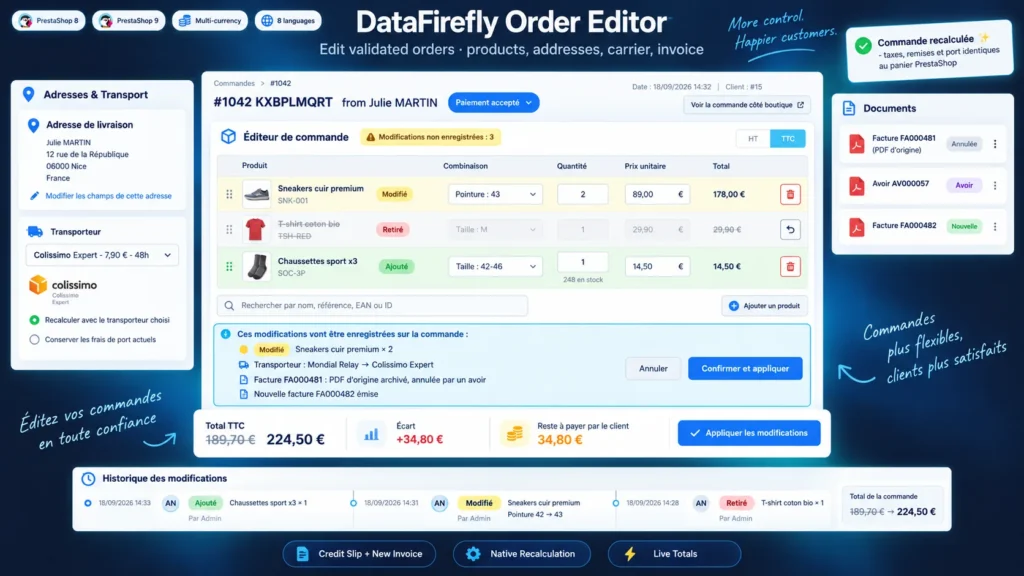
A customer wants another size, adds an item over the phone or entered the wrong address: in PrestaShop, the order page cannot change a combination, does not always recalculate discounts and edits an invoice already issued without keeping a record. This module adds an editor under the Products block of the order. Every change is recalculated by the PrestaShop cart engine, the new totals appear live, and on confirmation the invoice is cancelled by a credit slip and replaced by a new numbered invoice, with the original PDF archived.

At a glance
  • Add, remove, swap combinations, change quantities and prices tax excl. or incl. on a validated order
  • Taxes, discounts, shipping and rounding recalculated by the PrestaShop cart engine
  • Invoice cancelled by a credit slip and reissued with the next number, or updated with the same number
  • Addresses, carrier, free discount and new order state in the same operation
  • Live new totals, stock adjusted, history and original PDFs archived
PrestaShop 8 & 9 Credit slip + new invoice Native recalculation 8 languages
  • 30-day refund
  • 12 months updates
  • 24h support
www.datafirefly.com/en/
Edit Orders in PrestaShop 8 & 9: Products, Addresses and Invoice
v1.0.0 · updated 2026-09-23
What it does

The short version.

01

PrestaShop's calculation, not a homemade one

The module rebuilds the order in a temporary cart and lets PrestaShop compute taxes, cart rules, gift products, ecotax and shipping. Prices already paid are kept, except the ones you correct. In our tests an edited order gives exactly the same totals, to the cent, as an order placed directly with the same content, in all three rounding modes and in a foreign currency.

02

A compliant invoice after every edit

In the recommended mode, the invoice PDF is archived as it was, a credit slip cancels it for its full amount and a new invoice takes the next number. Payments are linked to the new invoice, the cancelled invoice disappears from the payment form, and PrestaShop does not record a fake payment when the order later moves to a paid state.

03

New totals before saving

A bar pinned to the bottom of the screen shows the total before and after, the difference and the amount still due or overpaid, moments after each change. The confirmation lists the lines affected, the carrier change, the documents that will be created and the new order state.

04

Every edit on record

The order history shows the date, the employee, the lines, discounts, addresses and carrier changed, with the PDFs of the original invoice and of the credit slip. A private note is added to the order messages, and the customer can receive the summary of the updated order by email, in their language.

The long version

Everything you'd want to know before you install.

A detailed look at how Edit Orders in PrestaShop 8 & 9: Products, Addresses and Invoice works, why we built it the way we did, and the thinking behind the features above.

§ 01

What the native order page cannot do

The PrestaShop back office lets you add a product or change a quantity, but not switch an existing line from size M to size L. Percentage discounts are not always recalculated, an address change does not update the VAT, and an invoice already issued is edited in place, with the same number and no archive. To fix an order properly, many merchants cancel it and create a new one while the customer waits.

§ 02

A complete editor under the Products block

The Edit this order button opens the editor right under the products. Each line can change combination, quantity or price, or be removed, and new products are added by search. Addresses, carrier, discounts and shipping cost are set on the same screen. Prices are entered tax excl. or tax incl., as the shop prefers.

§ 03

A recalculation identical to a real order

Instead of computing amounts itself, the module rebuilds the order in a temporary cart that is never linked to an order, and lets PrestaShop apply its rules: specific prices, customer groups, cart rules, gift products, ecotax, carrier price ranges and rounding mode. Prices already paid are kept with specific prices restricted to that cart. The preview runs in a transaction that is rolled back, so it leaves nothing in the database.

§ 04

Credit slip and new invoice, or updated invoice

In France and in many EU countries, an issued invoice cannot be changed: it is cancelled by a credit note and a new one is issued. This is the default mode. The invoice PDF is archived before any write, the credit slip takes its lines and full amount, and the new invoice takes the next number. The update mode, close to the native behaviour, keeps the number and still archives the previous PDF. The choice is made for each edit.

§ 05

Stock, payments and tracking

Stock is adjusted by difference: a quantity raised from 2 to 3 only uses one unit, and a removed line can be put back in stock. The amount still due or overpaid is shown before confirmation and the payment stays on the order. The history keeps every edit with its documents, and lines already refunded or returned are locked so existing credit slips stay correct.