



Everything you'd want to know before you install.
A detailed look at how Merge Duplicate Attributes & Features PrestaShop 8 & 9 works, why we built it the way we did, and the thinking behind the features above.
The problem PrestaShop cannot solve
PrestaShop offers no way to merge two attribute values or two feature values. Deleting the duplicate wipes the combinations using it, and recreating them by hand across hundreds of products is not an option. So catalogs built from an import or a migration carry their duplicates for years, with faceted filters listing the same colour twice.
A merge that carries over everything pointing at the duplicate
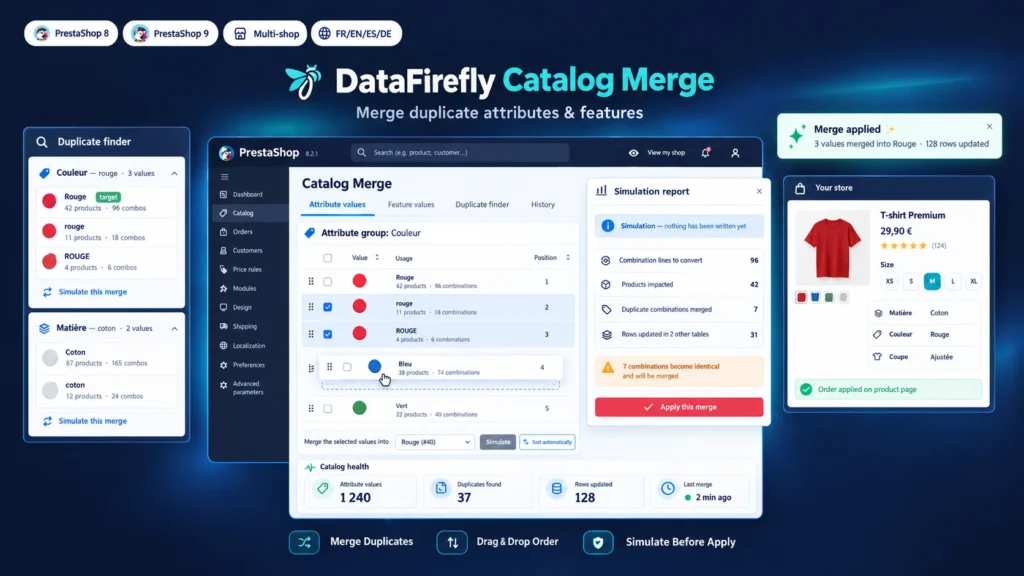
The module converts combination lines and product assignments to the value you keep, including the awkward cases: a combination already holding both the target value and its duplicate, a product carrying two values of the same feature, a custom value now shared by several products. Tables from other modules referencing an attribute or a feature value are detected and updated, so no orphan row is left in the faceted search index.
You see what will change before it changes
Every merge starts with a simulation. The report shows the number of combination lines to convert, the products involved, the combinations already holding the target value and those that will become identical. Nothing is written until you confirm, and the write runs inside a transaction: on any error the database returns to its initial state.
Clean combinations, not disguised duplicates
Merging Red and red on a product that had both creates two identical combinations, which PrestaShop then refuses to handle properly. The module joins them: quantities are added up shop by shop, images and specific prices are transferred to the combination that stays, and the product default combination remains the default. The parent product stock is resynchronised right after.
Display order, finally under control
Reorder values with drag and drop in a single screen, or run the automatic sort that places sizes from XS to XXXL and puts numbers in natural order. Positions apply to the combination selector and to the feature table of the product page. On PrestaShop 9 the module fills the native position of feature values; on PrestaShop 8, where that column does not exist, it applies the order at display time.

very useful module. after importing from woocommerce and after three years of work i had a lot of duplicate attributes, especially sizes, making the related filter almost useless. now instead everything is much more organized and easy to use for customers.Automatically translated