
Everything you'd want to know before you install.
A detailed look at how Customize PrestaShop PDF Invoices for PrestaShop 8 & 9 Without Editing TPL Files works, why we built it the way we did, and the thinking behind the features above.
Why the PrestaShop invoice is so hard to change
The PrestaShop PDF invoice is built from about ten Smarty files (header, addresses, product lines, tax, payments, footer) and then converted by TCPDF, which only understands part of HTML and CSS. Every change is made in those files, checked by generating an invoice, and must be carried over when the theme or PrestaShop is updated. Adding a note that depends on the customer's country means writing the condition in Smarty. Many shops therefore keep the original invoice, with a badly sized logo and useless columns.
An editor instead of .tpl files
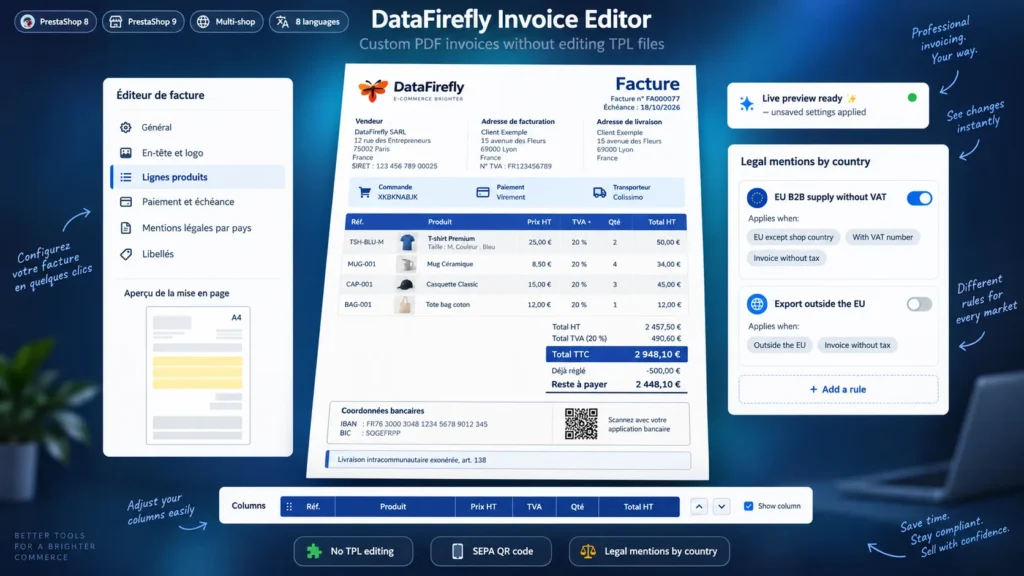
The module adds the Orders > Invoice editor page. Each area of the invoice has its own section: header and logo, addresses and summary, product lines, totals, payment and due date, custom fields, legal mentions, footer, wording. A sketch of the A4 page highlights the area being set. Everything is rendered in the format TCPDF understands, which avoids overflowing columns and broken tables.
The right mentions for each customer
An invoice to a German business customer with a VAT number must state the intra-Community exemption and the customer's VAT number. An invoice to Switzerland must mention the export outside the EU. An invoice to a French company must state the late payment penalties and the fixed 40 EUR recovery fee. Each rule carries its conditions and is only printed on the invoices concerned. The three example rules ship inactive: have your accountant check the wording before enabling them.
Get paid faster by bank transfer
For customers paying by bank transfer, the invoice shows the due date, the bank details and a reference to use in the transfer. The SEPA QR code holds the IBAN, the BIC, the amount still due and that reference: the customer scans it with their banking app and the transfer is prefilled, without typing errors. On a partly paid invoice, only the remaining amount is requested.
Test without risk
The preview generates the PDF of a real invoice of your shop with the settings on screen, without saving them. The Compare button opens the same invoice in the PrestaShop layout. The main switch hands back to the native invoice without deleting anything, and the JSON export lets you prepare the settings on a test shop before importing them into production.
There are no reviews yet.