
Our best PrestaShop modules for selling medical supplies
Eight modules to sell to health professionals, not to consumers.
Medical supplies sell to professionals — practices, clinics, pharmacies, care homes — with their own rules: restricted access, consumable reordering, team accounts, monthly invoicing, intra-EU VAT. And the equipment is heavy.
Sound familiar?
A catalog reserved for professionals
Some references may only be shown or sold to health professionals. Without an access filter, they are exposed to everyone.
Reordering consumables by hand
A practice reorders the same gloves, dressings and syringes every month. Without quick order, they rebuild the whole cart — or go elsewhere.
Professional invoicing that doesn't exist
Professionals expect a consolidated monthly invoice, VAT reverse charge, clean reminders. The consumer checkout can do none of it.
Heavy equipment that fails on delivery
Hospital bed, chair, examination table: without access conditions asked at checkout, delivery ends in a second trip.
Our selection, ranked
Every module below is built, maintained and supported by our team. The ranking reflects what we would install first on a client store.
-
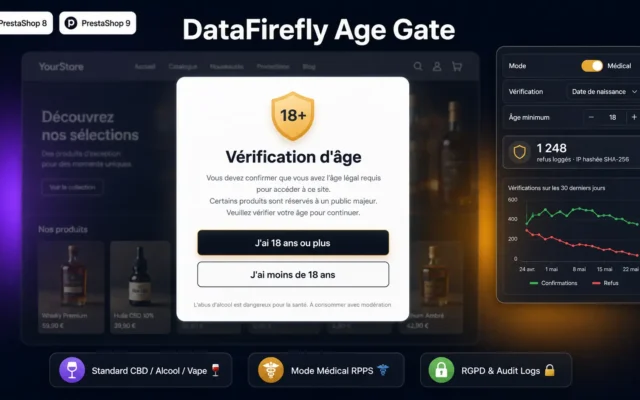
A blocking modal in health-professional mode reserves professional products for verified visitors. It is the foundation: you sell a partly regulated catalog.
Block access to your store until the visitor has confirmed their age. Standard mode for CBD, alcohol, vape, firearms. Medical mode for healthcare professionals.…
€59.00 View the module -
B2B Multi-User Accounts — Teams & Roles for PrestaShop 8 & 9
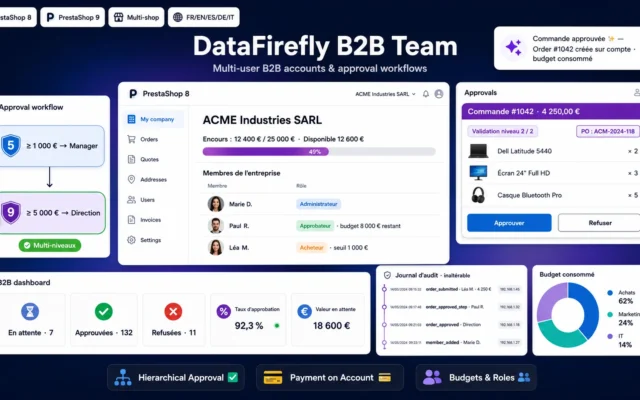
The team accountSeveral buyers, roles and a budget under one account: the clinic or care home orders the way it is organised.
Multi-user B2B accounts for PrestaShop 8 & 9: companies, roles, hierarchical approval, budgets and payment on account.
€109.00 View the module -
B2B Quick Order Module PrestaShop 8 & 9 — SKU Entry, CSV Import & Re-order
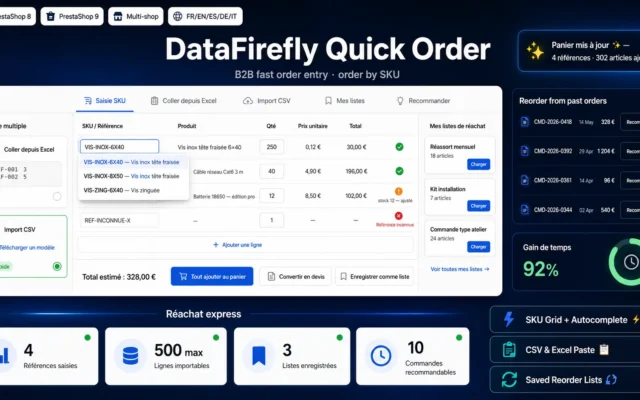
Reordering in secondsSKU entry, CSV import, reorder from history: the recurring consumable is reordered without rebuilding the cart.
A quick-order page for your professional customers: entry by reference with autocomplete, Excel paste, CSV import, reorder lists and one-click re-order of a past…
€89.00 View the module -
Heavy & Bulky Items Delivery Form — Furniture, Appliances, TV (PrestaShop 8 & 9)
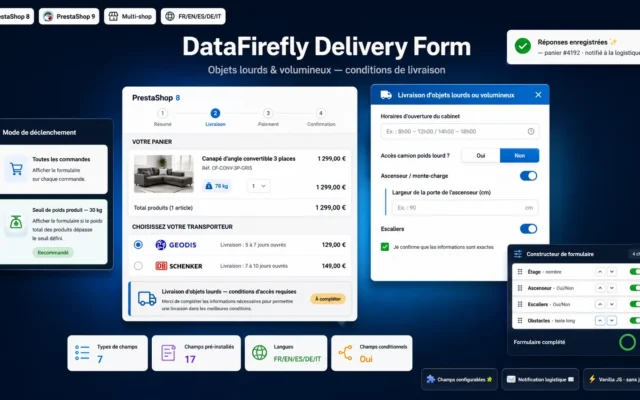
For heavy equipmentHospital bed, chair, examination table: floor, elevator and access asked at checkout, before shipping the bulky item.
Collect delivery access details (floor, elevator, stairs, obstacles) right at checkout for your heavy or bulky products: furniture, washing machines, TVs, medical furniture. Fields…
€89.00 View the module -
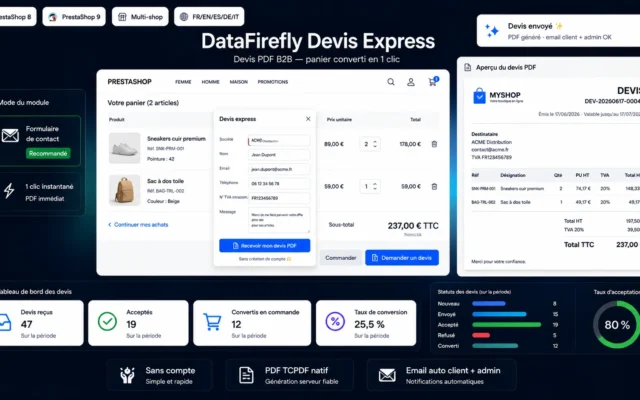
B2B Quote Request Module PrestaShop 8 & 9 — Cart to PDF Quote in 1 Click
A quote in one clickThe equipment cart becomes a PDF quote request: the project channel opens without endless email threads.
A "Request a quote" button in the cart footer: your B2B customer gets a PDF quote in one click, with no account required. Quote…
€69.00 View the module -
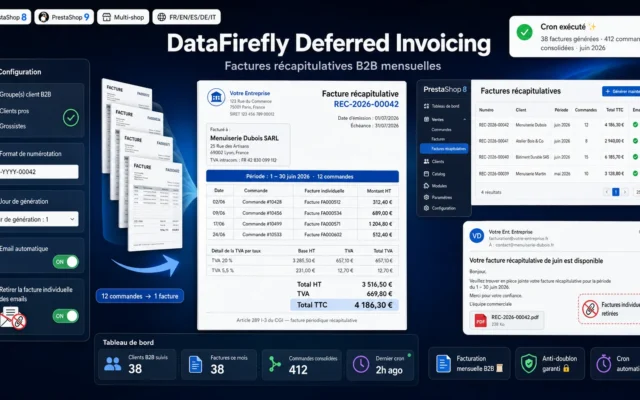
B2B Consolidated Invoicing Module for PrestaShop 8 & 9 — Monthly Invoice per Customer
The monthly invoiceOne consolidated invoice per month per professional customer, instead of one per order — what their accounting expects.
A single monthly consolidated invoice per professional customer, instead of one invoice per order. The module groups all the period's orders, numbers the consolidated…
€89.00 View the module -
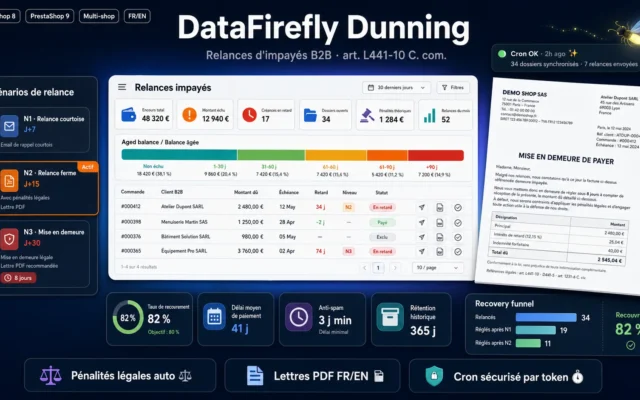
B2B Dunning & Late Payment Penalties – PrestaShop 8 & 9 Module
Unpaid invoices chasedGraduated reminders and automatic late-payment penalties: institutional buyers pay late, the module doesn't forget them.
Automate reminders for B2B orders paid by bank wire that remain unpaid: three-level reminder scenarios, calculation of legal late-payment interest and the fixed €40…
€89.00 View the module -
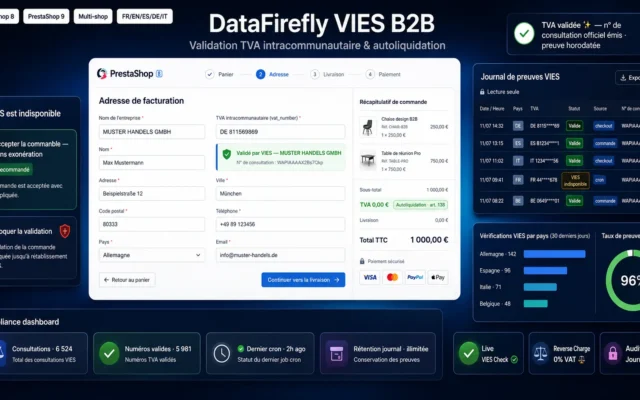
Intra-Community VAT VIES Validation & B2B Reverse Charge
Intra-EU VAT & reverse chargeVIES validation of the VAT number and automatic reverse charge for professional customers in the European Union.
Verify intra-community VAT numbers via VIES in real time at checkout, apply the reverse charge (0% VAT, art. 138) automatically for your EU B2B…
€79.00 View the module
Side-by-side comparison
| Module | Best for | Price | Rating | Link |
|---|---|---|---|---|
| Age Verification PrestaShop – Blocking Modal for CBD, Alcohol, Vape & Medical | Install this first | €59.00 | — | |
| B2B Multi-User Accounts — Teams & Roles for PrestaShop 8 & 9 | The team account | €109.00 | — | |
| B2B Quick Order Module PrestaShop 8 & 9 — SKU Entry, CSV Import & Re-order | Reordering in seconds | €89.00 | — | |
| Heavy & Bulky Items Delivery Form — Furniture, Appliances, TV (PrestaShop 8 & 9) | For heavy equipment | €89.00 | — | |
| B2B Quote Request Module PrestaShop 8 & 9 — Cart to PDF Quote in 1 Click | A quote in one click | €69.00 | — | |
| B2B Consolidated Invoicing Module for PrestaShop 8 & 9 — Monthly Invoice per Customer | The monthly invoice | €89.00 | — | |
| B2B Dunning & Late Payment Penalties – PrestaShop 8 & 9 Module | Unpaid invoices chased | €89.00 | — | |
| Intra-Community VAT VIES Validation & B2B Reverse Charge | Intra-EU VAT & reverse charge | €79.00 | — |
Selling medical supplies: you are not selling to consumers
A consumer store takes payment, ships, and it’s done. A medical-supplies store sells to practices, clinics, pharmacies and care homes — professional buyers with their own rules: a partly restricted catalog, recurring consumable orders, several people ordering under one roof, an accounting department that expects a monthly invoice and VAT reverse charge. The consumer checkout can do none of that.
And meanwhile the equipment — hospital bed, wheelchair, examination table — is heavy and bulky: the delivery can fail at the bottom of the building, exactly as it does for furniture.
Access first: reserve the professional catalog
Part of your catalog should not be visible or orderable by just any visitor. A blocking modal in “health professional” mode reserves those references for visitors who confirm their status, while the rest of the store stays open. It is the first setting to put in place: everything else builds on it.
The professional account: order, invoice, chase
A professional does not order like a consumer. They reorder the same consumables every month, they have several buyers on the team, they want a quote for equipment, a consolidated monthly invoice, VAT reverse charge if they are in the EU — and they often pay late. Five modules cover that chain end to end, with no re-entry and no second website.
And the equipment is heavy
The access-conditions form asks for floor, elevator and door width at checkout, so your logistics team knows before shipping a bed or a chair whether it takes two delivery people. It is the same lever as in furniture, applied to your equipment range.
How to choose
Start by locking down pro access
Part of your catalog is reserved for health professionals. The blocking modal in health-professional mode filters those references from the first visit: the visitor confirms their status, the rest of the store stays open. It is the setting everything else builds on.
Equip the professional account
Multi-user accounts and quick order: the clinic orders under a structured team account and reorders consumables by SKU entry or CSV import. Two modules, and your pro customers finally order the way they work.
Industrialise invoicing
Consolidated monthly invoice, VIES validation with reverse charge, dunning: the accounting chain every institutional buyer expects. Hospitals and care homes pay late — better to chase it automatically.
And don't forget the heavy equipment
For your equipment range — beds, chairs, tables — the access-conditions form asks for floor, elevator and door width at checkout. Your logistics team knows before leaving whether it takes two people.
What you gain
Access reserved for pros
A blocking modal reserves professional products for visitors who confirm their status — the rest of the catalog stays open.
Reordering in one screen
SKU entry, CSV import, order history: the consumable is reordered in seconds, not ten minutes.
The team account
Several buyers, roles, a budget: the clinic orders under one structured account.
The consolidated monthly invoice
One invoice per month per customer instead of one per order — what every accounting department expects.
Intra-EU VAT handled
Automatic VIES validation and reverse charge for professional buyers across the EU.
Unpaid invoices chased on their own
Graduated reminders and late-payment penalties: institutional buyers pay late, the module handles it.
From install to results
-
Restricted access first
The health-professional modal filters reserved products from the first visit.
-
The pro account next
Multi-user accounts + quick order: the clinic orders the way it is organised.
-
Professional invoicing
Consolidated monthly invoice, VIES validation, VAT reverse charge.
-
Dunning
Automatic penalties and reminders for slow institutional payers.
-
The equipment
The delivery form secures bulky beds, chairs and tables.
“Our customers are practices and care homes, not consumers. Since they order under a team account, with a monthly invoice and one-click reordering, we've cut email back-and-forth by two thirds — and consumables almost reorder themselves.”
Frequently asked questions
Which module should a medical-supplies store start with?
With restricted access. A blocking modal in health-professional mode reserves professional products for visitors who confirm their status — the foundation of a store whose catalog is partly regulated, before you even equip the ordering flow.
How do I reserve certain products for health professionals?
With the access-verification module: a blocking modal appears on reserved products or categories and asks the visitor to confirm their professional status before accessing the content or ordering. The rest of the store stays freely accessible.
My customers often reorder the same consumables. How do I simplify that?
The B2B quick-order module allows direct entry by SKU reference, cart import from a CSV file and reordering from history. A practice reorders its month of gloves and dressings in seconds, without rebuilding the cart.
A clinic has several buyers. How do I manage a shared account?
The B2B multi-user accounts module attaches several users to one entity, with roles and, if needed, an order cap. Everyone orders under the organisation's account, with a shared history.
Can I invoice professionals once a month?
Yes: the recap-invoicing module consolidates all of a professional customer's orders over the period into a single monthly invoice, instead of one invoice per order — exactly what an accounting department expects.
How do I handle intra-EU VAT for my European professional customers?
The VIES module validates the intra-EU VAT number against the European service and applies reverse charge when the conditions are met, for your professional customers established in another EU member state.
Hospitals and clinics often pay late. What can I do?
The dunning module sends graduated reminders and can apply late-payment penalties automatically. Institutional buyers have long payment terms: the reminders go out without you having to think about it.
Are these modules compatible with PrestaShop 9?
Yes, the whole selection is developed for PrestaShop 8.0 to 9.x, multistore and multilingual, with 12 months of updates included.
Not sure which one fits your store?
Tell us your context — we answer with a straight recommendation, not a sales pitch.