
Our best PrestaShop modules for accessibility and EAA compliance
Four modules that make the store EAA-compliant and usable by everyone: WCAG fixes, adjustment widget, audio playback and dark mode.
Since June 2025, e-commerce accessibility is no longer a recommendation but European law. An accessible store meets the EAA and serves the quarter of the audience that simply leaves inaccessible stores.
Sound familiar?
The obligation is already here
The EAA has applied since June 2025: ignoring the WCAG criteria risks complaints, sanctions and exclusion from tenders.
Structural errors under the widget
Missing alt texts, unreadable contrasts, forms without labels: errors no overlay widget in the world can cover.
Visitors who leave quietly
Font too small, glaring surfaces, flickering animations: part of your visitors give up before reaching the cart.
The endless retrofit
Retrofitting accessibility by hand means auditing every product page one by one: with hundreds of sheets, that is illusory without automation.
Our selection, ranked
Every module below is built, maintained and supported by our team. The ranking reflects what we would install first on a client store.
-
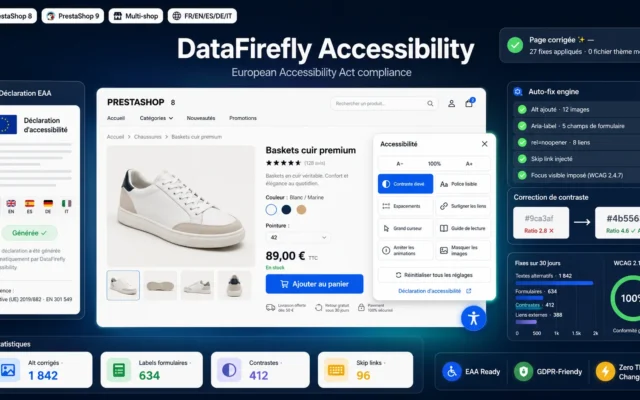
EAA Accessibility — Widget & Automatic WCAG Fixes
The compliance foundationEAA widget plus automatic WCAG fixes in the code: alt texts, focus, contrasts and forms get repaired, not covered up.
Bring your PrestaShop store into compliance with the European Accessibility Act (EAA): complete accessibility widget, automatic WCAG fixes (alt texts, labels, ARIA, focus, contrast)…
€79.00 View the module -
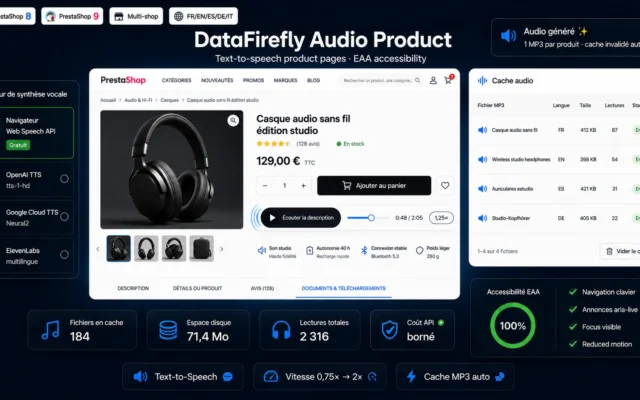
Text-to-Speech Product Audio Module PrestaShop 8/9
The product page's voiceText-to-speech on the product page: descriptions read themselves aloud, for visually impaired users, dyslexic readers and everyone who prefers listening.
Add a "Listen to the description" button to your product pages: free in-browser speech synthesis or premium OpenAI, Google and ElevenLabs voices, adjustable speed…
€79.00 View the module -
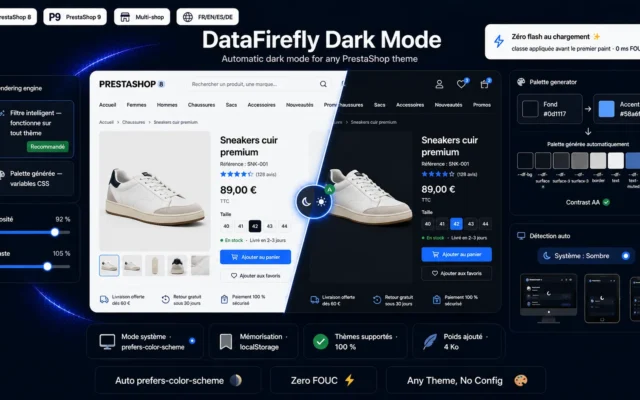
Dark Mode Module for PrestaShop 8/9 — Automatic Dark Theme
Rest for the eyesAutomatic dark mode following the system preference with a manual toggle: less glare, more comfortable browsing.
Automatic dark mode for PrestaShop 8 and 9: system preference detection, visitor choice memorization, automatic dark palette generation and a toggle you can place…
€59.00 View the module -
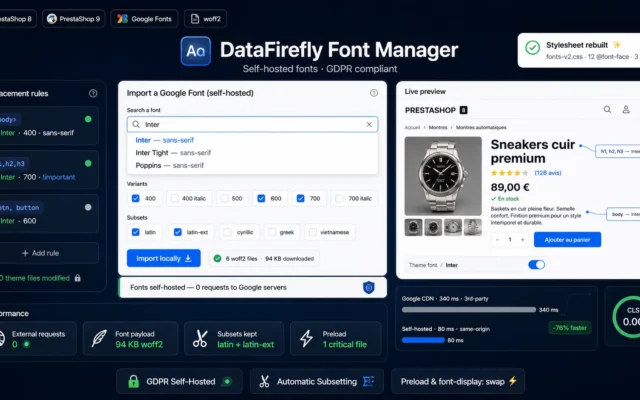
Local Google Fonts Module PrestaShop 8/9 — Self-Hosted GDPR Fonts
Controlled typographySelf-hosted Google Fonts: stable, fast and GDPR-compliant font rendering as the basis of readable pages.
Self-host your Google Fonts in one click: no more requests to Google servers (GDPR), automatic subsetting so only the alphabets you need are downloaded,…
€59.00 View the module
Side-by-side comparison
| Module | Best for | Price | Rating | Link |
|---|---|---|---|---|
| EAA Accessibility — Widget & Automatic WCAG Fixes | The compliance foundation | €79.00 | — | |
| Text-to-Speech Product Audio Module PrestaShop 8/9 | The product page's voice | €79.00 | — | |
| Dark Mode Module for PrestaShop 8/9 — Automatic Dark Theme | Rest for the eyes | €59.00 | — | |
| Local Google Fonts Module PrestaShop 8/9 — Self-Hosted GDPR Fonts | Controlled typography | €59.00 | — |
Accessibility has been mandatory since June 2025
The European Accessibility Act (EAA) applies to e-commerce: online stores must be usable by people with disabilities, following the WCAG criteria. That covers contrasts, navigation, alternative texts and forms, in other words the heart of every product page and checkout.
Fix, not just cover up
A widget alone does not make a store compliant. The selection combines automatic WCAG fixes in the code (alt texts, focus, ARIA) with user tools: font and contrast adjustment, audio playback of product pages, dark mode for light-sensitive eyes.
Accessibility sells
Around a quarter of the population lives with some form of impairment, permanent or temporary. An accessible store is easier for everyone: bigger click targets, clearer contrasts, cleaner structure. Compliance and conversion pull in the same direction.
How to choose
Start with the structural fixes
Alt texts, form labels, focus order, contrasts: these are the WCAG criteria an auditor tests first and that no overlay can repair. Automatic fixes in the code are the foundation, the widget is the complement.
Give the user control
Font size, line spacing, contrast, animation stop: what is comfortable for one person is unreadable for another. The adjustment widget resolves that conflict by letting every visitor choose.
Think beyond the screen
Audio playback makes content accessible that would otherwise stay visual, and dark mode relieves sensitive eyes. Both are comfort features for everyone and necessities for some: the very definition of good accessibility.
Document what you do
The EAA also requires an accessibility statement. Record which criteria are met and which tools are in place: if audited, the demonstrable effort is what counts.
What you gain
EAA compliance that lasts
Automatic WCAG fixes in the code plus a user widget: the store becomes compliant and stays so through every catalogue change.
The store adapts to the user
Font size, contrasts, spacing, animation stop: every visitor adapts the store to their own eyes.
Product pages you can listen to
The product page reads itself aloud: visually impaired users, dyslexic readers and multitaskers hear what others read.
Dark mode for sensitive eyes
Automatic dark mode following the system preference: less glare, more comfortable evening browsing.
Typography under control
Self-hosted fonts with no Google servers: faster loading, stable typography and GDPR compliance in one.
From install to results
-
Repair the structure
Fix alt texts, labels, focus and contrasts automatically: the foundation before anything else.
-
Enable the user widget
Make font, contrast and animations adjustable: every visitor chooses for themselves.
-
Add the audio channel
Audio playback on product pages: content becomes audible, not just visible.
-
Relieve the eyes
Dark mode following the system preference: comfort for everyone, a necessity for some.
-
Document the compliance
Maintain the accessibility statement: if audited, the demonstrable effort counts.
“We thought accessibility was a compliance cost. Then came the emails from customers who could finally order on their own. And mobile conversion rose along with it.”
Frequently asked questions
Does the EAA really apply to my store?
The European Accessibility Act has applied to e-commerce services in the EU since 28 June 2025. Online stores must meet the requirements of EN 301 549, which is based on WCAG. Micro-enterprises are partly exempt, but marketplace partners and customers impose the requirements anyway.
Is an accessibility widget enough for compliance?
No, and that is the most common trap. An overlay widget without code fixes leaves the structural errors in place: missing alt texts, unreachable forms, broken focus order. That is why the module combines automatic fixes in the rendered code with the widget's user tools.
What is the point of audio playback on product pages?
Audio playback serves several groups at once: people with visual impairment, dyslexia or reading fatigue, but also customers who prefer listening while doing something else. On content-rich product pages it measurably extends time on page.
Is dark mode automatic?
Yes. Dark mode follows the device's system preference (prefers-color-scheme) and can be toggled manually. It reduces glare for light-sensitive users and is among the most requested comfort features overall.
Is this compatible with PrestaShop 9?
Yes. The whole selection covers PrestaShop 8.0 to 9.x, using native hooks and no core overrides.
Not sure which one fits your store?
Tell us your context — we answer with a straight recommendation, not a sales pitch.