
Everything you'd want to know before you install.
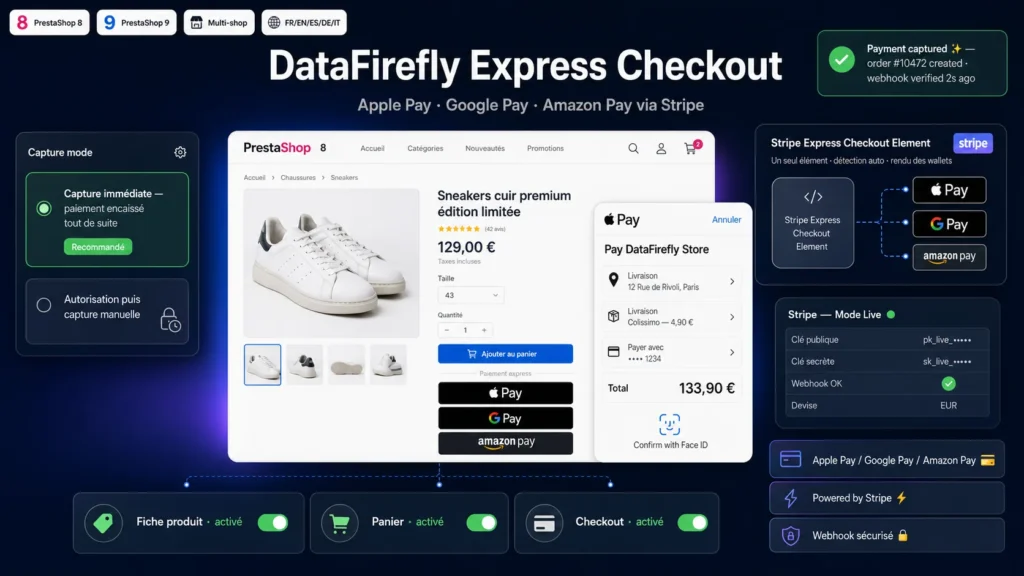
A detailed look at how DataFirefly Express Checkout — Apple Pay, Google Pay & Amazon Pay via Stripe (PrestaShop 8 & 9) works, why we built it the way we did, and the thinking behind the features above.
§ 01
Why express checkout?
Every field in the checkout funnel loses customers. Wallet payment removes card and address entry: the customer confirms with Apple Pay, Google Pay or Amazon Pay in a single authentication (Face ID, fingerprint, Amazon password). The result: less friction, less abandonment, more conversions — especially on mobile.
§ 02
One element, three wallets
The module uses Stripe's Express Checkout Element, which detects the customer's context and automatically displays the compatible wallets. Apple Pay appears on Safari/iOS (verified domain), Google Pay on Chrome/Android, and Amazon Pay once enabled in your Stripe Dashboard. No display logic to handle on your side.
§ 03
Present where the customer decides
Show the button on the product page for an immediate purchase, in the cart to speed up validation, and on the checkout page as an alternative to classic methods. Each location can be enabled or disabled independently from the module configuration.
§ 04
Reliable orders, no duplicates
After payment, the order is created and validated via a Stripe webhook whose signature is verified (HMAC SHA-256). A return controller acts as a safety net, and a transactions table guarantees idempotency: a single transaction never generates two orders. The guest customer and their addresses are rebuilt from the information returned by the wallet.
§ 05
Immediate or manual capture
Choose to charge immediately, or to authorize the payment and capture it later. In manual capture mode, the order arrives in a dedicated state “Payment authorized (awaiting capture)”: capture by moving the order to “Payment accepted”, or release the authorization by cancelling it.



There are no reviews yet.