
Everything you'd want to know before you install.
A detailed look at how DataFirefly Payment Fees — Surcharge per payment method (PrestaShop 8 & 9) works, why we built it the way we did, and the thinking behind the features above.
§ 01
Why charge fees per payment method?
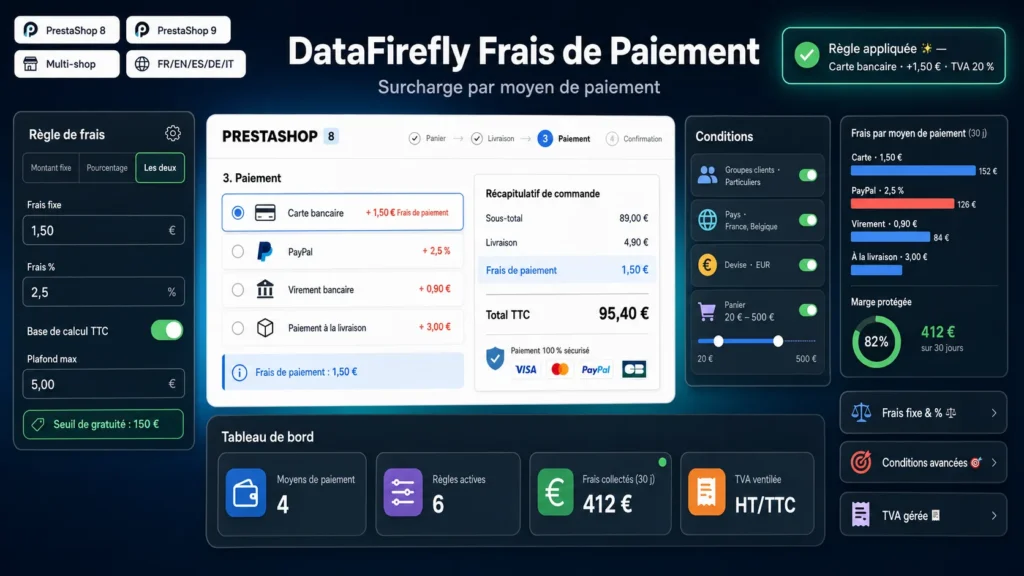
Every payment type has a different cost: card commissions, cash-on-delivery handling, processing cheques or bank wires. Passing on that cost — or, conversely, offering a free threshold — protects your margins and nudges customers toward the payment methods that are most advantageous for your store.
§ 02
A complete rules engine
Create as many rules as you need. Each rule combines a fixed amount and/or a percentage, a tax-excluded or tax-included base (with or without shipping), minimum and maximum caps, and a free threshold. Rules are evaluated by priority: the first one that matches the customer's context applies.
§ 03
Precise targeting conditions
Limit fees by customer group (for example, exempt professionals), billing country, currency used, or a cart total range. You keep full control over who pays what, and in which situations.
§ 04
Transparent for the customer, reliable for you
During checkout, the fee amount is shown in real time next to each payment method and in a reminder below the list. On validation, the fee is added to the order total: order, invoice and confirmation email are updated, and the tax-excl/incl detail plus the VAT rate are kept for your accounting.
§ 05
Tax, multistore and multilingual
Assign a tax rule to each fee and indicate whether the amounts entered are tax-excluded or tax-included: the breakdown is computed automatically. The label shown to the customer is translatable, and each rule can be associated with the stores in your multistore network.



There are no reviews yet.