
Selling at 49 euros in France and 54 euros in Germany is not a whim: it follows from different logistics costs, a different competitive landscape and different VAT rates. The problem is that PrestaShop does not think in prices per country. It thinks in a single price, converted by currency and corrected by VAT.
Here is what the native system genuinely allows, where it stops, and the regulatory point most stores overlook.
What the native system does
Three mechanisms exist and combine.
The currency. Each currency carries a conversion rate applied to the base price. You do not set a price in pounds sterling: you set a rate, and PrestaShop calculates. The result gives prices like 43.17 pounds, which nobody displays on purpose.
VAT per country. Tax rules apply according to the delivery country. The price excluding tax stays identical, only the price including tax varies. A product at 40 euros excluding tax becomes 48 euros in France and 47.60 in Germany.
Multistore. One store per country, each with its catalogue, its prices and its domain. It is the only native way to set genuinely different prices, and it carries a real management cost.
The round tax-inclusive price trap
This is the point that surprises most. You want to display 49.90 euros across Europe, a classic psychological price. With a single price excluding tax, that is impossible: VAT rates differ, so tax-inclusive prices differ.
To display the same tax-inclusive price everywhere, the price excluding tax has to vary inversely to the VAT rate. Your margin then differs from one country to another, which is a commercial decision to take knowingly, not a side effect to discover in the profit and loss account.
The opposite reasoning is just as valid: keep the margin and accept tax-inclusive prices that are not round. There is no universally right answer, but there is a bad practice, which consists of not deciding.
The four levers of differentiation
- The specific price per country. PrestaShop lets you attach a specific price to a given country. It is the most direct lever, but it is configured product by product, which makes it impractical beyond a few dozen references.
- The customer group. One group per zone, with a global discount or markup. Simple, but it assumes the customer is attached to the right group, therefore identified, which excludes visitors who are not logged in.
- The coefficient per currency. Rather than a strict exchange rate, applying a commercial coefficient. That settles the problem of prices that are not round but differentiates only by currency, not by country: France, Germany and Spain stay on the same tariff.
- Multistore. Total control, maximum management cost. Every catalogue change has to be replicated, or inherited with the precautions that implies.
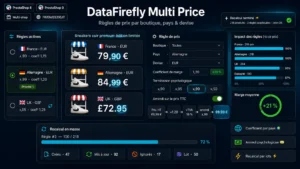 Price by Country, Shop & CurrencyThe right price displayed in every country, combinations included€89.00
The regulatory point to know
The EU regulation on unjustified geo-blocking has framed this practice since 2018, and it is regularly misunderstood.
What it does not forbid: offering different prices on the national versions of your site. You remain free to set your pricing policy per market.
What it forbids: preventing a customer from accessing another version of your site because of their nationality, place of residence or the country their payment card was issued in, and redirecting them automatically without their agreement. Concretely, a French customer has to be able to browse and order on your German store, under German terms, if they wish, including with a French card.
Automatic redirection by geolocation therefore calls for care: suggesting, yes, imposing, no. A banner suggesting the local version with a link to stay on the current one meets the condition. A silent redirect does not.
Country detection and cache
Two technical difficulties stack up as soon as the price depends on the country.
Detection. Before a customer is logged in or has entered an address, their country can only be inferred from their IP address, with imperfect reliability and no accuracy at all behind a VPN. The price displayed in anonymous browsing is therefore always a hypothesis. It has to be correctable through a visible selector, and the definitive price is only fixed when the delivery address is entered.
The cache. A cached product page contains a price. If that price depends on the country, you either segment the cache by country, which multiplies its volume, or take the price block out of the cache and load it separately. The first option is simpler, the second more economical.
A classic symptom reveals a badly segmented cache: the first visitor to a page from a given country sees the right price, the following ones see theirs.
Consistency with external channels
A point often discovered too late. If your prices vary by country, your product feeds have to vary the same way. A Merchant Center feed announcing 49 euros for a page showing 54 triggers a rejection, and repeated rejections can suspend the account.
The rule is to generate one feed per target country, fed by the same source as the display, never by a frozen export.
Putting differentiation in place
The Prices by Country, Store and Currency module handles this need on PrestaShop 8 and 9: pricing rules per country and per currency applied in bulk rather than product by product, margin coefficient, psychological rounding per currency and consistent display across catalogue, product page and cart.