PrestaShop Checkout & Payment

Add Custom Checkout & Registration Fields to PrestaShop 8 & 9 (PO Number, Delivery Date)

Your B2B customers' PO number, from checkout to invoice.

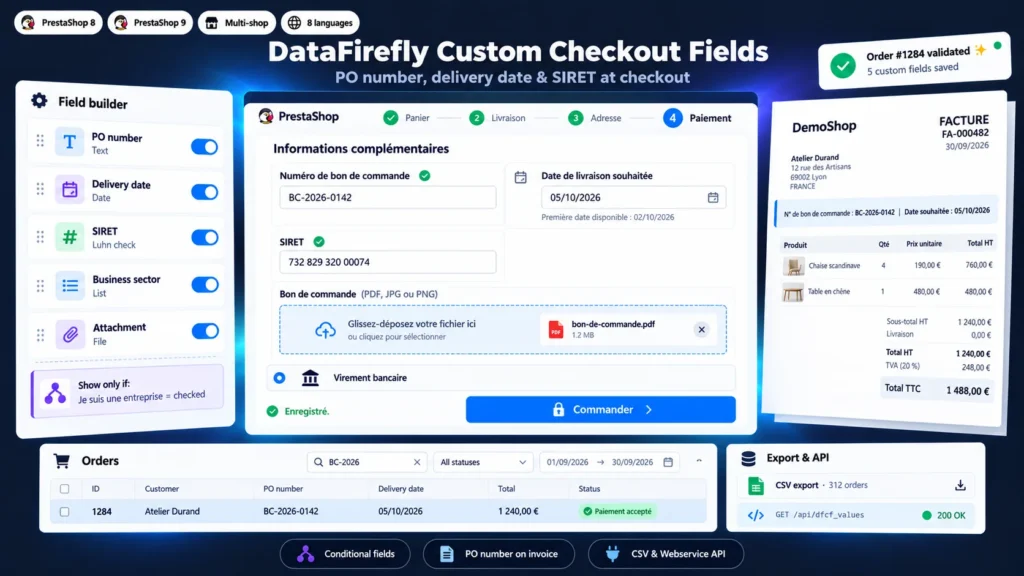
Your business customers need to enter their purchase order number, a delivery date or their company ID, or attach a document, and PrestaShop has no field for any of it. The information ends up in the order message, in an email or nowhere, and the invoice goes out without the reference the customer's accounts department needs to pay it. This module adds custom fields to the checkout and the registration form, checks them before the order is placed and carries them wherever you need them: order page, PDF invoice, delivery slip, emails, order list, customer page, CSV exports and webservice. Five ready-to-use fields are created on install and remain fully editable.

At a glance
  • PO number, requested date, SIRET, sector and attachment created on install
  • 9 field types, stored on the order or on the customer account
  • Conditional display, billing country and customer group restrictions
  • Values on the PDF invoice (header or bottom), emails, order list and exports
  • Place order button locked while a required field is empty or invalid
PrestaShop 8 & 9 B2B Webservice API 8 languages
  • 30-day refund
  • 12 months updates
  • 24h support
www.datafirefly.com/en/
Add Custom Checkout & Registration Fields to PrestaShop 8 & 9 (PO Number, Delivery Date)
v1.2.1 · updated 2026-09-30
What it does

The short version.

01

Checked before the order

Fields are saved while the customer types. As long as a required field is empty or invalid, the Place order button (or Continue at the delivery step) stays locked and the customer sees the message below the field. The server checks every value again: format, SIRET, date, file extension and content.

02

SIRET verified, not just typed

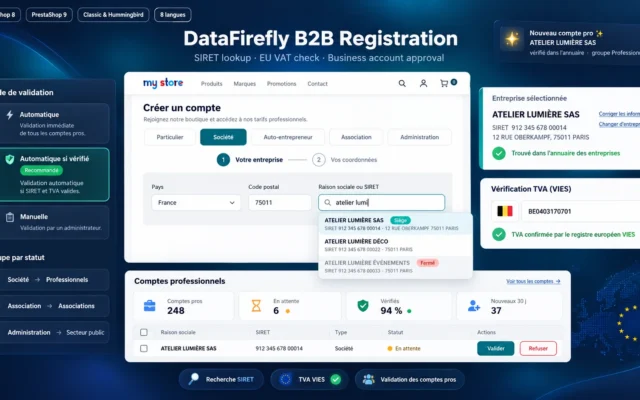
The SIRET type checks the 14 digits and the Luhn key, including the rule specific to La Poste establishments. The value can be copied to the native SIRET field of the customer, used by PrestaShop B2B mode.

03

A realistic delivery date

Minimum lead time in days, maximum horizon, working days only and closing days: a single day, a period or a yearly date such as 25 December. The first available date is calculated and shown below the field.

04

Fields that adapt to the customer

A field can appear only when another has a given value (the SIRET when the customer ticks I am a business), only for some billing countries or some customer groups. A hidden field is never required and its value is not kept.

05

PO number in the invoice header

PrestaShop has no hook in the invoice header. The module adds a delimited block to the invoice.summary-tab.tpl template of the theme to show your fields below the invoice number, where buyers look for them, and removes it on uninstall. The bottom-of-invoice position is still available.

06

Find an order by the customer's reference

Each field can become a searchable column of the order list, and customer account fields a column of the customer list. Type the PO number in the filter and the order shows up.

The long version

Everything you'd want to know before you install.

A detailed look at how Add Custom Checkout & Registration Fields to PrestaShop 8 & 9 (PO Number, Delivery Date) works, why we built it the way we did, and the thinking behind the features above.

§ 01

What PrestaShop cannot do

PrestaShop offers a free message at the delivery step and, in B2B mode, SIRET and APE fields on the customer account. Nothing for a purchase order number per order, a requested delivery date or a document to attach, and no way to make this information mandatory. Business buyers write it in the message or send it by email, customer service copies it by hand, and the invoice goes out without the reference the customer's accounts department requires to pay it.

§ 02

Each field at the right point of the journey

Company fields (SIRET, business sector) are saved on the customer account: entered at registration or with the first order, they are prefilled afterwards and copied to each order. Order fields (PO number, requested date, attachment) appear in the checkout, at the payment or delivery step. Each order keeps a copy of the values from the day it was placed.

§ 03

For customer service, accounting and the ERP

The PO number and requested date appear on the order page, in a searchable column of the order list, on the invoice and on the delivery slip. The CSV export lists the orders of a period with their fields, ready for Excel. An ERP or connector reads the same values through the PrestaShop webservice, with the dfcf_values resource.

§ 04

Attachments with no risk for the shop

A file sent by a customer is checked twice: its extension must be in the allowed list of the field, and its real content must match, so a script renamed to .pdf is refused. It is stored with a random name and no extension, in a folder where direct access is denied. Only the customer who owns the order and back-office employees can download it.

§ 05

Fields adapted to each customer

A manufacturer selling in France and Belgium can limit the SIRET to French billing addresses, show the PO number only to the Professionals group and ask for a document only when the customer picks the Healthcare sector. Conditions can be chained and a hidden field is never required.