
Everything you'd want to know before you install.
A detailed look at how Delivery Time Slots for PrestaShop 8 & 9: Slot Booking with Capacity and Click & Collect works, why we built it the way we did, and the thinking behind the features above.
Why a delivery slot matters so much for fresh products
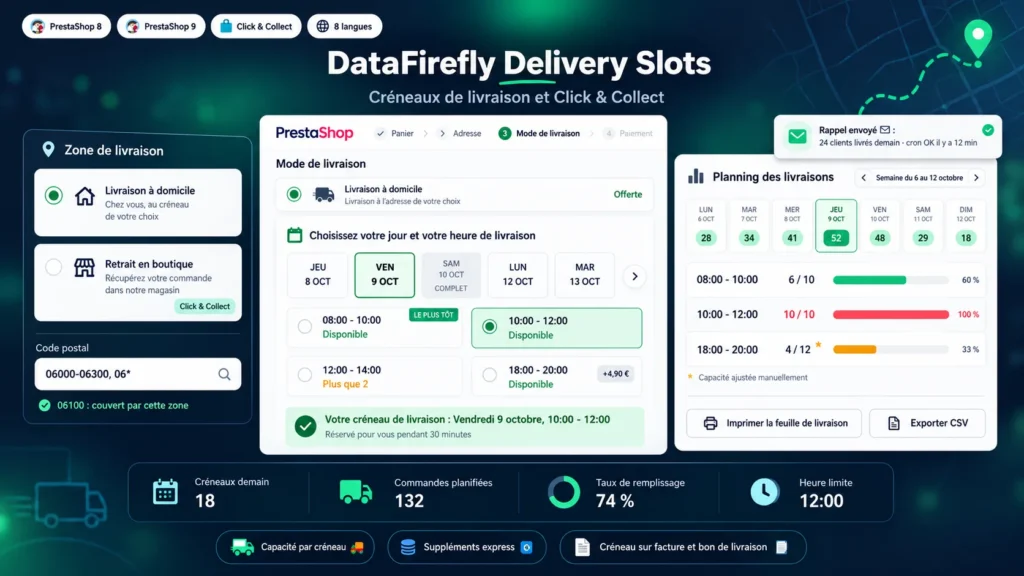
PrestaShop handles carriers and shipping costs, but no delivery day or time. For a grocery, a caterer or a greengrocer it is the key information: a fresh product must arrive when someone is home to receive it. This module adds a real choice of day and time slot at checkout and refuses to confirm the step until the choice is made.
Capacity that follows your delivery rounds
Each slot accepts a number of orders that you set, and a zone can have a limit for the whole day. On busy days you raise the capacity of a slot for that date only from the planning, or close a slot when a driver is missing. Cancelled orders free their place automatically.
Zones, lead times and closing days
A zone groups postcodes, countries and carriers. The first day offered takes into account the minimum lead time, the order cut-off time and the preparation time. Products made to order add their extra days, and public holidays or annual leave are closed in a few clicks, once or every year.
Store pickup and slot fees
A zone in pickup mode shows "Choose your pickup day and time" and adapts the emails. To charge for an express or evening slot, the fee is added to the cart on a separate line with its own tax, because PrestaShop cannot add an amount to the shipping cost of a native carrier without an override. It therefore appears on the invoice and in the amount collected.
From the order to the delivery round
The slot is saved with the order and visible wherever you need it: daily planning, order page, filterable column of the order list, PDF invoice and delivery slip, confirmation emails. The day before, a reminder email tells the customer the slot and the delivery address.
There are no reviews yet.