
Everything you'd want to know before you install.
A detailed look at how B2B Registration & Company Verification for PrestaShop 8 & 9 works, why we built it the way we did, and the thinking behind the features above.
Why the native form falls short for B2B
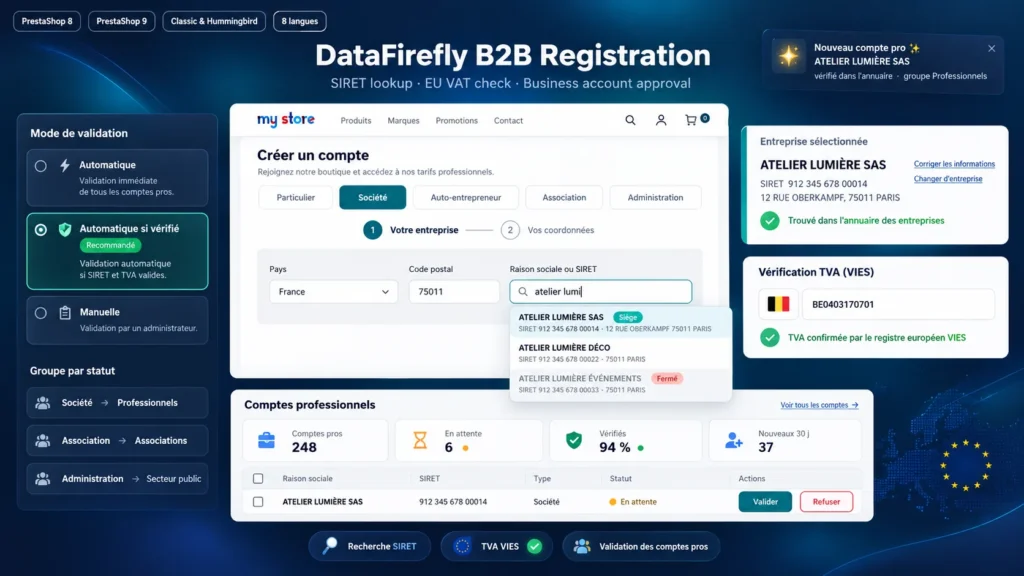
PrestaShop does offer company and SIRET fields, but customers fill them in by hand, nothing is checked, and nothing tells a business apart from an individual. The result: approximate company names, wrong or copied registration numbers, invoices to correct and trade discounts granted without any check. The module replaces this typing with a search in the official directory and turns registration into a proper business journey.
Your customer's journey, step by step
The customer first chooses who they are. If they are a business, the "Your business" step opens: country, optional postcode, then company name or SIRET. They pick their company from the list, a card sums up the identity found, and only the useful extras stay open: department, phone, address complement. The "Your contact details" step then shows the usual PrestaShop fields. The same journey appears in the checkout, where the company address arrives preselected for delivery and invoicing.
Customers in France and across the EU
For France, the search queries the government's business directory API, which is free and keyless, and the intra-community VAT number can be computed from the SIREN. For other EU countries, the customer enters their VAT number, checked live in VIES; when the country publishes it, the company name and address are filled in. If a register is down, registration is never blocked: the account is created and you can check it again later from the back office.
Approval, groups and emails
In automatic mode, the business account is active immediately. In automatic-if-verified mode, only companies confirmed by the directory or VIES are approved without you, the others wait for your review. In manual mode, you approve each request. On approval, the customer joins the business group or the group of their status and receives an email; meanwhile they can order at public prices. The shop receives a detailed notification for every new account.
A back office built to process requests
The Customers > Business accounts page shows the number of accounts, pending requests, the share of verified accounts and new accounts of the month. Each row links the SIRET to the directory, and the Approve, Refuse and Check again actions work on one row or a selection. On the customer page, a block sums up the business account and lets you create or correct it, with the same checks as on the storefront.
There are no reviews yet.