
Everything you'd want to know before you install.
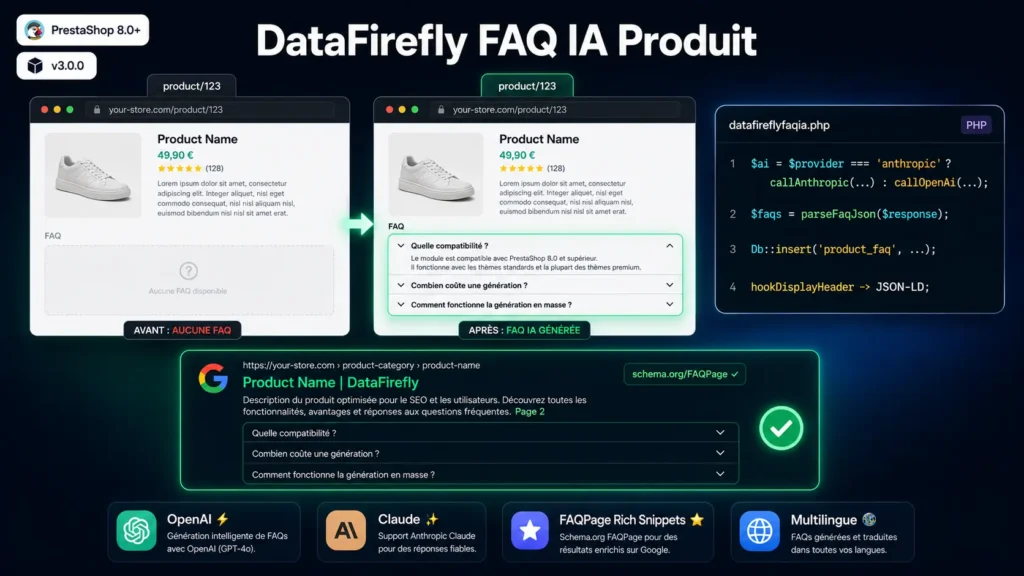
A detailed look at how DataFirefly Product FAQ AI — Auto-generated product FAQ with Google rich snippets and OpenAI/Claude for PrestaShop 8 works, why we built it the way we did, and the thinking behind the features above.
§ 01
Why product FAQs have become essential
Three combined reasons. SEO first: since FAQPage rich results arrived, Google displays questions/answers directly in the SERP, taking three to four times more visual height than a classic result — it's one of the most effective SEO levers of the decade, and it's free. Conversion next: a hesitating visitor almost always has an unanswered question (compatibility, dimensions, warranty, return). A FAQ visible on the product page lifts that objection without them having to contact your support, turning hesitation into purchase. Support time finally: your team answers the same questions dozens of times per month — every question in the product FAQ is one less support ticket. On 200 products with 5 questions each, you're looking at 1,000 entries that pay for themselves in a few weeks.
§ 02
Why generate the FAQ with AI rather than by hand
The arithmetic speaks for itself. 200 products × 5 questions × 3 languages = 3,000 FAQ entries to write. At 5 minutes per entry (reading the product, formulating relevant copy, clean translation), that's 250 hours of work — more than six full-time weeks. No e-commerce team can seriously allocate that budget. Outsourcing to a copywriter typically costs €1 per entry, so €3,000 per campaign — not counting iterations. AI generation brings the cost down to a few dozen euros (OpenAI or Anthropic consumption) and the time down to a few minutes per product, including bulk generation. And the quality is well at the level of a junior copywriter as long as you correctly configure the tone, audience and directives.
§ 03
Choosing between OpenAI and Anthropic Claude
The module supports both providers and switches automatically to the right API based on your configuration. OpenAI offers gpt-4o-mini (the most economical, ~$0.0005 per generation of 5 questions, quality more than sufficient for most products), gpt-4o (finer, ideal for technical or B2B products), gpt-4-turbo, and gpt-3.5-turbo. Anthropic Claude offers claude-haiku-4-5 (equivalent to gpt-4o-mini in cost and positioning), claude-sonnet-4-5 (finer, comparable to gpt-4o), and claude-opus-4-7 (the most powerful for long or technical content). Both providers return structured JSON that the module parses robustly (resilient to markdown fences). You can switch from one provider to the other at any time without breaking anything.
§ 04
The fully customizable prompt
This is what sets this module apart from a basic generic ChatGPT integration. Three cumulative levels of customization. Level 1: tone of voice among 6 preconfigured styles (professional, friendly, casual, technical, enthusiastic, reassuring) — each tone changes the formulation of answers without any code. Level 2: free-text target audience (e.g. "B2B medical professionals", "first-time buyers", "DIY enthusiasts") — the AI adapts vocabulary, references and level of detail. Level 3: custom system prompt (full override of default instructions, for shops with strict editorial guidelines) and additional user directives (e.g. "always mention the 2-year warranty", "avoid superlatives", "don't compare to competitors"). You can also toggle inclusion of the category, manufacturer, and technical features in the prompt — which radically changes the precision of the result on technical products.
§ 05
Schema.org FAQPage rich snippets and SEO impact
The module automatically injects Schema.org FAQPage structured data into the HTML head of every product page that has at least one active FAQ. The markup complies with Google Search Central requirements and the encoding uses the JSON_HEX_TAG / JSON_HEX_AMP / JSON_HEX_APOS / JSON_HEX_QUOT flags — which fully eliminates HTML-special characters and allows the block to be displayed in the head without the Smarty `nofilter` filter (which is a red flag for the PrestaShop validator). In Google's SERP, the effect is immediate: your product page displays an accordion of questions/answers under the title, multiplying visible surface and CTR. According to public benchmarks, the CTR of a FAQPage result is on average 30 to 40% higher than that of a classic result — across dozens of product pages, the cumulative effect on organic traffic is far greater than the cost of the module.
§ 06
The per-product FAQ editor
AI generation gets you 90% of the way — but you must always be able to take back control. The built-in editor offers full CRUD per product and per language: add a manual question, edit a question or answer text, reposition an entry by numerical weight, activate/deactivate an entry without deleting it, delete permanently. Ideal for fixing an imprecise answer, adding a strategic question not covered by the AI, or temporarily disabling an obsolete FAQ without regenerating everything. A language selector at the top of the editor lets you switch instantly from one language to another without a full reload.
§ 07
Bulk generation, force regenerate, excluded categories
Three levers to manage a large catalog. Bulk generation: a single click to generate all missing FAQs in the active back-office language — useful for catching up on an existing catalog. Multilingual bulk generation: one click to generate all missing FAQs in every active shop language — typically 200 products × 3 languages = 600 generations in about 10 minutes (~1 product/second per language, depending on API latency). Force regenerate: checkbox in the UI to overwrite existing FAQs (useful after a prompt or AI provider change). Excluded categories: comma-separated list of category IDs — products in those categories are automatically ignored in bulk (e.g. draft products, virtual products, gift cards that don't need an FAQ).
§ 08
Five display positions to choose from
Depending on your theme and UX preferences, you choose where the FAQ block appears on the product page: displayProductFooter (below the entire page, default position, works on every theme), displayFooterProduct (alternative variant depending on the theme), displayProductAdditionalInfo (additional info under the buy button, more visible), displayReassurance (reassurance block, useful in mainstream B2C), displayAfterProductThumbs (under the thumbnails, non-standard but possible on some themes). The module registers all hooks at install and only renders the block at the configured one — you change position with a dropdown, no manual handling of PrestaShop hook positions.
§ 09
PrestaShop validator: 100% compliant
The module passes the official PrestaShop validator with no errors or warnings.
§ 10
Typical use cases
Fashion or equipment shop with a rich catalog: multilingual bulk generation + friendly tone + "general public" audience — every page receives an FAQ that answers classic objections (size, material, care, returns). Technical or industrial B2B: technical tone + "professionals" audience + product feature inclusion — generated FAQs cover compatibility, certifications, minimum volumes, lead times. Cosmetics or food: reassuring tone + user directive "always mention organic/cruelty-free certifications" — FAQs cover ingredients, conservation, allergens. Multi-brand or multi-shop: independent configuration per sub-shop (API key, tone, audience), shared technical infrastructure.


There are no reviews yet.