


Everything you'd want to know before you install.
A detailed look at how Product Story — Product Page Storytelling Blocks works, why we built it the way we did, and the thinking behind the features above.
§ 01
Why product storytelling sells
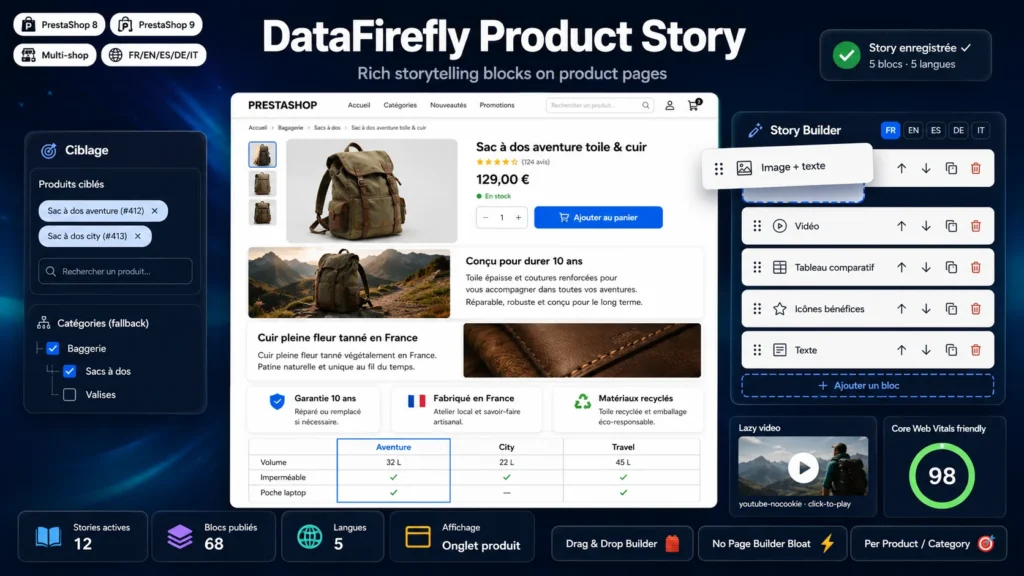
A standard product page lines up a price, a description and a spec sheet. A converting product page tells why the product exists, shows the details that justify its price and reassures at the moment of doubt. Leading D2C brands figured this out long ago: their product pages alternate immersive visuals, short arguments and concrete proof. Product Story brings exactly that format to PrestaShop, without a theme rebuild or a developer.
§ 02
Five blocks, endless combinations
Compose each story with alternating image + text blocks to unfold your visual narrative, a video block for the demo, a comparison table to help choose between your ranges, a benefit icon grid for the key arguments at a glance, and free text sections for everything else. Every block moves with the mouse, duplicates in one click and translates into all your languages via simple tabs.
§ 03
One story, dozens of products
No need to write product by product: assign a story to an entire category and all its products inherit it automatically. Need specific content for a best-seller? Give it its own story and it takes over. The priority system even lets you stack several stories on the same page, in the order you decide.
§ 04
Light where page builders are heavy
Generic page builders inject hundreds of kilobytes of CSS and JS on every page and lock your content into proprietary shortcodes. Product Story loads its assets only on product pages, replaces YouTube and Vimeo iframes with GDPR-friendly click-to-play facades, and outputs clean HTML that inherits your theme's typography. Your Core Web Vitals stay green.
§ 05
Built for international stores
Every title, text, table column and benefit item translates independently. The product tab title is multilingual too, with default values shipped in French, English, Spanish, German and Italian. In multistore mode, a story can be shared across the network or reserved for one shop.



There are no reviews yet.