
Our best WooCommerce plugins for customer service
Five plugins — and the insight that automation comes second.
Most of your level-1 tickets are two questions: where is my order, and how do I return it. Those aren't service questions — they're gaps in your flow, coming back to you as tickets.
Sound familiar?
Tickets that shouldn't exist
Two questions make up most of your volume. Both are avoidable.
A chatbot as a bandage
Answering faster a question that shouldn't have existed: that's treating the symptom.
An AI with too many permissions
An agent that can edit and refund is a liability with a chat window.
Response time as the wrong metric
It measures how fast you treat a problem — not whether it needed to exist.
Our selection, ranked
Every module below is built, maintained and supported by our team. The ranking reflects what we would install first on a client store.
-
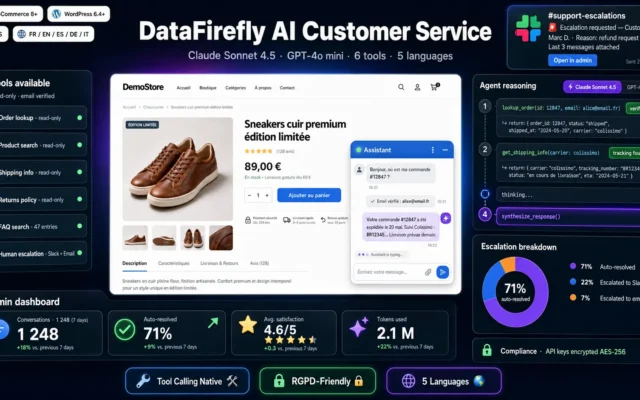
AI Customer Service Agent
The agent — with read accessSix read-only tools, five languages, escalation with the full transcript. It can't break anything, and that's the point.
An AI agent that genuinely understands your customers and has read-only access to WooCommerce. Order status, returns, shipping, FAQ: it answers instantly in 5…
€99.00 View the module -
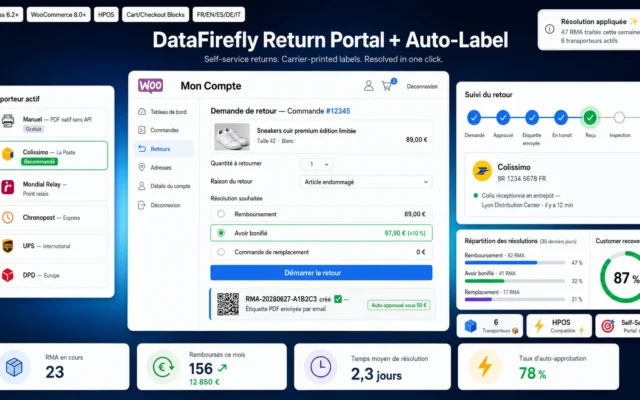
Return Portal + Auto-Label for WooCommerce
First — remove the commonest questionLabel, portal, status. The return becomes self-service instead of an email thread — and the ticket never exists.
Self-service customer return portal with automatic multi-carrier label generation (Colissimo, Mondial Relay, Chronopost, UPS, DPD), admin inspection workflow, and resolution engine (refund, bonus store…
€79.00 View the module -
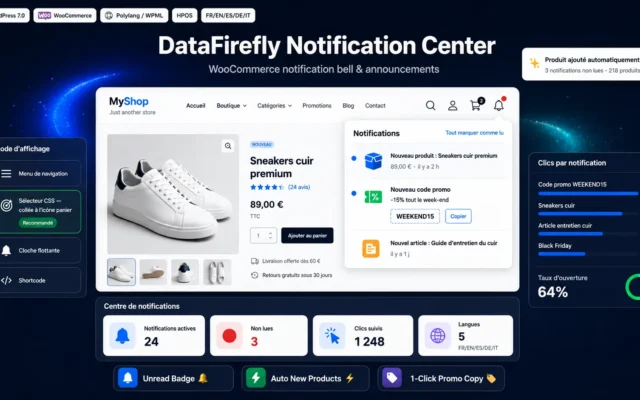
WooCommerce Notification Center
Inform before they askSomeone who knows the status doesn't write to you. Proactive beats any response time.
A notification bell for your WooCommerce store: new products announced automatically, promo codes and posts in one click, unread badge, multilingual and cache friendly.
€29.00 View the module -
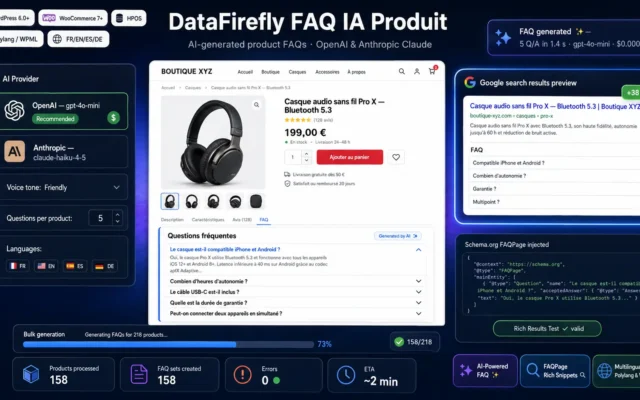
DataFirefly Product FAQ AI — Automatic AI-generated FAQs with Google rich snippets and OpenAI/Claude for WooCommerce
Answer before the ticket existsThe questions are already in your inbox. Answered on the product page, they never become tickets.
WooCommerce plugin that automatically generates product FAQs using AI (OpenAI or Anthropic Claude). Google FAQPage rich snippets, Polylang/WPML multilingual, per-product FAQ editor, bulk generation,…
€49.00 View the module -
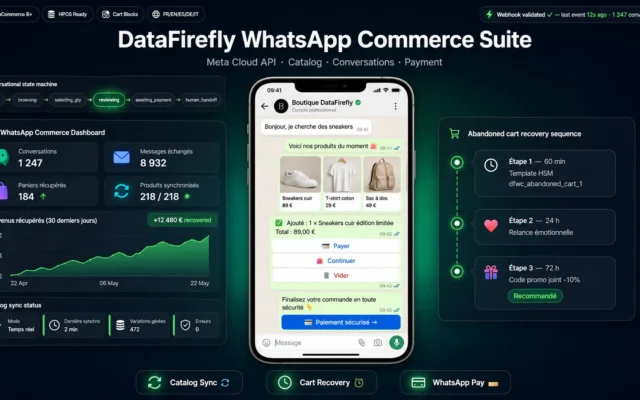
DataFirefly WhatsApp Commerce Suite — WooCommerce
The channel — lastVery high visibility. Without the groundwork, it gets you more messages, not fewer.
Go way beyond simple WhatsApp notifications: Meta Commerce catalog sync, full conversational ordering, abandoned cart recovery via WhatsApp with HSM templates, and a signed…
€79.00 View the module
Side-by-side comparison
| Module | Best for | Price | Rating | Link |
|---|---|---|---|---|
| AI Customer Service Agent | The agent — with read access | €99.00 | — | |
| Return Portal + Auto-Label for WooCommerce | First — remove the commonest question | €79.00 | — | |
| WooCommerce Notification Center | Inform before they ask | €29.00 | — | |
| DataFirefly Product FAQ AI — Automatic AI-generated FAQs with Google rich snippets and OpenAI/Claude for WooCommerce | Answer before the ticket exists | €49.00 | — | |
| DataFirefly WhatsApp Commerce Suite — WooCommerce | The channel — last | €79.00 | — |
The best ticket is the one that never exists
Look at your level-1 tickets: most of them are two questions. “Where is my order?” and “I want to return this.” Those aren’t customer service questions. They’re gaps in your flow, coming back to you as tickets.
A chatbot treats the symptom
It answers faster a question that shouldn’t have existed. That’s useful — but it isn’t the same as removing the question. First close the gap. Then automate what’s left.
And an AI allowed to do everything is not a good AI
An agent that can edit orders or issue refunds isn’t progress — it’s a liability with a chat window. The right agent reads, answers, and escalates when it doesn’t know. Admitting that is the feature.
How to choose
Remove the question first — then answer it
Most of your level-1 tickets are two questions: where is my order, and how do I return it. Both are gaps in the flow, not service cases. A self-service returns portal and a proactive notification delete them — they don't answer them faster.
Then the AI, for what's left
An agent with read access to orders answers instantly, in five languages, around the clock. What matters is what it cannot do: edit, refund, set passwords. A model allowed to act gets it wrong in your database.
Escalation isn't failure
An AI that improvises instead of handing over produces worse tickets than no AI at all. "I don't know, I'm handing this over" is the most valuable behaviour in the system — with the full transcript passed to a human.
And measure contact rate, not response time
Response time measures how fast you treat a problem. Contact rate — tickets divided by orders — measures whether the problem had to exist. Only one of those two numbers goes down when you're doing this right.
What you gain
Questions that never get asked
The customer finds the status alone. No ticket, no response time, no queue.
An AI allowed to read, not to act
Six read-only tools. It cannot edit anything, refund anything — and that's deliberate.
Escalation as a feature, not a failure
Keywords, frustration, repeated failure: the agent hands over instead of improvising.
Returns without a ticket
Label, portal, status tracking. The return becomes self-service instead of an email thread.
Inform before they ask
People who are informed don't ask. A proactive notification beats any response time.
The right metric
Not response time. Contact rate is the only number that exposes waste.
From install to results
-
Count your level-1 tickets
The two commonest questions are flow gaps, not service cases.
-
Open the returns portal
Self-service instead of an email thread. The ticket never exists.
-
Push status automatically
Someone who knows the status doesn't ask. Proactive beats fast.
-
Only then, the AI agent
Read, answer, escalate. Never edit.
-
Measure contact rate
Tickets divided by orders. Not response time.
“We set out to cut our response time. Instead we opened the returns portal and pushed shipping status automatically. Response time barely moved — but we got half as many tickets.”
Frequently asked questions
Which questions make up most of my tickets?
Usually two: "where is my order" and "I want to return this". Neither is a service question — both are gaps in the flow. Close the gaps and most of your ticket volume disappears before anyone answers anything.
So a chatbot is useless?
It is — for what's left. A chatbot answers faster a question that shouldn't have existed. Useful, but not the same as removing the question. Order of operations: close the gap first, automate second.
Why an AI with no write access?
Because an agent that can edit and refund is a liability with a chat window. Reading and answering is useful; acting is dangerous — and a model that gets it wrong then gets it wrong in your database, not just in text.
What happens when the AI doesn't know?
That's the most important behaviour of the system. An AI that improvises instead of handing over produces worse tickets than no AI at all. Detection by keyword, frustration and repeated failure — then the case goes to a human with the full transcript.
Which metric should I track?
Contact rate: tickets divided by orders. Response time measures how fast you treat a problem — contact rate measures whether you could have avoided it. Only one of those two numbers goes down when you do this properly.
Where do I start?
With the returns portal. It's the question with the most back-and-forth and the least value created. Then notifications, then the agent. The channel (WhatsApp) comes last — it amplifies, it doesn't repair.
Is WhatsApp really a better channel?
Yes, and that's exactly why it's dangerous without the groundwork. Very high visibility also means you get more messages, not fewer. A channel doesn't fix a flow — it just speeds up whatever you're already getting wrong.
This need on other platforms
Not sure which one fits your store?
Tell us your context — we answer with a straight recommendation, not a sales pitch.