
Everything you'd want to know before you install.
A detailed look at how Custom OAuth MCP for WordPress / WooCommerce — up to 40 tools works, why we built it the way we did, and the thinking behind the features above.
§ 01
What is an MCP server?
The Model Context Protocol is an open standard created by Anthropic that lets an AI assistant (Claude, ChatGPT, Cursor, etc.) call tools running on a remote server: read data, modify content, trigger business actions. In practice, your WordPress site becomes a natural-language-controllable toolbox for the AI of your choice, with no need to recode an integration per model.
§ 02
Why a custom MCP for WordPress and WooCommerce?
Generic MCP plugins expose around twenty standardised functions that never cover your real business needs. A custom MCP gives you tools aligned with your real workflows: your product nomenclature, your taxonomies, your custom fields, your accounting exports, your ERP integrations. The LLM then works directly within your business logic instead of improvising with a generic REST API, which radically changes the reliability and relevance of the results.
§ 03
How does the engagement unfold?
The project starts with a 60 to 90 minute scoping meeting to precisely identify the tools you need and their parameters. We then deliver a written specification of the 40 tools (or fewer, depending on your scope), followed by development of the WordPress plugin, the OAuth integration and the technical documentation. You receive the source code, an installable ZIP and a one-hour handover session for full ownership by your team.
§ 04
OAuth authentication: security first
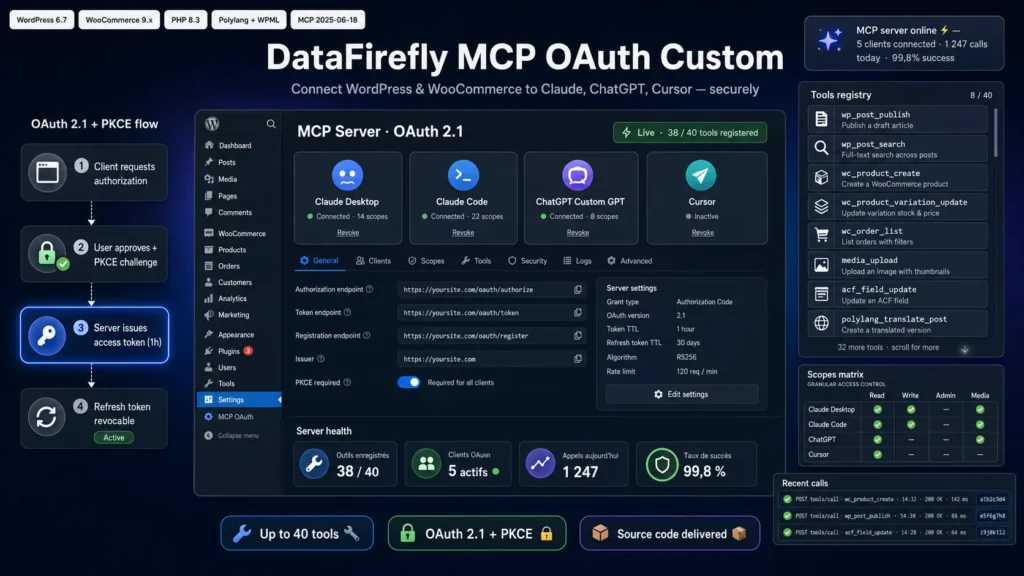
Authentication follows the OAuth 2.1 standard with PKCE recommended by the MCP specification. Each client (Claude Desktop, ChatGPT, etc.) receives its own distinct ID and secret, with granular scopes that limit what each client can do. Access tokens are short-lived, refresh tokens are revocable from the WordPress admin, and every call is logged with its correlation ID.
§ 05
Examples of tools we build
Publishing articles with category and tag management; creating and updating WooCommerce products with variations, stock and prices; uploading images with thumbnail generation; managing menus; editing pages; managing custom taxonomies; reading WooCommerce orders; exporting reports; triggering scheduled tasks; updating ACF or Meta Box fields; Polylang or WPML translations; user and role management. The exact scope is defined together during the initial scoping meeting.
§ 06
What you receive at delivery
The complete WordPress plugin (non-obfuscated PHP source code), an MCP server URL ready to plug into Claude Desktop or any other client, the admin interface to manage OAuth clients and tokens, technical documentation listing the tools and their parameters, and a step-by-step installation guide. You keep ownership of the delivered code and can audit, evolve or redeploy it freely across your internal instances.
§ 07
Warranty and support
30 days of warranty after delivery to fix any defect on the specified scope. 3 months of included technical support to adjust tools, add parameters or handle integration questions on the MCP client side. 12 months of compatibility updates with new versions of WordPress, WooCommerce and the MCP specification itself.

There are no reviews yet.