
Everything you'd want to know before you install.
A detailed look at how DataFirefly Address Lookup - Checkout address autocomplete for PrestaShop 8 & 9 works, why we built it the way we did, and the thinking behind the features above.
§ 01
The invisible problem that costs you money: misspelled addresses
One customer in ten enters their address with a typo, an incomplete street, a wrong postcode. The result: failed deliveries, reshipping costs, overloaded support, carts abandoned at checkout. On PrestaShop, the native address form provides zero assistance — the customer types blind. DataFirefly Address Lookup fixes this by turning the address form into an intelligent assistant that suggests, completes and validates in real time.
§ 02
The French BAN API: free and official
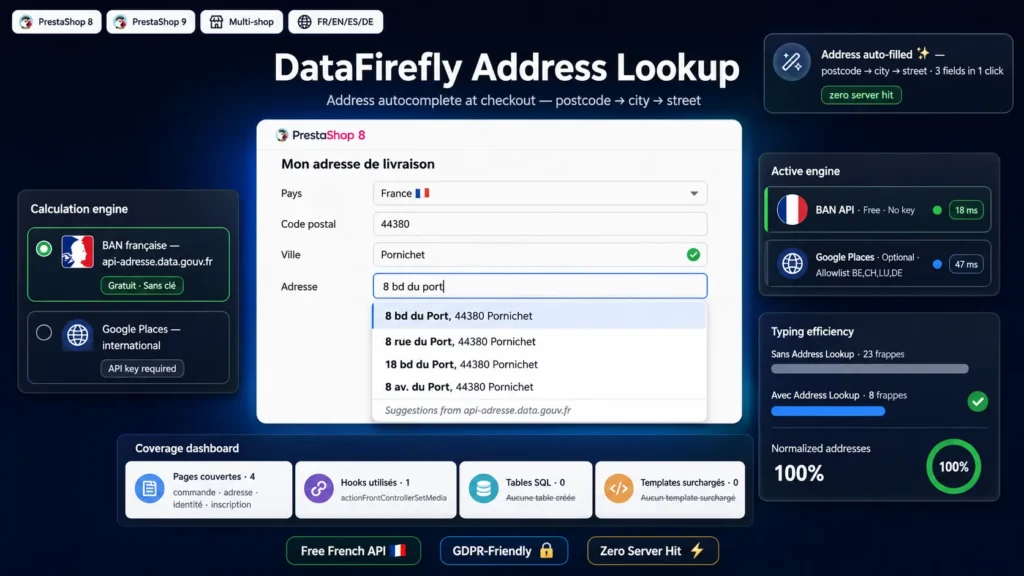
The module uses data.geopf.fr/geocodage by default, the official French government API. It is the same database used by postal services and public information systems: exhaustive territory coverage, continuous updates, normalized addresses. No API key, no subscription, no usage cost. Requests go directly from the customer browser to the API — your server is never involved, your bandwidth is not consumed.
§ 03
Optional Google Places for international customers
If you sell internationally, enable the Google Places engine as a complement. Enter your API key in the configuration, restrict it by HTTP referrer in the Google Cloud Console, and the module switches to Google automatically as soon as the customer selects a country other than France. You can also restrict Google to a country allowlist (BE, CH, LU, DE for example) to keep your Google Cloud budget under control.
§ 04
The customer workflow: postcode → city → street
The customer starts filling their address. They type the five digits of their postcode: if a single municipality matches, the city fills in by itself; otherwise, a city picker appears. They start typing their street: the module queries the BAN filtering by the postcode already known and proposes the matching addresses. One click, and all three fields are filled at once with a normalized address. Three interactions, zero wasted keystrokes.
§ 05
Zero-friction integration on every checkout
The module hooks into the standard actionFrontControllerSetMedia and only injects its JavaScript and CSS on pages that contain an address form: order, my address, my identity, registration. No Smarty template override. No database tables. No dependency on a particular theme — Classic, Hummingbird, and most third-party themes work with no configuration.
§ 06
Robustness: compatible with one-page checkout and multiple forms
The PrestaShop one-page checkout re-renders the address form on every step change, and some third-party extensions do the same. The module handles these re-renders with a MutationObserver combined with native PrestaShop events: updatedAddressForm, updatedAddress, updatedDeliveryForm, changedCheckoutStep. If two address forms are displayed simultaneously (shipping + billing), each gets its own independent autocomplete.
§ 07
Performance and privacy: no intermediary server
All autocompletion requests go directly from the customer browser to the chosen API (BAN or Google). Your PrestaShop server is never queried by the module during typing: no CPU load, no bandwidth consumed, no added latency. GDPR-wise: no data transit through DataFirefly, no collection on the DataFirefly side, no third-party cookie set by the module.
§ 08
Configuration in two minutes
Install the module, open its configuration, and it is already operational for France. For Google Places: enable the option, paste your key, choose the country allowlist. Set the minimum number of characters before triggering, the debounce delay, the activation of match highlighting. No line of code to modify.



There are no reviews yet.