PrestaShop Accounting & Invoicing

PrestaShop 8/9 ERP Export Module — Sage 100, EBP, Cegid, Codial

Your PrestaShop orders in your ERP, every night, with zero re-keying.

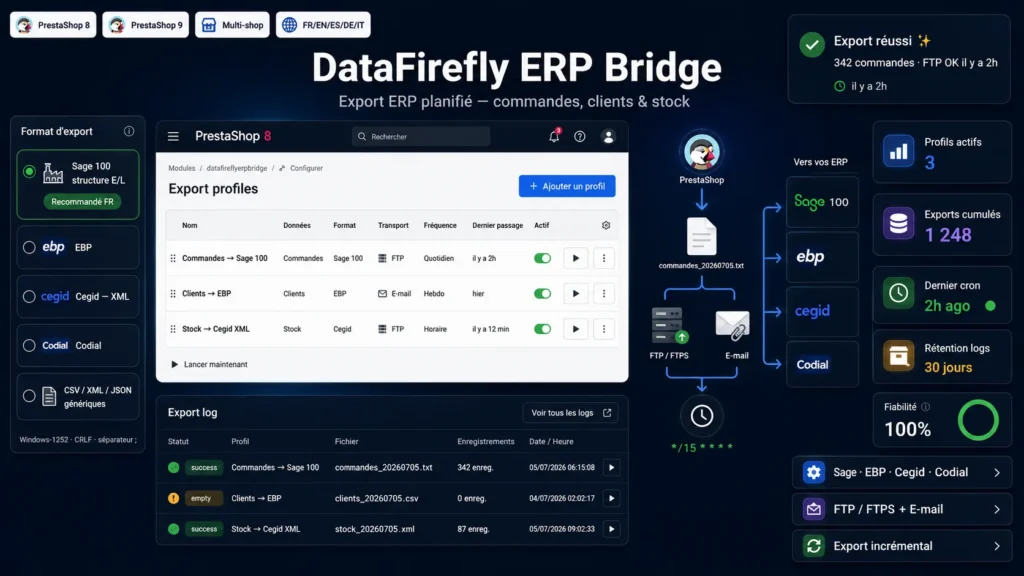
A scheduled export engine that sends your orders, customers and stock to Sage 100, EBP, Cegid, Codial or a generic CSV / XML / JSON format. Automatic delivery over FTP / FTPS or e-mail, triggered by cron, with incremental export and a full log.

At a glance
  • Unlimited export profiles: orders, customers or stock, each with its own frequency
  • 4 French ERP presets (Sage 100, EBP, Cegid, Codial) + generic CSV, XML, JSON formats
  • Automatic delivery over FTP / FTPS or e-mail, triggered by cron
  • Incremental export: only new orders since the last run
  • Encrypted FTP password, order-status filter, export log
PrestaShop 8.0 – 9.x Multistore Native cron FTP / FTPS + E-mail
  • 30-day refund
  • 12 months updates
  • 24h support
www.datafirefly.com/en/
ERP Export Module PrestaShop 8/9 — Sage 100, EBP, Cegid, Codial
v1.0.0 · updated 2026-07-05
What it does

The short version.

01

4 ready-to-use French ERP presets

Sage 100 (header/line E/L structure), EBP Gestion Commerciale, Cegid (XML ENTETE/LIGNES) and Codial. Windows-1252 encoding, semicolon separator, comma decimals and CRLF line endings — exactly what these programs' configurable import wizards expect.

02

Orders, customers and stock

Each profile exports one of the three entities. Orders carry their line items, per-line VAT, shipping costs and the full invoice address (SIRET, intra-EU VAT number).

03

FTP / FTPS or e-mail, your choice

Automatic upload to your FTP server (passive mode and explicit SSL supported) or the file sent as an e-mail attachment. The FTP password is encrypted at rest, never stored in clear text.

04

Cron-driven, per-profile frequency

A token-secured URL to call from your crontab or a cron service. Each profile runs on its own cadence: hourly, daily or weekly, with a 5-minute tolerance.

05

Smart incremental export

For orders and customers, only records created since the last run are exported — no duplicates in your ERP. Stock is always sent as a full snapshot.

06

Log and manual execution

The last 20 exports are visible in the back office with their status, record count and generated file. A 'Run now' button lets you test each profile on demand. Automatic purge based on the configured retention.

The long version

Everything you'd want to know before you install.

A detailed look at how PrestaShop 8/9 ERP Export Module — Sage 100, EBP, Cegid, Codial works, why we built it the way we did, and the thinking behind the features above.

§ 01

Connect PrestaShop to your business software

Every day your orders land in PrestaShop while your accounting or commercial management lives elsewhere — in Sage, EBP, Cegid or Codial. DF ERP Bridge automates the link: it generates the file your ERP expects and drops it in the right place, at the right time, with no one having to export, reformat and re-import by hand.

§ 02

Formats built for French ERPs

The four presets are not just renamed CSVs. Sage 100 uses a header/line (E/L) structure compatible with document import; Cegid outputs a DOCUMENTS/ENTETE/LIGNES XML; EBP and Codial produce flat CSVs with headers. All respect the Windows-1252 encoding, semicolon and comma decimals expected by configurable import wizards. Need a neutral feed for another tool? The generic CSV, XML and JSON formats export every field in UTF-8.

§ 03

You choose what, when and where

Create as many profiles as you need: a daily order export to the ERP over FTP, a weekly customer export by e-mail, a stock snapshot every hour. Each profile has its own entity, format, transport, frequency and status filter. Incremental export ensures that only new orders go out on each run.

§ 04

Security and traceability

The FTP password is encrypted at rest with the store key. The cron URL is protected by a regenerable token. Every run is logged — status, record count, file name — and logs are purged automatically based on the retention period you set.