
Everything you'd want to know before you install.
A detailed look at how Google Reviews Carousel for Shopware 6 works, why we built it the way we did, and the thinking behind the features above.
§ 01
Google reviews displayed in 5 minutes flat
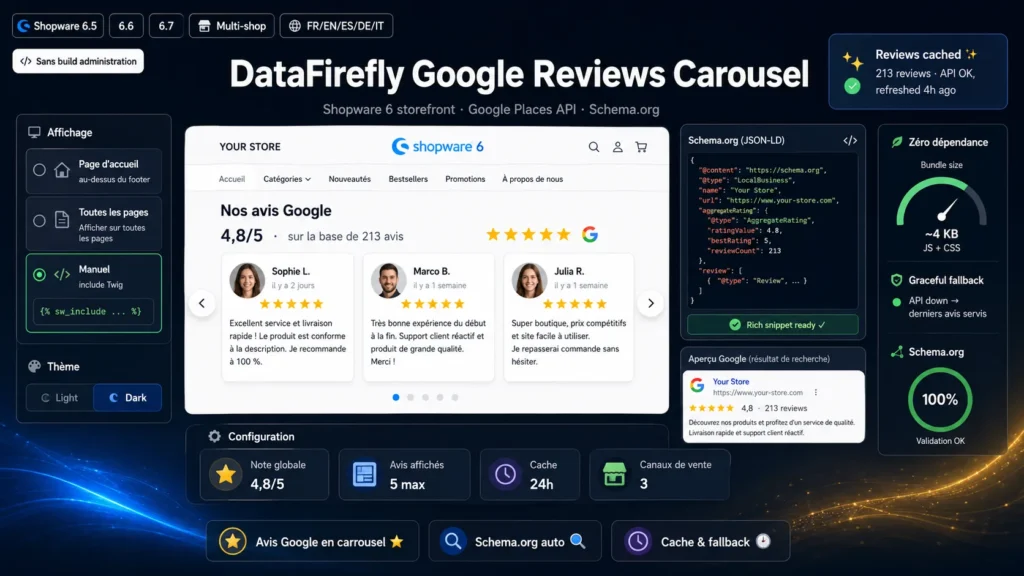
Once the plugin is installed and activated, enter your Google API key and Place ID in the plugin configuration. Choose the display position: homepage above the footer, all pages, or manual insertion via a Twig include wherever you want in your theme. The carousel appears immediately with your business's reviews, stars, avatars and relative dates. No administration build is required: the plugin installs on any hosting.
§ 02
SEO boosted by automatic Schema.org
The plugin automatically generates complete JSON-LD markup every time the carousel renders: LocalBusiness with the name and overall rating, AggregateRating with the average and total review count, and one Review block per displayed review. This markup is interpreted by Google and can make stars appear directly in search results (rich snippets), improving click-through rate with no extra effort.
§ 03
Performance: zero dependency, smart caching
The plugin ships no third-party library. The carousel is written in vanilla JS (~4 KB) and the CSS is self-contained, injected only on pages where the carousel renders. Calls to the Google Places API are cached in the Shopware object cache, with a lifetime configurable from 1 hour to 7 days. If the API is momentarily unavailable, the last valid reviews keep being displayed (graceful degradation). The cache can be cleared any time with bin/console df:google-reviews:clear-cache.
§ 04
Accessible and responsive by design
The carousel automatically adapts to screen size: 3 cards side by side on desktop, 2 on tablet, 1 on mobile. Navigation works via keyboard (arrow keys), touch swipe and mouse drag on desktop (Pointer Events). All interactive elements carry appropriate aria-labels and the carousel ARIA roles are respected. Since rendering is server-side, reviews remain readable by crawlers and users without JavaScript: the carousel is only a progressive enhancement.
§ 05
Built for Shopware and multi-store
All configuration is managed from Extensions > My extensions > Google Reviews Carousel and applies per sales channel: you can use a different API key, Place ID, theme or position for each sales channel. Two console commands are provided: df:google-reviews:test to check the API connection and preview reviews before publishing, and df:google-reviews:clear-cache to force a refresh. Uninstalling with data removal automatically cleans up all configuration.


There are no reviews yet.