
Everything you'd want to know before you install.
A detailed look at how Axonaut Connector for WooCommerce works, why we built it the way we did, and the thinking behind the features above.
§ 01
What is the Axonaut Connector for WooCommerce for?
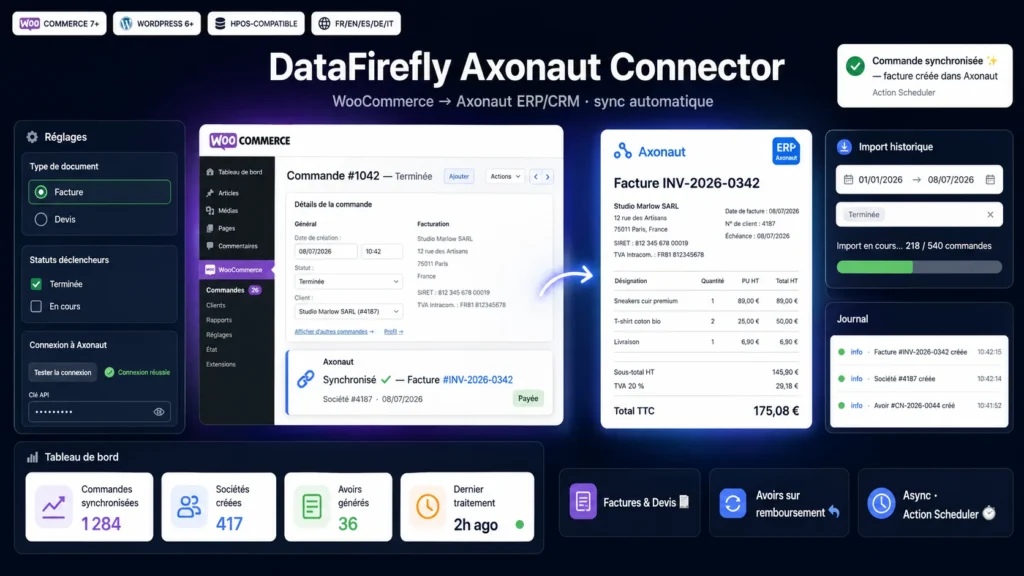
Axonaut is a French ERP/CRM that centralizes quotations, invoices, customers and accounting. This connector links your WooCommerce store to Axonaut to eliminate re-keying: every order becomes an invoice or a quotation, every customer a company with its contact, and every refund a credit note. You save time and make your accounting more reliable.
§ 02
Order sync as invoices or quotations
Choose the order statuses that trigger the push (for example Completed) and the document type to create, invoice or quotation. The connector builds the document line by line with the correct VAT rate, adds shipping and any fees, and forwards the payment date if the order is already paid. Processing runs in the background via Action Scheduler without slowing checkout, and stays idempotent: an order is never pushed twice.
§ 03
Companies, contacts and EU VAT
From the billing information, the connector creates the company in Axonaut and attaches the buyer as a contact. It automatically distinguishes business customers from individuals, deduplicates existing companies and maps the EU VAT number detected from the main EU VAT plugins. Repeat buyers are recognized by their email, even for guest checkout.
§ 04
Credit notes, refunds and historical import
A WooCommerce refund, full or partial, generates a credit note in Axonaut, linked to the original invoice. You can also import your entire order history by date range and status, or synchronize a selection of orders with a bulk action from the orders list. An activity log and a debug mode give you full visibility.
§ 05
Installation and compatibility
The plugin is compatible with HPOS (custom order tables) as well as with legacy storage, requires no Composer dependency on your server, and installs like any WordPress plugin. Enter your Axonaut API key, test the connection, choose your trigger statuses, and synchronization starts.
There are no reviews yet.