


Everything you'd want to know before you install.
A detailed look at how Custom Box Builder Module for PrestaShop 8 & 9: Mix & Match Bundles works, why we built it the way we did, and the thinking behind the features above.
A box to fill raises the average order value
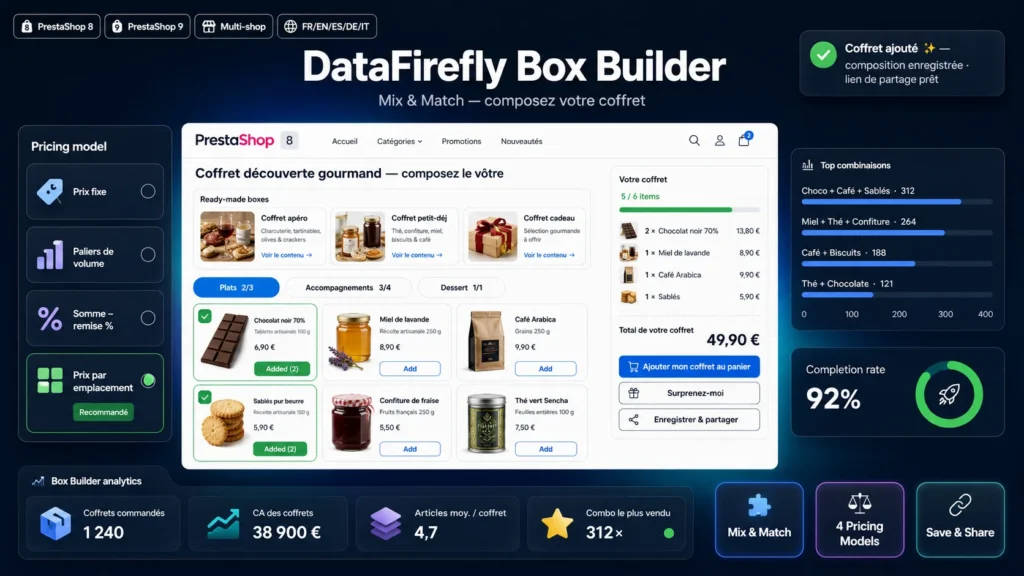
The customer who comes for one item leaves with four, because they want to fill their box and see the progress bar turn green. Box Builder sets this up without creating a single pack product: you choose the eligible products and the rules, the module handles every combination.
A guided path, on desktop and on mobile
With slots, the customer moves through numbered steps and the builder goes to the next step on its own when the previous one is full. They search for a product, filter by category, sort by price and open the quick view without leaving the page. The summary shows the box filling up, the price, the savings and what is still missing. On mobile, the grid switches to two columns and a sticky bar keeps the price in view.
Boxes by weight for chocolates, tea or fine foods
Chocolatier, confectioner, tea house or delicatessen: the customer fills their box up to the weight they want instead of counting items. You set a minimum, a maximum or an exact weight. The module uses the weight entered on each product page, the one already used for shipping, and shows weights in grams below 1 kg. Products without a weight are not offered, and the box editor tells you how many are left out.
Five ways to set the price
A fixed price suits the 49.90 box. Volume tiers reward quantity: 3 items for 25, 6 for 45. The sum with discount values the actual contents minus a percentage. The price per slot gives each kind of item its own value. The price per weight charges the box per kg, with degressive rates if you want them. Whatever the model, the price is recomputed by the server from your catalog, added to the cart on its own line, and the savings against the items bought separately can be shown.
Built for gifting
Gift message, free or paid gift wrap, free gift or free shipping when the box is complete: what a holiday box needs. The message follows the order to the back office and the invoice. If the customer changes their mind, they reopen the box from the cart and edit it without starting over.
Sell where your customers look
The box can appear in your categories and search results with its "from" price, be suggested on the page of each product it contains and on the home page, or be placed anywhere in the theme with the widget. For a limited edition, set an end date, a number of boxes to sell, or keep it for a customer group.
Reliable stock, orders and analytics
The stock of each component is checked across the whole cart, taken when the order is validated and given back on cancellation. In the back office, the contents are readable on the order and the invoice. Analytics show, per period, how many customers open the builder, add a box and then order, and which items come up most often, so you can adjust your selection and ready-made boxes.


There are no reviews yet.