
Our best PrestaShop modules for selling custom and made-to-order products
Five modules to sell products the customer composes personally: engraving with live preview, step-by-step configurator, boxes, BOMs and samples.
A standard product gets compared and negotiated. A personalized product only exists in your store. Customization turns the visitor into a co-creator: they invest in the product before even buying it, and average order value follows.
Sound familiar?
A price war on standard goods
The same product at ten competitors: the only remaining variable is price, and it goes down.
Options handled by hand
Engravings requested by email, free-text options, support back-and-forth: every custom order becomes a case file.
Composed products unsellable online
Boxes, assemblies, technically optioned products: without a dedicated interface, the customer gives up or calls.
Hesitation without a sample
Material, colour, real finish: what the screen cannot show, the customer will not buy, especially in B2B.
Our selection, ranked
Every module below is built, maintained and supported by our team. The ranking reflects what we would install first on a client store.
-
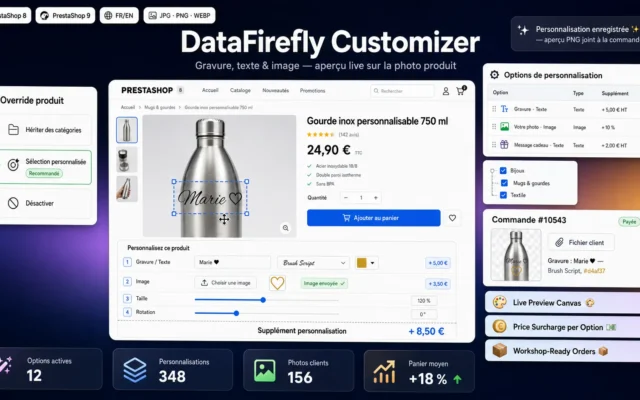
Product Customizer — Engraving, Text & Image Upload with Live Preview (PrestaShop 8 & 9)
Full personalizationEngraving, text and image with live preview on the product page: the reference module for gifts, jewellery and branded objects.
Engraving, custom text and image upload with live preview right on the product picture. Each option adds its own surcharge — fixed amount or…
€69.00 View the module -
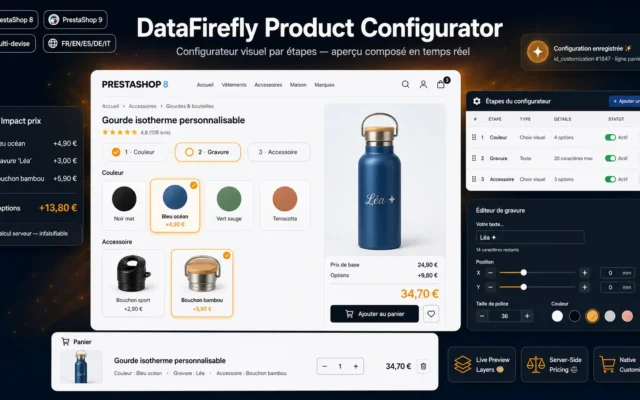
Step-by-Step Product Configurator — Visual Options, Live Preview & Price Impact (PrestaShop 8 & 9)
The technical configuratorStep-by-step configuration with visual options, live preview and price impact: for complex products previously sold by quote.
Turn your product page into a step-by-step configurator: visual options with photo thumbnails or color swatches, text engraving, real-time composed preview and a server-side…
€129.00 View the module -
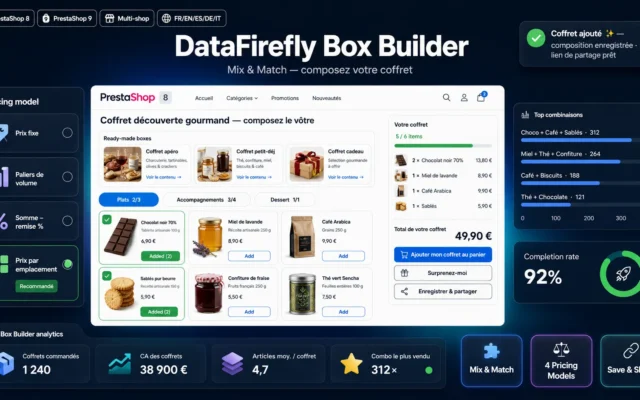
Custom Box Builder Module for PrestaShop 8 & 9 — Mix & Match Bundles
The mix-and-match boxBox builder: the customer composes a box under your rules (item count, categories, budget), ideal for fine food, cosmetics and gifts.
Let your customers compose their own box from the selection you curate: interactive grid, live computed price, 4 pricing models, categorical slots, pre-composed boxes,…
€129.00 View the module -
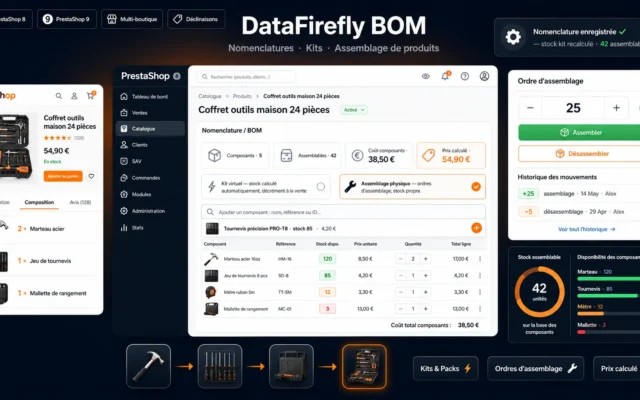
DataFirefly BOM — Bill of Materials & Product Assembly
Assembly under controlBills of materials and product assembly (BOM): components are deducted automatically, stock stays correct even on composed products.
Sell kits and manufacture assembled products in PrestaShop 8 & 9: bills of materials (BOM), automatically computed stock, component stock deduction on sale, assembly…
€109.00 View the module -
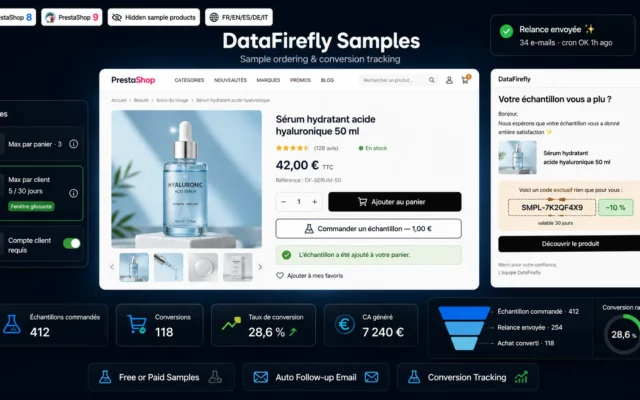
Product Sample Ordering — Follow-up & Conversion Tracking (PrestaShop 8 & 9)
Hesitation convertedSample ordering with follow-up and conversion tracking: the customer touches the material before buying the final product.
Add an "Order a sample" button (free or paid) to your product pages, cap requests per customer, track sample-to-purchase conversion and follow up automatically…
€129.00 View the module
Side-by-side comparison
| Module | Best for | Price | Rating | Link |
|---|---|---|---|---|
| Product Customizer — Engraving, Text & Image Upload with Live Preview (PrestaShop 8 & 9) | Full personalization | €69.00 | — | |
| Step-by-Step Product Configurator — Visual Options, Live Preview & Price Impact (PrestaShop 8 & 9) | The technical configurator | €129.00 | — | |
| Custom Box Builder Module for PrestaShop 8 & 9 — Mix & Match Bundles | The mix-and-match box | €129.00 | — | |
| DataFirefly BOM — Bill of Materials & Product Assembly | Assembly under control | €109.00 | — | |
| Product Sample Ordering — Follow-up & Conversion Tracking (PrestaShop 8 & 9) | Hesitation converted | €129.00 | — |
The product your customer builds with you
A personalized product cannot be compared on Google Shopping: it only exists in your store. Engraving, text, step-by-step configuration or composed boxes, customization takes the shop out of the price war.
From engraving to a full configurator
Simple personalization (text, image, engraving with live preview) covers gifts and branded objects. The step-by-step configurator handles technical products with options and price impacts. The box builder lets the customer compose a mix-and-match box.
And behind the scenes, assembly
Bills of materials (BOM) deduct components at the right moment, and sample ordering converts buyers who hesitate over a product they cannot touch.
How to choose
Choose by product complexity
For text, an engraving or an image on an existing product, simple personalization with live preview is enough and deploys in an hour. As soon as options chain together and change the price (dimensions, materials, finishes), the step-by-step configurator becomes essential: it replaces the email quote.
The box is a case of its own
The box builder does not personalize one product: it lets the customer assemble several. The rules engine (minimum items, required categories, budget) guarantees every composed box stays profitable. It is the format that raises average order value fastest.
Think about the back office before selling
An assembled product without a BOM becomes an inventory nightmare: the bundle sells, components are not deducted, and the stock-out arrives unannounced. Put the BOM in place before pushing volume.
Samples, the weapon of expensive made-to-order
The more expensive the personalized product, the better samples convert: fabrics, materials, shades. Automatic follow-up after sample delivery turns a logistics cost into a measurable conversion machine.
What you gain
A reassuring live preview
The customer sees their engraving, text or image on the product before adding to cart: fewer doubts, fewer returns.
Options with price impact
Each configurator step shows its effect on the price in real time. The quote builds itself, no emails needed.
A box composed by the customer
Mix and match with content rules: the customer composes, the store collects a basket worth more than any single product.
Stock that follows assembly
BOMs deduct components at order time: made-to-order without inventory surprises.
Samples that convert
Sample ordering with follow-up and tracking: hesitation becomes a funnel step instead of an exit.
From install to results
-
Map your customizable products
Separate simple marking, price-impacting options and assemblies: each case has its module.
-
Start with the live preview
Text, image and engraving personalization deploys fast and proves demand.
-
Move up to the configurator
For technical products: steps, visual options and live pricing replace the quote.
-
Secure stock with the BOM
Every composed product sale deducts its components automatically.
-
Add samples on the high end
Follow-up after delivery and conversion tracking: measure what every sample earns.
“Before, every engraved order took three emails and a proof approval. Now the customer sees their text on the product, approves it themselves, and our returns have melted away.”
Frequently asked questions
Does the live preview work on mobile?
Yes. The personalization preview (text, image, engraving) is rendered in the browser and adapts to touch screens, where the majority of personalized gift purchases now happen.
Configurator or native PrestaShop combinations?
Native combinations suit a few simple attributes (size, colour). Once options count in the dozens, chain in steps or carry conditional price supplements, combinations explode: the configurator handles that complexity without creating thousands of combinations.
Does the box builder manage the stock of included products?
Yes. Each product added to the box is deducted from its own stock at order time, and a sold-out product automatically disappears from the available choices.
What is a BOM for in a store?
Selling an assembled product built from separately stocked components: a gift basket, a built PC, a kit. Selling the finished product deducts each component, and the finished product's stock is computed from available components.
Are customer-uploaded files checked?
Yes. Images uploaded for personalization are validated (format, size, dimensions) and stored outside public folders. With moderation enabled, you approve or reject each visual before production.
Is this compatible with PrestaShop 9?
Yes. The whole selection covers PrestaShop 8.0 to 9.x, using native hooks and no core overrides.
Not sure which one fits your store?
Tell us your context — we answer with a straight recommendation, not a sales pitch.