



Everything you'd want to know before you install.
A detailed look at how Clean HTML in Product & Category Descriptions: Strip Word Markup, Inline Styles and Empty Tags (PrestaShop 8 & 9) works, why we built it the way we did, and the thinking behind the features above.
What the module removes
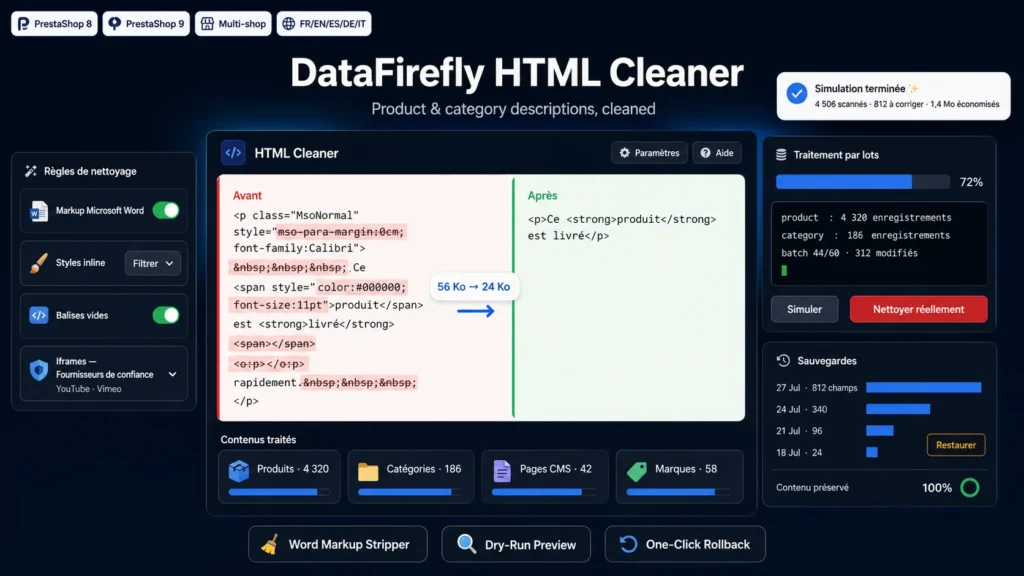
A description pasted from Word arrives with an Office conditional comment at the top, an XML island, paragraphs carrying the MsoNormal class, inline styles forcing a font and a size, empty o:p tags and runs of three non-breaking spaces. None of it shows on the page, but all of it sits in your database, travels to every visitor and gets read by Google. The module recognises these patterns and removes them. Text, links, lists, tables and images are kept.
A real parser, not a regular expression
Cleaning goes through DOMDocument. The document is rebuilt, which repairs unclosed tags and bad nesting along the way instead of breaking them further. Two regular expression passes wrap the DOM analysis, only for what a parser cannot represent: conditional comments, XML islands, namespaced tags. If parsing fails on unusual content, the module returns the original value untouched.
Simulate, batch, back up
Processing runs in AJAX batches, with a progress bar and a stop button. Batch size goes down to 5 records on constrained hosting, which avoids the PHP timeout even on a catalog of several tens of thousands of records. In simulation mode nothing is written: you get the counters, the weight saved and ten before/after comparisons. In real mode every replaced value is copied into the backup table with a run identifier, so the whole thing can be put back from the back office.
What the module does not break
Iframes from trusted providers keep their allow and allowfullscreen attributes and their dimensions; the check runs on the real host, so an address like youtube.com.example.tld is rejected. Empty table cells are preserved so your layout does not shift. The content of pre, code and textarea tags escapes whitespace normalisation. And the engine is idempotent: running the cleaning again on an already processed record produces no change, so no stray update timestamps.
Cleaning on save
An option applies the same rules every time a product or a category is saved in the back office, through the hooks fired before the object is written. It is off by default: it is better to validate your rules in simulation before applying them continuously. This mode does not create a backup entry, unlike batch processing.

There are no reviews yet.