
Everything you'd want to know before you install.
A detailed look at how PrestaShop Amazon Integration Module 8 & 9: Catalog, Stock and Orders Sync works, why we built it the way we did, and the thinking behind the features above.
What a manually managed Amazon store costs
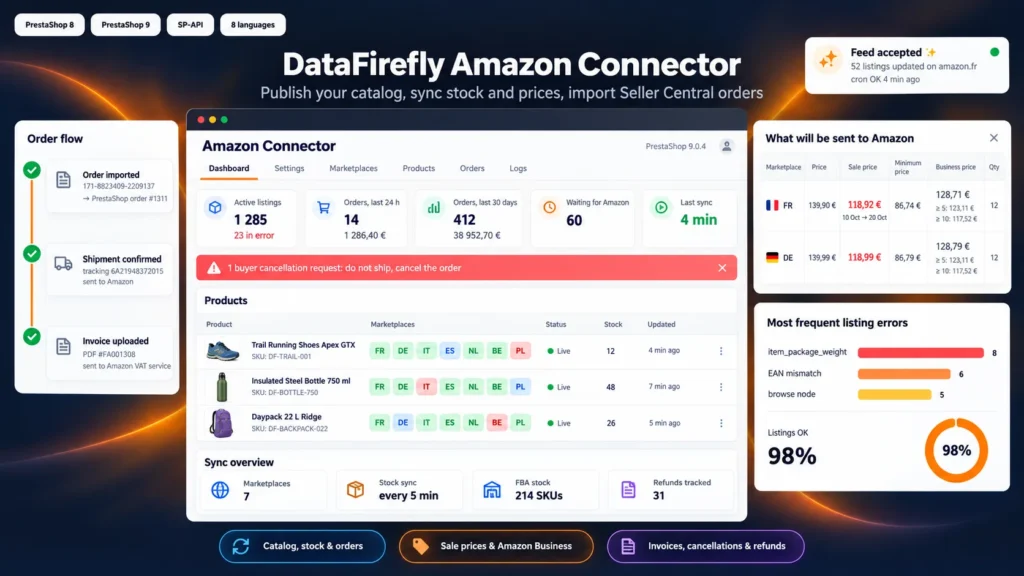
Without a link between PrestaShop and Seller Central, every sale on your site has to be reflected on Amazon, and every Amazon sale on your site. One miss is enough to sell an item that is already gone, with a cancellation that hurts your seller metrics. The module removes this double entry: PrestaShop stays the reference for products, stock and prices, Amazon stays your sales channel, and both update automatically.
Publish quickly what exists, create cleanly what is missing
Most branded products already exist on Amazon: you only need to attach your offer by ASIN or EAN. For your own products, the module creates the full listing from the Amazon product type chosen for the category: title, description, bullet points, images, brand, weight, and combinations grouped into a family with their variation theme. Before sending, you can have Amazon check the listing and read the errors attribute by attribute.
One price per marketplace, sales that look like sales
Each marketplace has its own markup, fixed amount and rounding, and the price is computed in the country currency with the country VAT. Your shop discounts can go out as Amazon sale prices, with the regular price struck through and the discount dates. A minimum price based on your cost price stops a repricing tool from selling at a loss. If you sell to businesses, the price of a customer group becomes your Amazon Business price, with its quantity levels.
Amazon orders processed like any other
Paid orders arrive in PrestaShop with the customer, delivery address, Amazon amounts and a dedicated carrier, with no e-mail sent to the buyer, as Amazon requires. You prepare the order in your usual back office; when it moves to shipped, the shipment and tracking number go to Amazon, then the PDF invoice if you use the VAT Calculation Service. Buyer cancellation requests are flagged in red before you ship.
Readable Amazon errors, problems reported in time
The dashboard groups the most frequent Amazon errors by code, so you fix a hundred listings at once instead of one by one. Each listing shows its status per country in the product list. A red banner appears if the synchronisation stops running, and a daily e-mail lists late shipments, requested cancellations and rejected feeds.


There are no reviews yet.