
A studio photo shows the product. A customer photo shows the product in a living room lit by a ceiling light, worn by someone who is not a model, next to everyday objects. The second answers a question the first dodges: what does this actually look like in my home?
That is why a gallery of customer photos moves two indicators at once, conversion and return rate.
Why it works
Three mechanisms stack up, and they differ from those of a written review.
Reducing uncertainty. On clothing, a colour, a piece of furniture, the gap between the catalogue photo and reality is the leading cause of abandonment and returns. A photo taken in natural light by a customer settles the question of the real shade better than any description.
Scale. An object photographed on a white background has no size. The same object placed on a table, held in hand or worn becomes immediately measurable.
Proof of use. A photo proves that someone bought, received and used the product. That is an implicit guarantee the text of a review does not deliver to the same degree.
Collecting the photos
Three sources, with very different yields.
- The post-purchase request, coupled with the review solicitation. This is the most productive source and the cleanest legally, because consent is gathered at the same moment. Simply add a photo upload button to the review form.
- The social media hashtag. You propose a branded hashtag, customers post, you import. High volume on visual products, but the rights question becomes more complicated.
- Direct upload from a dedicated page, often tied to a prize draw. Effective as a one-off, unproductive as a steady state.
A modest incentive, a voucher worth a few euros or entry into a draw, multiplies the volume. It has to be publicly announced and must not be conditional on a flattering photo.
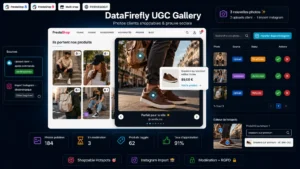 Shoppable Customer Photo Gallery — UGC & InstagramSocial proof that sells, right on your product pages€79.00
Image rights, in practice
This is where many galleries get built on sand. Publishing a photo taken by a customer assumes two distinct authorisations.
Copyright on the photo. The customer is the author of their shot. They have to grant you the right to reproduce it on your site, and you have to specify for how long and on which media. A checkbox at upload time, pointing to readable terms, is enough, provided it is explicit.
Personality rights of the people shown. If a person is identifiable in the photo, their authorisation is required. The customer’s if it is them, that of third parties present otherwise. On a photo showing a child, the authorisation of both parents is required, which makes those images hard to use in practice.
Two simple rules avoid most problems: favour product photos with no identifiable person, and keep a timestamped record of the consent, not just the photo.
Moderation
No automatic publication. A validation queue is indispensable, with written criteria.
- Does the photo actually show the product concerned?
- Is a third party identifiable without authorisation?
- Does personal data appear in the background: a licence plate, a letter, a screen?
- Is a competitor’s brand visible?
- Does the quality allow anything to be made out?
Count less than a minute per photo once the criteria are set. It is not the moderation that costs, it is the absence of criteria.
The technical point: linking to the right product
This is the main implementation difficulty, and it is underestimated. A photo from an order containing four items has to be associated with the right one, otherwise the gallery becomes an unusable jumble.
Two approaches. Ask the customer to choose the product concerned at upload time, which adds a step but guarantees accuracy. Or offer the upload from the product page itself, the link then being implicit. The second gives better results.
On photos imported from social media, the link stays manual, which limits the volume you can handle.
Where to place the gallery
On the product page, below the description and above the reviews, the gallery works as a visual extension of the reviews. A dedicated page gathering every photo serves as a social showcase and shares well, but it converts less.
On mobile, horizontal scrolling with full-screen opening works better than a compressed grid.
Measuring
Compare the conversion rate of product pages with at least three customer photos against those with none, on comparable products. Also track the return rate of those same pages: that is often where the gain is clearest, and the least expected.
The Shoppable Customer Photo Gallery module handles this chain on PrestaShop 8 and 9: collection from the product page or the post-purchase email, consent capture, moderation queue, product linking and gallery display on the product page as well as on a dedicated page.