


Everything you'd want to know before you install.
A detailed look at how Bulk Category Assignment for PrestaShop 8 & 9 works, why we built it the way we did, and the thinking behind the features above.
Assign or remove categories from dozens of products in a few clicks
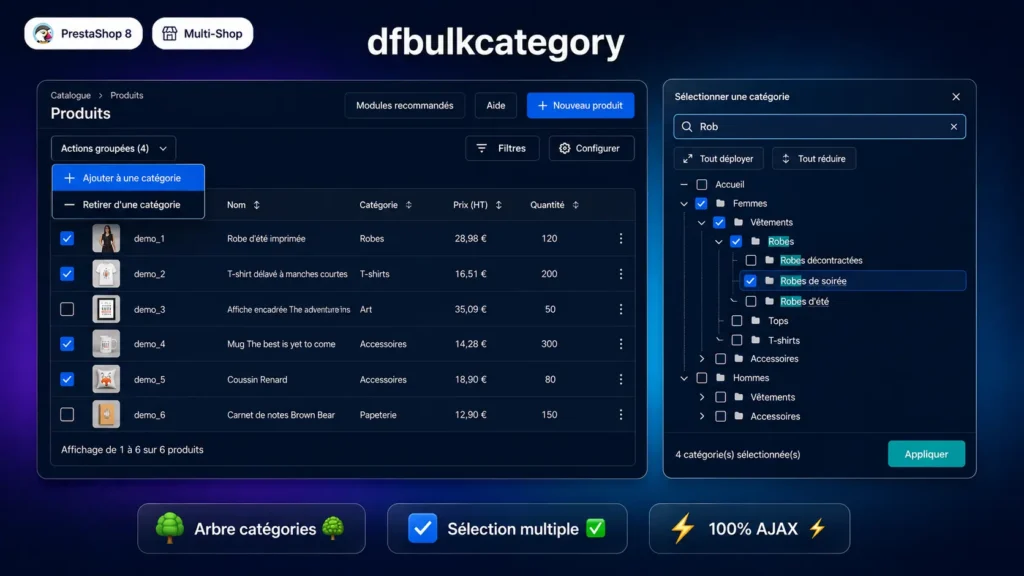
On a catalogue of several hundred products, reorganising product categories by hand — page by page, product by product — can take hours. dfbulkcategory solves this: select the products to update using the native PrestaShop checkboxes in the product list, click Bulk actions, choose Add to category (or Remove from category), select one or more categories in the modal, confirm. The operation runs via AJAX in a few seconds, regardless of how many products are selected.
A modal interface built for large catalogues
The modal loads the full category tree for the current store via AJAX and displays it with nested checkboxes that respect the hierarchy. A search field filters the tree in real time — useful when the catalogue has dozens of categories and sub-categories. Expand all and Collapse all buttons allow quick navigation. An optional checkbox also displays disabled categories for catalogues undergoing restructuring.
Safety and multistore management
When removing a category, the module always preserves each product's default category: a product can never end up without a main category. In multistore mode, each operation runs in the context of the store currently active in the back office. The module verifies that the product belongs to the target store before any modification, preventing cross-store side effects.
Clean installation, no SQL table
The module creates no database table. All operations go through native PrestaShop methods (Product::updateCategories, Category::getChildren) which manage the category_product and category_product_rule tables themselves. Uninstallation is fully reversible. CSS and JS assets are loaded only on the back-office product list page, not on every admin page.
There are no reviews yet.