PrestaShop Administration & Productivity

PrestaShop Monitoring & Alerts: Downtime, PHP Errors, Failed Payments

Your shop tells you when something is wrong, before your customers do.

A module update that breaks the checkout on a Friday night, a payment gateway that has refused every card for two hours, an SSL certificate that expires during the holidays: without an on-call agency, these outages are found on Monday, in customer emails. This module watches the shop around the clock and sends a precise alert as soon as a problem appears, naming the module most likely at fault, then a message when everything is back to normal.

At a glance
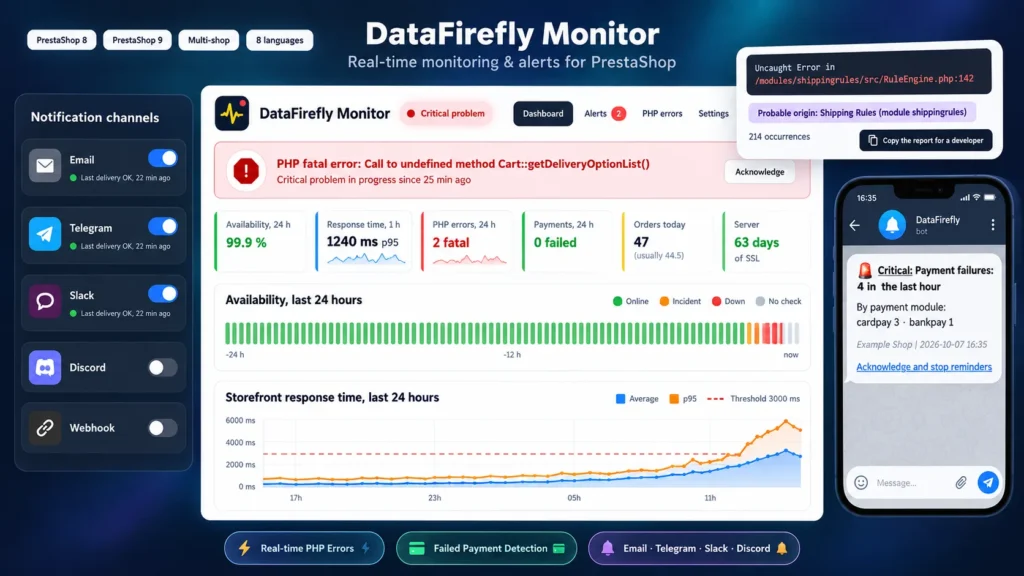
  • PHP fatal error reported within seconds, with the module or theme most likely responsible
  • Failed payments, checkout conversion collapse and order drops compared with your usual activity
  • Uptime check every 5 minutes, response time measured on real visits
  • Alerts by email, Telegram, Slack, Discord or webhook, acknowledged in one click from a phone
  • SSL certificate, disk space and cron task monitored, weekly email report
PrestaShop 8 & 9 Email, Telegram, Slack, Discord Error origin Multistore
  • 30-day refund
  • 12 months updates
  • 24h support
www.datafirefly.com/en/
PrestaShop Monitoring & Alerts: Downtime, PHP Errors, Failed Payments
v1.1.0 · updated 2026-10-07
What it does

The short version.

01

The faulty module named in the alert

Every PHP error is linked to its probable origin: module, theme, override or core. When the error happens inside the PrestaShop core, the call stack is walked back to find the module that triggered it. One button copies a complete report to send to the developer concerned.

02

Sales are monitored, not just the server

A site can answer HTTP 200 and sell nothing. The module counts payments that move to a failed status, compares customers who reach the payment step with the orders actually created, and detects a drop in orders against the same time slot of the previous four weeks.

03

Alerted where you already are

Email, Telegram, Slack, Discord or a signed webhook to Zapier, Make or n8n. Each channel has its own severity threshold, quiet hours let only critical alerts through at night, and a link in every notification stops the reminders from a phone.

04

No false alarm on a Sunday night

Sales checks rely on statistical tests and on the history of your own shop. A normal lull triggers nothing; a shop that usually takes 15 orders in that slot and sees none triggers a critical alert.

The long version

Everything you'd want to know before you install.

A detailed look at how PrestaShop Monitoring & Alerts: Downtime, PHP Errors, Failed Payments works, why we built it the way we did, and the thinking behind the features above.

§ 01

Built for merchants without an on-call agency

Some agencies watch their clients' shops, but most merchants have nobody reading the logs at 11 pm. The module does that job: it watches the shop continuously, keeps its alerts for real problems and sends them to the channel you already check. The dashboard sums up the state of the shop in one sentence, then details availability, response time, errors, payments and orders.

§ 02

PHP errors you can get fixed

A blank page does not say who caused it. The module records each error with its file, line, page, number of occurrences and probable origin. Identical errors are grouped, a new fatal error triggers an alert within seconds, and the copyable report gives the developer of the module concerned everything needed to reproduce the problem. Server paths and the admin folder name are masked before anything is sent.

§ 03

A shop that answers but no longer sells

Classic uptime tools do not see a broken payment gateway. The module records every cart that reaches the payment step, compares it with the orders created, then with the usual rate of the shop over 28 days. It also tracks orders moved to a failed payment status, with a breakdown by module, and the drop in orders against the same time slot of the previous four weeks. Thresholds take your volume into account: a small shop on a Sunday night does not get an alert.

§ 04

Alerts that do not flood you

A problem opens a single alert, updated while it lasts. Reminders are spaced according to your setting and stop as soon as you acknowledge, from the back office or from the link in the notification. A message tells you when the problem is resolved. An hourly cap protects your inbox if everything breaks at once, quiet hours let only critical alerts through, and the pause suspends notifications during an update without stopping detection.

§ 05

The silent causes of outages

Some outages give days of warning. The module reads the SSL certificate served by your domain every 6 hours and warns you before it expires, watches free disk space and reports when the cron task stops. To cover the case where the whole server goes down, an external heartbeat URL (Healthchecks.io, Better Stack) can be called at every cron run.