
Everything you'd want to know before you install.
A detailed look at how Google Search Console Integration for PrestaShop 8 & 9 works, why we built it the way we did, and the thinking behind the features above.
§ 01
Why connect Google Search Console to PrestaShop?
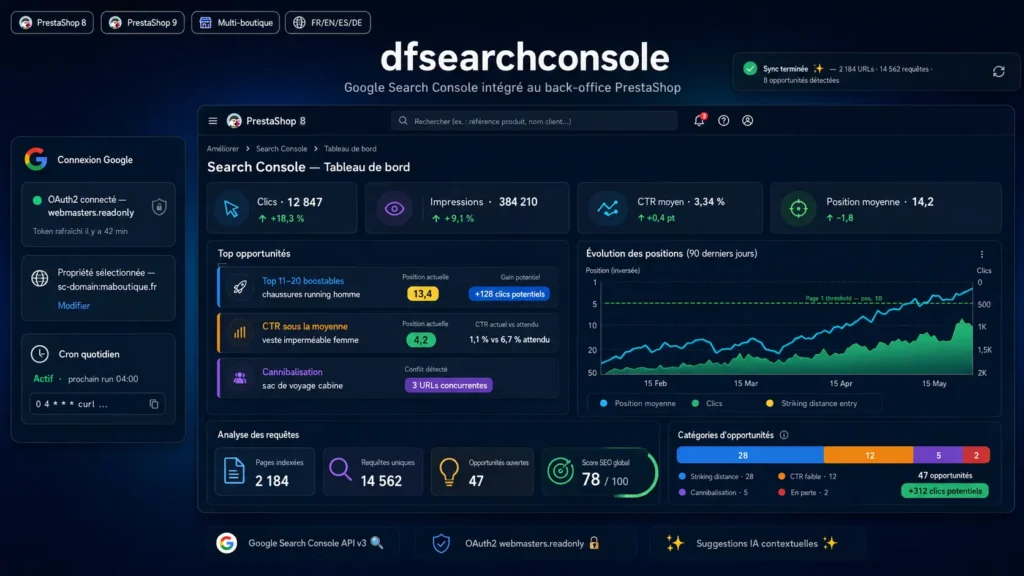
Google Search Console is the source of truth for your organic search performance. But the Google interface is designed for ad hoc analysis, not for day to day SEO management of an e-commerce store. The most profitable queries are buried in reports, pages on the edge of page 1 (which would deliver the most uplift if they moved up) are never highlighted, and cases of cannibalization between product sheets or between category and product remain invisible. dfsearchconsole imports your GSC data directly into the PrestaShop back office and applies four SEO opportunity detectors on it. You see at a glance what needs to be addressed first, with a direct link to edit the entity concerned.
§ 02
The four automatically detected opportunity categories
The striking distance category (top 11 to 20 boostable) targets queries for which your page ranks just outside the first Google page. Targeted content work on these terms often has a high return on investment: moving from position 13 to position 7 can multiply traffic by 4 without changing your overall strategy. The low CTR top 10 category compares your actual CTR to the reference CTR curve (aggregated from public studies by Advanced Web Ranking, Sistrix and Backlinko). If your page is in position 5 but its CTR is half the average for that position, it is almost always a title tag or meta description issue. The cannibalization category detects cases where the same query brings up multiple URLs from your store: Google hesitates, your rankings suffer. The module lists the URLs concerned and proposes a consolidation strategy. The declining category identifies pages that have lost more than 25 percent of clicks compared to the previous period, for quick investigation.
§ 03
Optimization suggestions tailored to page type
The module does not just flag opportunities: for each one it generates concrete suggestions adapted to the page type concerned. For a product sheet, advice will focus on the product page (description, features, FAQ, customer reviews, Open Graph tags). For a category, recommendations will target the category text, the richness of the product grid, internal linking. For a CMS page, the focus will be on article structure, heading tags and topical authority. All suggestions are written in French and action oriented.
§ 04
Native integration in the PrestaShop back office
dfsearchconsole respects PrestaShop conventions: 5 dedicated tabs under the Improve menu, native bootstrap look and feel, standard hooks, autoloaded classes. No Composer dependency, just native cURL to communicate with the Google API. This makes the module lightweight, quick to install, and compatible with both PrestaShop 8 (up to 8.2) and PrestaShop 9 without modification. The SQL tables use utf8mb4 and indexes sized to absorb hundreds of thousands of query plus URL pairs without slowing down the back office.
§ 05
Manual or automatic synchronization via cron
The first synchronization is done with one click from the Settings screen after connecting your Google account via OAuth2. Plan for a few seconds for a small store to 2-3 minutes for a site with thousands of indexed pages. For daily updates, the module provides a cron URL protected by a 32 character random token. Just add one line to your crontab to have the freshest data every morning. As Search Console has a 2 day delay on data, the module by default synchronizes the window ending today minus 2 days.
§ 06
Security and compliance
The module uses OAuth2 with refresh token: you authenticate once, your Google credentials never leave their original infrastructure. The scope requested is webmasters.readonly (read only), so dfsearchconsole technically cannot modify your Search Console properties, submit a sitemap, or add anything to your Google account. Tokens are stored in the PrestaShop configuration table (encrypted at database level if you have enabled that option). The cron token is generated randomly at installation and can be regenerated at any time. No data is sent to third party servers: communication is direct from your store to Google.
§ 07
Technical architecture
The module is structured in five main classes: DfGscOAuth handles the OAuth2 connection and automatic token refresh, DfGscClient wraps the Webmasters v3 API with pagination management, DfGscSync orchestrates synchronizations and writes data in batches of 500 rows, DfGscUrlResolver maps Search Console URLs to PrestaShop entities (product, category, CMS) via link_rewrite, and DfGscAnalyzer detects opportunities and generates suggestions. On the controller side, there are five admin controllers (dashboard, pages, queries, opportunities, settings) and two front controllers (OAuth callback, cron endpoint). The code is documented and organized to facilitate future evolutions.
§ 08
Who is this module for?
dfsearchconsole is aimed at PrestaShop merchants who want to seriously drive their SEO without spending hours in Search Console. At agencies managing multiple PrestaShop stores who want a standardized SEO dashboard. At PrestaShop developers who want a clean and extensible tool for their clients. And at e-commerce managers looking to turn raw Search Console data into actionable optimization projects.




There are no reviews yet.