
Everything you'd want to know before you install.
A detailed look at how WooCommerce Notification Center works, why we built it the way we did, and the thinking behind the features above.
§ 01
A notification center to keep visitors engaged
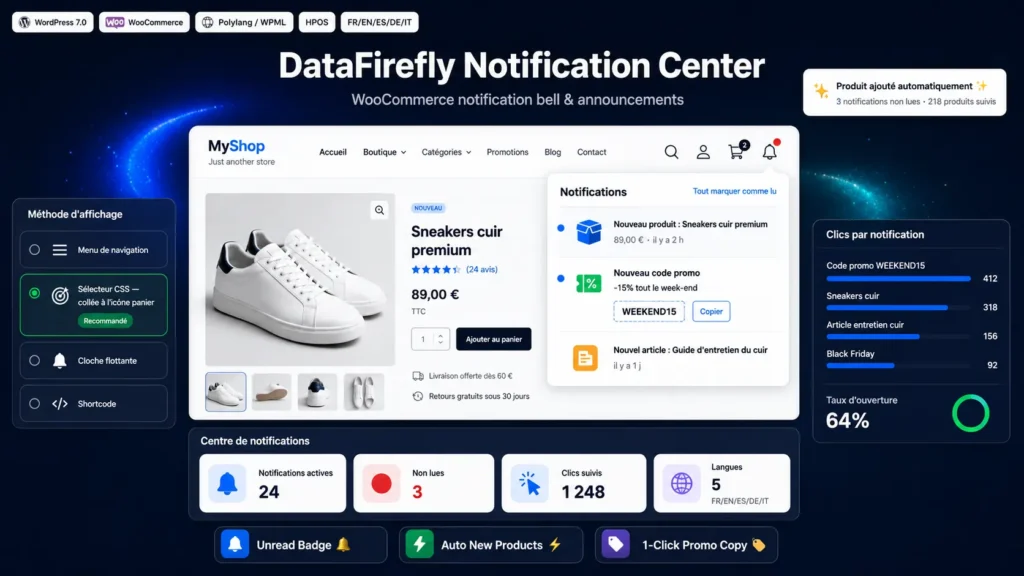
Notification Center adds a bell to your store header, right next to the cart and account area. A red badge flags unread updates and naturally drives clicks. Your customers stay informed about new products, promotions and your latest posts — with no email and no intrusive pop-up.
§ 02
Your new products announced automatically
As soon as a product is published, it appears in the notification center. No setup: the new item is surfaced instantly to the visitors browsing your site.
§ 03
Promo codes and posts in a single checkbox
When you create a promo code, a Notification Center checkbox appears in the WooCommerce editor: tick it and the code is broadcast, with a Copy button. The same applies to blog posts, from the post editor. You can also write free-form announcements from the dashboard.
§ 04
Built for performance and multilingual stores
The bell is page-cache friendly: dynamic content is loaded over AJAX without breaking your cache. The read/unread state is synced server-side for logged-in customers and stored locally for visitors. Polylang and WPML compatible, each notification only shows in its own language.
§ 05
Flexible and headless-ready
Four ways to display the bell (menu, CSS selector to pin it to the cart icon, floating bell or shortcode), configurable colors and animations, click tracking, automatic coupon expiry, and a read-only REST endpoint for headless stores. HPOS compatible.


There are no reviews yet.