


Everything you'd want to know before you install.
A detailed look at how DataFirefly B2B Quote Request works, why we built it the way we did, and the thinking behind the features above.
§ 01
The B2B sales flow PrestaShop is missing
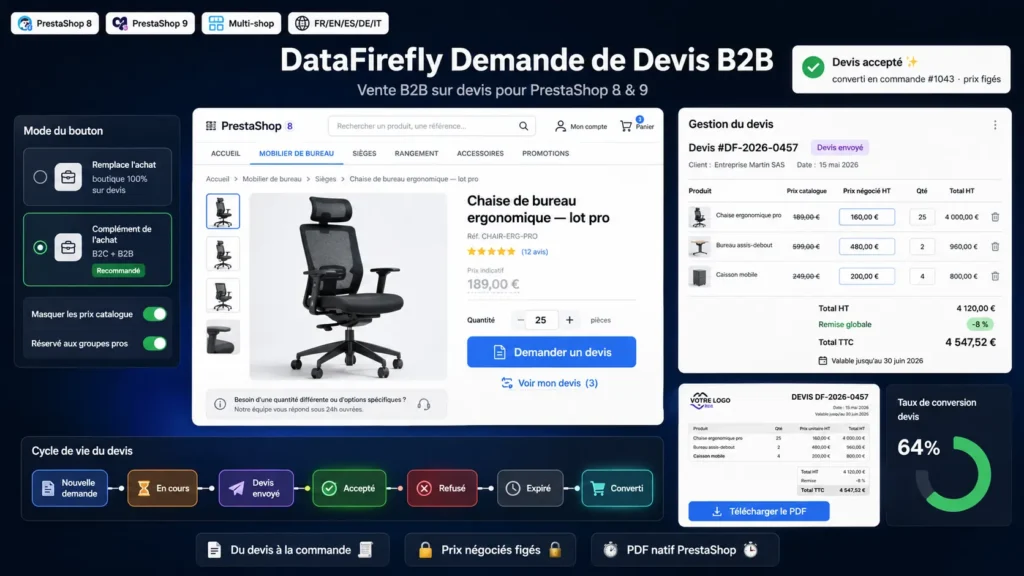
Many stores sell to professionals who don't buy in one click: they ask for a price, negotiate quantities, wait for a formal quote before committing. PrestaShop offers nothing native for this flow. This module fills the gap by adding a true quote-request journey, from the first click on the Quote button to the final order, without ever leaving your usual back office or breaking the standard purchase journey of your retail customers.
§ 02
A journey designed for the professional customer
On the product page and listings, a Quote button replaces add-to-cart or sits next to it, as you choose. You can hide catalog prices for a fully quote-based logic, and restrict the button to specific customer groups to separate B2B and B2C. The customer builds their request in a dedicated quote cart, adjusts quantities, adds a message, then submits. If they are not logged in, you can allow the request in guest mode with contact details. Every request immediately generates a notification to your team.
§ 03
Negotiation happens in the back office
When a request arrives, you get a complete management screen. For each line, the catalog price is recalled and you enter the negotiated price. You apply a global discount as a tax-excluded amount or a percentage, indicative shipping costs, a message for the customer and a validity date. You change the quote status and, with a single checkbox, notify the customer by email. The full status history is kept, timestamped and linked to the employee who changed it.
§ 04
A clean PDF, in your store style
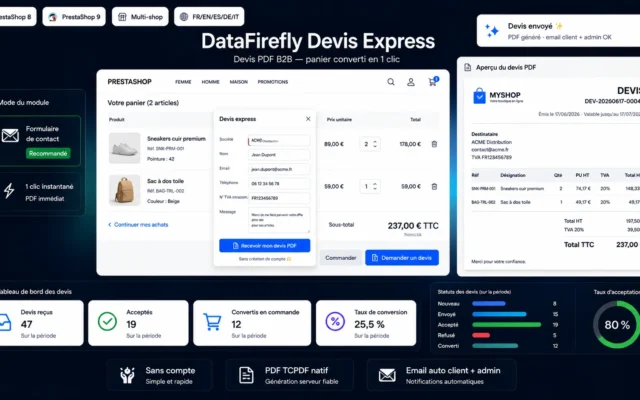
The quote is generated as a PDF via the native PrestaShop engine, which ensures rendering consistent with your other documents. It includes your logo, your details, the customer address, the line detail with negotiated prices and VAT rate, the tax-excluded and tax-included totals, any discount and your terms. The customer downloads it from their area, and the administrator from the back office.
§ 05
From acceptance to order, in one click
When the customer accepts the quote from their area, the status switches and you can convert it to a real order. The module creates a cart, applies each negotiated price via a SpecificPrice attached to that cart to freeze the rate, adds any global discount as a cart rule, then creates the order via validateOrder with the status of your choice. The specific prices and temporary rules are cleaned up automatically once the order is created: your catalog stays intact, and the order carries exactly the negotiated amounts.
§ 06
Built for PrestaShop 8 and 9
The module respects the specifics of both major versions: translation calls adapted to PS9, AJAX responses as direct JSON to avoid signature incompatibilities, price and date formatting compatible with the removal of some legacy helpers in PrestaShop 9. The architecture is PSR-4 without Composer, with one class per file and a dedicated autoloader, in line with DataFirefly standards and the constraints of shared hosting.


There are no reviews yet.