
Everything you'd want to know before you install.
A detailed look at how In-Store Pickup — Click & Collect with Map (PrestaShop 8 & 9) works, why we built it the way we did, and the thinking behind the features above.
§ 01
Frictionless Click & Collect
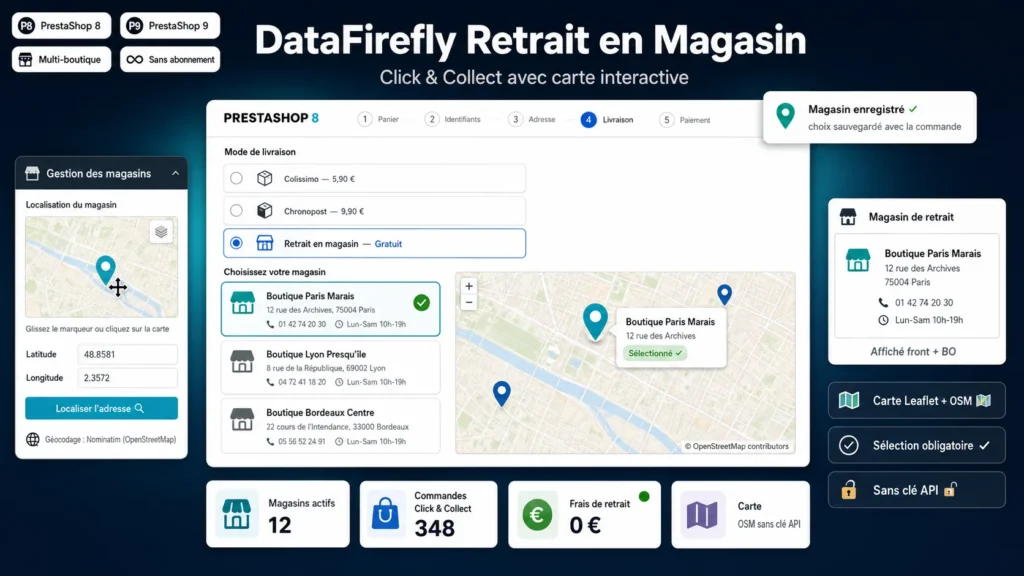
On install, the module creates an “In-store pickup” carrier with configurable fees. When customers select it at checkout, your store list and an interactive map appear: one click on a store (in the list or on the map) saves their choice instantly.
§ 02
Stores that are easy to manage
From the module configuration, add and edit your stores: name, address, postcode, city, phone, opening hours. The GPS position is set by clicking the back-office map or via automatic address geocoding — no coordinates to type by hand.
§ 03
Information that follows the order
The selected store is saved with the order (database snapshot) and shown on the confirmation page, in the customer account order detail and in the side column of the back-office order page. Your team always knows where to prepare the order.
There are no reviews yet.