
Everything you'd want to know before you install.
A detailed look at how Header/Footer Code Injector (CSS/JS) works, why we built it the way we did, and the thinking behind the features above.
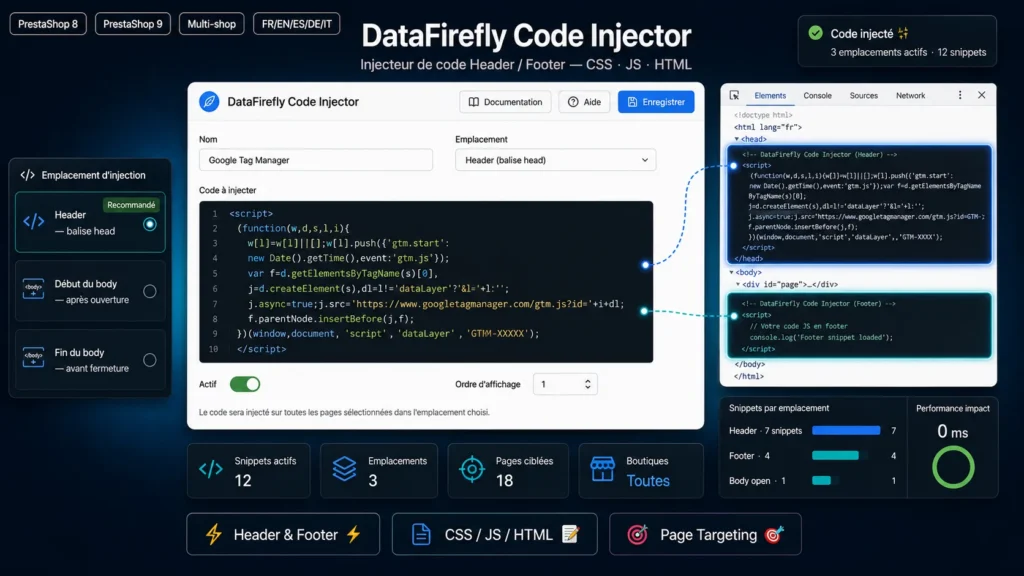
Your code in the page, theme untouched
Pasting a Google Tag Manager tag or a verification tag into a template means editing the theme, and the change is lost at the next update. Here, each block of code is a snippet stored in the database and injected through the PrestaShop hooks. The theme stays intact and the snippets survive its updates.
Three locations, whatever the theme
The head tag receives styles, meta tags and the main GTM script. The body start holds the GTM noscript part, the body end the tracking and chat scripts. Some themes do not call the body hooks: the module then inserts the code directly into the final page HTML, right after the opening body tag or right before the closing one. No setting is required.
The right code on the right pages
Each snippet runs on all pages, only on a selection, or everywhere except a selection. The list covers 30 PrestaShop pages, including order confirmation for conversion pixels, and a free field accepts module pages in the module-modulename-controller format. The injection order is set per location, and duplication creates a disabled copy to review before enabling it.
Test on the live store before publishing
Test mode keeps a snippet limited to the maintenance IP addresses set in PrestaShop. You check the tag on the real store without any visitor receiving it, then switch test mode off. The module reads every snippet in a single SQL query per page, supports multistore and its interface is translated into eight languages.




There are no reviews yet.