
Everything you'd want to know before you install.
A detailed look at how Shopware 6 Address Autocomplete — Multi-Provider BAN & Google Places works, why we built it the way we did, and the thinking behind the features above.
§ 01
Why address autocomplete changes your conversion rate
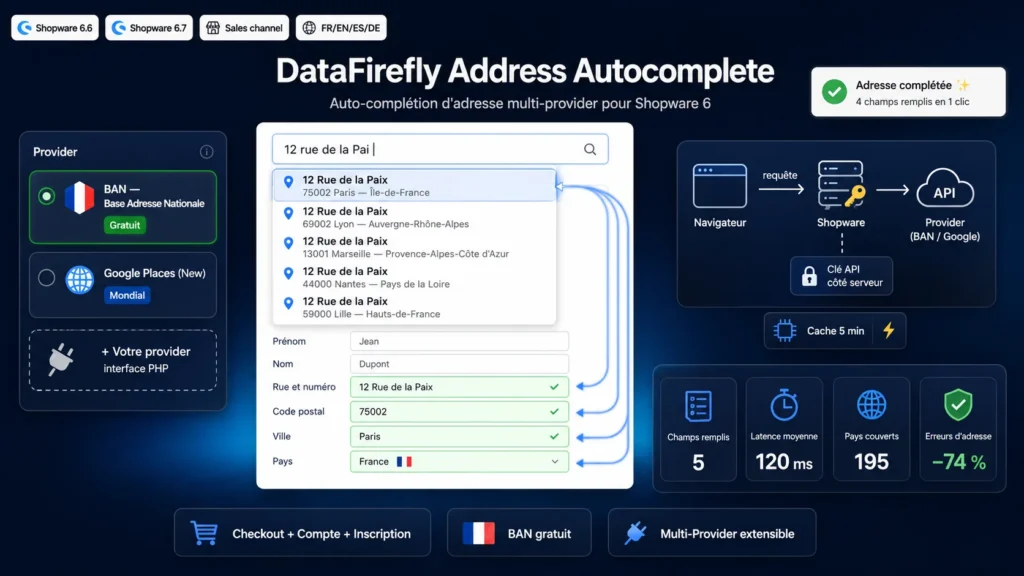
The address form is the most tedious step of any checkout: six fields, typos, wrong postcodes. Every friction point costs sales and every invalid address costs a returned parcel. This plugin replaces manual typing with an instant search: the customer types the beginning of their address, a suggestion list appears, one click fills every field. The data comes from an official repository (BAN) or from Google, so it is normalized and deliverable.
§ 02
BAN or Google Places: pick by market
If you sell in France, the Base Adresse Nationale is unbeatable: free, keyless, government-maintained, it covers the mainland and overseas departments with street-number precision. If you sell internationally, Google Places (New) takes over with worldwide coverage. The plugin uses the modern Places API v1 endpoints and keeps your key server-side: it never travels through the browser, which greatly simplifies securing your Google Cloud project.
§ 03
An architecture built for integrators
The plugin exposes an AutocompleteProviderInterface and collects providers through the df_address_autocomplete.provider Symfony tag. Adding Mapbox, HERE, Loqate or an internal address repository boils down to one PHP class and three lines of services.xml. Every suggestion embeds its provider prefix, so detail calls are routed automatically even if you change providers mid-session.
§ 04
Installed in five minutes
Upload the ZIP, activate the plugin, compile the storefront and pick your provider in the configuration. Everything else — per-page activation, country restriction, debounce, cache — is managed from the Shopware admin, with a per-sales-channel scope if you run multiple shops.



There are no reviews yet.