
Everything you'd want to know before you install.
A detailed look at how Product Packs & Bundles Module for PrestaShop 8 & 9: Discounted Bundles & Kits works, why we built it the way we did, and the thinking behind the features above.
Why not a native pack product
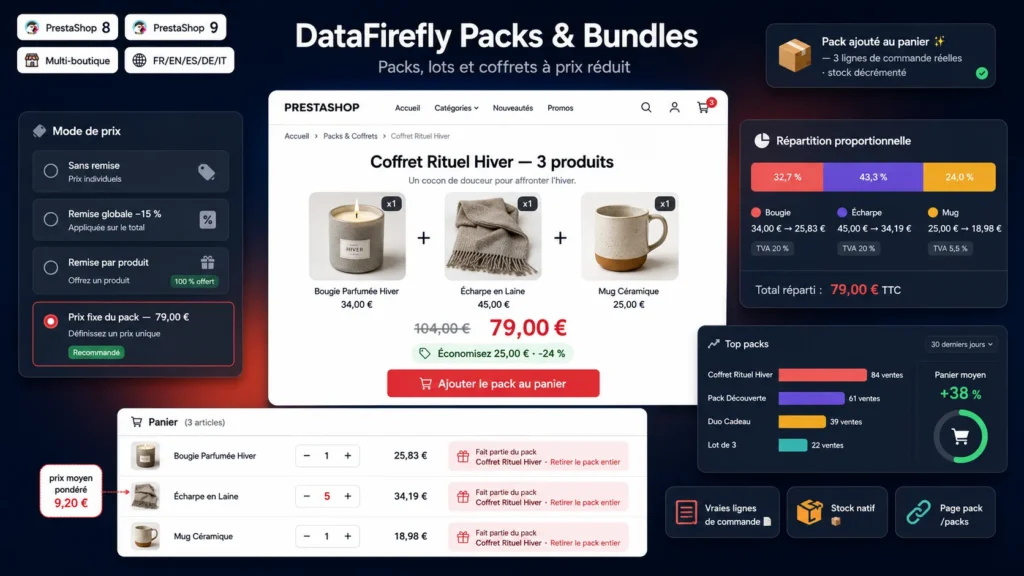
The native PrestaShop pack creates a separate product with its own stock and a single order line. The result: the pack stock does not follow the components, the invoice does not detail the items, and your accounting or ERP exports see a product that does not exist in your master data. This module does the opposite: the pack is a commercial definition, the products stay yours. You compose, it assembles.
Four ways to set the price
No discount, for a pure convenience bundle. A global percentage discount applied to every component. A per product discount, as a percentage or an amount, which lets you give one item away at 100 percent in a machine plus free consumable deal. A fixed pack price, the most persuasive mode: you announce a round 49, the module spreads the gap proportionally across each line, which stays accurate even when components carry different VAT rates.
The pack sells where the customer hesitates
The pack page has its own URL, but most sales start from product pages. Every component displays a "this product is also available in a pack" block: item thumbnails, crossed out total, pack price, savings badge and a direct add button. You pick the position (under the buy block, at the bottom of the page, or both), how many packs to show and their sorting.
Combinations, options and quantities
Per component, you decide whether the customer picks the combination (size, color) or whether it is locked. A component can be optional: the customer unticks it and the price recalculates live. Quantities can be opened to editing, component by component. Pack availability is computed from real stock: the pack is sellable when every required component is available in the requested quantity.
What happens in the cart
On add, every component becomes a real cart line invoiced at its pack price through a specific price scoped to that cart. Every pack line carries a badge with the pack name, a link to its page and a button removing the whole pack. Strict mode goes further: if the customer deletes one component, the whole bundle and its discount are removed, which prevents keeping the discount while returning half the pack.
The pack price does not leak
If the customer raises the quantity of a pack product, only the pack units keep the reduced price. The module recomputes a weighted average unit price: pack quantity at the pack price, surplus at the regular price. On a 2 unit pack at 8 against a regular price of 10, moving the line to 5 units totals 46, not 40. The customer buys freely, the discount stays capped at what you decided.
Clean orders all the way to accounting
Every pack product lands on its own order line, at its pack price. Invoices, delivery slips, credit slips and partial returns work natively, item by item. The back office shows a pack summary in every order detail, and a per pack sales counter tells you what works. Your ERP and accounting exports only ever see real references from your catalog.
Technical integration
The product page block uses displayProductAdditionalInfo and displayFooterProduct, the cart badge uses displayCartExtraProductActions, bundle consistency uses actionCartSave. The pack page uses a dedicated route like /pack/12-winter-box. Front JavaScript is vanilla with no jQuery dependency, CSS is isolated under the dfpackpro prefix with a configurable accent color. No class or controller override is installed.

There are no reviews yet.