PrestaShop Marketing & Promotions

“From” Price Module — Quantity Discounts on Product Listings (PrestaShop 8 & 9)

Your quantity discounts are worthless if nobody sees them on the product listing.

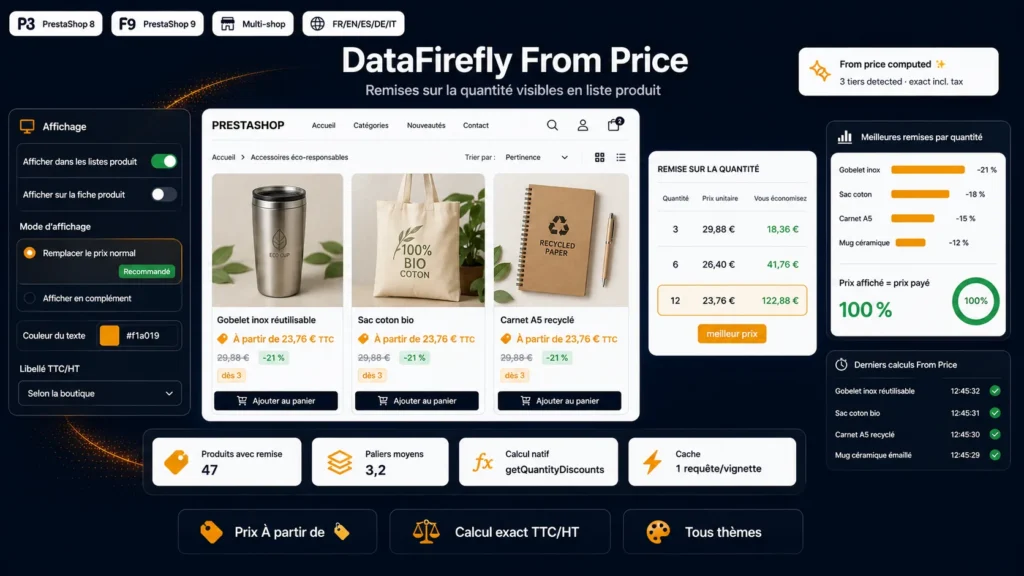
This module displays "From {price}" and the lowest unit price right on your product listings — categories, search, cross-selling, featured products — as soon as a product has a quantity discount. The price is calculated exactly like PrestaShop's native "Quantity discount" table: customer group, currency, country and tax all respected. You control everything: listings and/or product page, multilingual label, quantity and savings percentage display, tax label, color, exclusions, and whether to replace or complement the price. Compatible with PrestaShop 8 and 9, all themes, no Composer dependency.

At a glance
  • "From X" and the best per-quantity price shown on product listings
  • Price calculated like the native "Quantity discount" table: group, currency, country, tax
  • Full options: quantity, savings percentage, tax label, color, exclusions
  • Replace-the-price mode (configurable CSS selector) or show alongside
  • PrestaShop 8 & 9, all themes, multilingual, multistore, dependency-free
PrestaShop 8 & 9 All themes Multilingual FR/EN/ES/DE/IT Multistore Dependency-free
  • 30-day refund
  • 12 months updates
  • 24h support
www.datafirefly.com/en/
"From" Price Module — Quantity discounts in product listings (PrestaShop 8 & 9)
v2.0.0 · updated 2026-07-06
What it does

The short version.

01

Bulk pricing visible before the click

A shopper browsing a category never sees your discount tiers buried on the product page. This module surfaces "From X" straight onto the thumbnail, turning an invisible discount into an immediate selling point.

02

An exact price, not an estimate

The best per-quantity price is calculated through the same mechanism as PrestaShop's native table (getQuantityDiscounts), using the visitor's customer group, currency, country and tax method. The listing price matches the product page to the cent.

03

Replace the price or show it alongside

In replace mode, only the coloured "From" price shows instead of the regular price, hidden by a configurable CSS selector that adapts to any theme. In addition mode, it enriches the existing price. Your call.

04

Quantity, savings and tax, your way

Show the quantity required for the best price ("from 3"), a savings badge ("-21%"), and the incl./excl. tax label based on your shop settings. Every label is translatable across the five catalog languages.

05

A display you control

Text color, minimum savings threshold to trigger the display, exclusions by product or category IDs, custom CSS: everything is set from a native configuration page, without touching your theme.

06

PrestaShop 8 and 9 compatible, dependency-free

The module hooks into displayProductPriceBlock, present in every product listing. No core override, no template edit, no Composer dependency: install by simple upload.

The long version

Everything you'd want to know before you install.

A detailed look at how "From" Price Module — Quantity Discounts on Product Listings (PrestaShop 8 & 9) works, why we built it the way we did, and the thinking behind the features above.

§ 01

A discount nobody sees sells to nobody

You've set up great quantity discounts: buy 3, save 20%. The problem is that this table is buried at the very bottom of the product page. A shopper browsing a category, a search or a related-products block never sees it — and buys a single unit, or worse, shops elsewhere. This module surfaces the information where the decision is made: on the product thumbnail, right in the listing.

§ 02

"From X", calculated to the cent

Under each product with a quantity discount, the module shows "From" followed by the lowest reachable unit price. This price is not an approximation: it is calculated exactly like PrestaShop's native table, via getQuantityDiscounts and getPriceStatic, taking into account the customer's group, currency, country and tax calculation method. The listing price is precisely what the customer will get by reaching the tier.

§ 03

Replace the price, or enrich it

Two display philosophies, your choice. In replace mode, only the "From" price appears, in colour, instead of the regular price — hidden by a CSS selector you can adapt to any theme. In addition mode, the "From" price is added to the standard price to show the gap. The default hide selector works with Classic-based themes and with Falcon; a simple tweak covers any other theme.

§ 04

Quantity, savings, tax: the message you want

Reinforce the incentive to buy in volume. Show the quantity required to unlock the best price ("from 3"), a maximum savings percentage badge ("-21%"), and the incl./excl. tax label based on your shop settings and the customer's group. All labels are translatable across the five catalog languages, with a dynamic variable to insert the quantity wherever you want in the sentence.

§ 05

A display under control, without touching the theme

From a native configuration page, you set the text color, a minimum savings threshold below which nothing shows, exclusions by product or category IDs, and even custom CSS injected cleanly into the header. You also decide where the module appears: product listings only, product page, or both.

§ 06

Light, robust, PrestaShop 8 and 9 compatible

The module hooks into displayProductPriceBlock, present natively in every PrestaShop product listing, without core override or template edit. A static cache per product and combination guarantees a single calculation query per thumbnail, even on heavy category pages. No Composer dependency, no JavaScript framework: install by simple upload, compatible with PrestaShop 8 and 9, in single-store as well as multistore.