
Everything you'd want to know before you install.
A detailed look at how Dark Mode Module for PrestaShop 8/9 — Automatic Dark Theme works, why we built it the way we did, and the thinking behind the features above.
Dark mode is a standard now, not an option
Most smartphones and computers are set to a dark theme, at least part of the day. A site that stays blazing white at 11 pm on a phone screen causes immediate visual discomfort, and often an exit. This module brings your PrestaShop store the comfort your customers already find everywhere else, without you touching a single line of your theme.
It follows your visitors' preference on its own
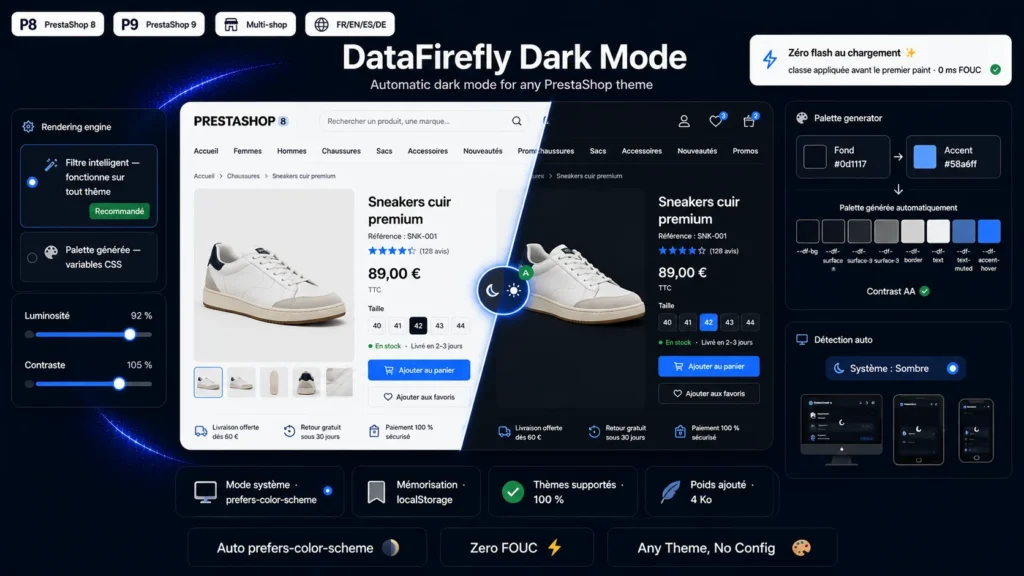
By default, the module reads the visitor's operating system color preference and applies the matching mode. If the customer switches their device to dark mode while browsing, the storefront follows live, without a reload. As soon as they use the button to choose explicitly, their choice is stored in their browser and remembered for every subsequent visit.
A universal engine that respects your product photos
The smart filter engine inverts the page and counter-inverts every medium: images, videos, iframes, canvas and backgrounds. Your product photos therefore keep their natural colors, and a white t-shirt stays white. An anti double-inversion guard handles nested media, a frequent case on themes that use the picture element for responsive images. Brightness and contrast are adjustable to fine-tune the result.
Or a real dark palette, generated for you
The second engine computes a complete dark range from two colors only: a background and an accent. Three surface levels, borders, primary and muted text, the accent and its hover state are all derived automatically, then exposed as CSS variables. The button text color is even picked from your accent's relative luminance, to guarantee readable contrast.
Zero white flash, from the very first frame
Most dark-mode solutions apply their theme in JavaScript after load, which produces an unpleasant white flash. Here, a synchronous script places the dark class on the root element before the browser's first paint. The visitor never sees the light version, not even for a fraction of a second.
The button where you want it, without coding
A discreet floating button in one of the four corners, or a switch embedded in your header or footer. You pick the target hook from a list, or you type the name of a custom hook from your theme: the module registers it automatically on save. For integrators, the PrestaShop widget syntax also lets you render the toggle anywhere in a template.
Light, self-contained, dependency-free
No Composer, no framework, no external JavaScript library. Around 8 KB added in total, a public API and a mode-change event to plug in your own integrations, and full accessibility care: ARIA attributes, visible focus and support for the system reduced-motion setting.


There are no reviews yet.