PrestaShop Design & Navigation

PrestaShop Email Template Editor: Customize Order Emails Visually (8 & 9)

Order emails that look like your brand, built with drag and drop.

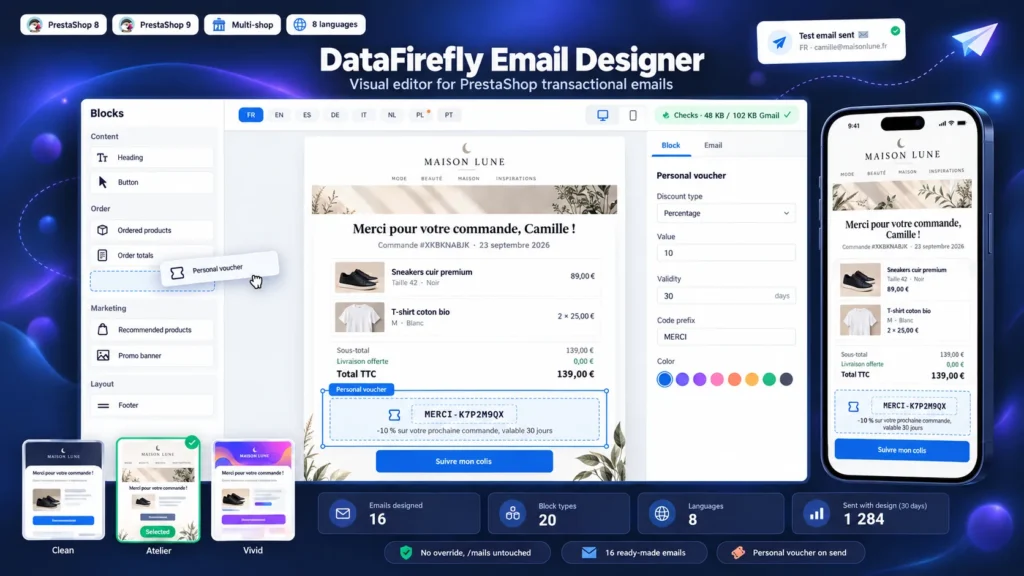
Changing a PrestaShop email today means opening order_conf.html in /mails, copying it into every language, then repeating it for the 15 other emails and after every theme update. The result is still a table of lines with no product photo, no product suggestion and nothing that looks like your brand. This module replaces that work with a visual editor in the back office: product blocks with photos, totals, addresses, tracking button, recommended products, promo banners and a personal voucher. Every email is previewed in every language with sample data or a real order, and a test email goes out in one click. The /mails files stay untouched: switch a design off and the native email is back.

At a glance
  • Drag-and-drop editor with clickable preview, 20 block types and unlimited undo
  • Product photos, combinations, totals, addresses and tracking button taken from the real order
  • 16 ready-made emails in 3 styles, texts written in 8 languages
  • Scheduled promo banners and a unique voucher created for each customer
  • No file in /mails edited, native email restored in one click
PrestaShop 8 & 9 No override 16 ready-made emails 8 languages
  • 30-day refund
  • 12 months updates
  • 24h support
www.datafirefly.com/en/
PrestaShop Email Template Editor: Customize Order Emails Visually (8 & 9)
v1.1.0 · updated 2026-09-23
What it does

The short version.

01

No file in /mails edited

The module hooks into actionEmailSendBefore and actionEmailAddAfterContent, which PrestaShop calls for every email, and replaces the content with the active design. The HTML and TXT files in /mails and in the theme are never touched. Design off, module disabled or rendering error: the native email is sent, no email is ever blocked.

02

An editor you drive with the mouse

Block palette on the left, preview in the middle, settings on the right. Clicking a block in the preview selects it, and the structure is reordered with drag and drop. Colors, fonts, margins and rounded corners are set for the whole email, each block keeps its own spacing. Ctrl+Z undoes, Ctrl+S saves, and 20 versions are kept in the history.

03

The real order in the email

The products block shows the photo of the ordered combination, attributes, customer customizations, reference, quantity and price with or without tax. Totals, addresses, carrier and tracking link come from the order. Enter an order ID in the editor to preview the email with its real data.

04

Every language checked before sending

One pill per installed language switches the preview and the text fields. An orange dot flags a missing translation, and a button copies the text from another language. Right-to-left languages get a mirrored layout. The test email goes out in the chosen language, with the unsaved content.

05

Emails that bring customers back

Recommended products (accessories, best sellers, new products or a manual selection), promo banners with start and end dates, and a personal voucher: a code unique to the customer, as a percentage, fixed amount or free shipping, created when the email is really sent. Links to the shop get UTM parameters to track the sales in Analytics.

06

16 emails ready in seconds

Order confirmation, awaiting bank transfer or check, payment accepted, processing, shipped, tracking, backorder, canceled, refund, voucher, account creation, password reset and merchant alert. Pick a style, tick your brand color, and the 16 designs are created with their texts in 8 languages.

The long version

Everything you'd want to know before you install.

A detailed look at how PrestaShop Email Template Editor: Customize Order Emails Visually (8 & 9) works, why we built it the way we did, and the thinking behind the features above.

§ 01

Why PrestaShop emails so often stay the default ones

Every PrestaShop email exists as two files, HTML and text, per installed language, in /mails or in the theme. A shop in 4 languages has more than 120 files for the order and account emails alone. Editing them requires email-specific HTML made of tables and inline styles, then checking the result in Outlook and Gmail. Most shops therefore keep the default emails: a product list with no photo, no suggestion and nothing in common with the website.

§ 02

A visual editor instead of files

The module adds the Design > Email designer page. The list shows every email of the shop with its status: native or designed, active or not, number of sends over 30 days. The editor builds the email from blocks, shows the preview next to it and outputs HTML made of tables and inline styles, the only format every email client displays the same way.

§ 03

Order data without code

The order blocks read the order being sent: combination photos, attributes, customizations, totals, addresses, carrier and tracking. The PrestaShop email variables stay available in every text and are picked from a menu. A display condition hides a block when its variable is empty, for instance the tracking button until the parcel has a number.

§ 04

Turning service emails into sales

An order confirmation is opened almost every time. The module adds recommended products, a scheduled promo banner and a personal voucher to it: the code is created for the customer when the email is sent, limited to one use and to their account, with the validity and minimum purchase you choose. Links to the shop get UTM parameters to measure the resulting sales in Google Analytics.

§ 05

Testing without risk

Each design stays inactive until you activate it: the native email keeps going out while you work. The preview works with sample data or a real order, the test email uses the current content, and the check list flags an email too heavy for Gmail or an incomplete language. The ZIP export lets you prepare the designs on a test shop and import them into production.