


Everything you'd want to know before you install.
A detailed look at how Price by Country, Shop & Currency works, why we built it the way we did, and the thinking behind the features above.
§ 01
The right price in every market
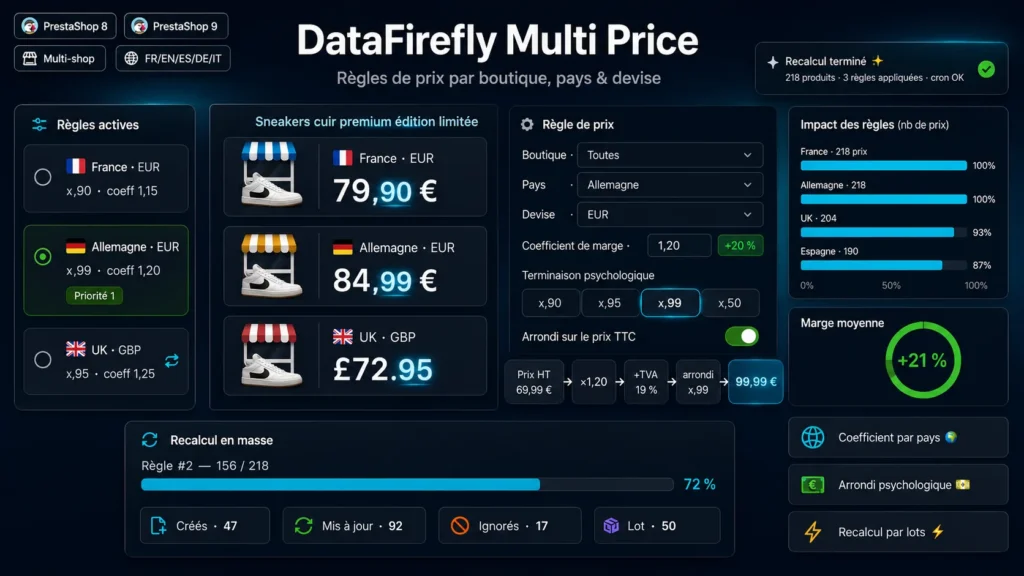
A mechanically converted catalog shows amounts like 84.73 where the customer expects 84.99. This module applies your margin and the ending of each market without editing products one by one: one rule for France with x.90, one for Germany with x.99, one for the United Kingdom in pounds sterling.
§ 02
One rule, one market
Each rule targets a shop, a country, a currency and a customer group, with a scope by category, by brand and an excluded products list. You choose the base (retail price tax excl. or cost price), the coefficient, the ending and two safety nets: a minimum displayed price and a margin floor over cost price.
§ 03
Rounding computed on the price the customer sees
The coefficient applies to the tax-excluded price, converted into the rule currency. The module then adds the country VAT and ecotax, forces the ending, and goes back to the stored tax-excluded price. With a base price of 69.99 excl. tax, a 1.20 coefficient and 19% VAT, the customer sees 99.99 incl. tax. With the per-combination option, each combination gets its own price, impact included, and keeps the exact ending.
§ 04
Check before, undo after
The simulation shows, for each product, the current storefront price, the new price and the change in percent, without saving anything. The full preview exports to CSV. Once a recalculation runs, the module records the previous state of every price it touches: one click puts prices back as they were, up to 5 recalculations back per rule.
§ 05
What the module does not break
PrestaShop applies a single specific price per product, so a country price would hide a broader promotion: the module leaves products on promotion untouched and reprices them after the promotion ends. A manual fixed price with the same dimensions is taken over by the rule, then given back to the merchant on undo, or when the rule is disabled or deleted.
§ 06
Native specific prices
Prices are written as native PrestaShop specific prices, with no computation at display time and no extra load on the storefront. Recalculation runs in batches with a detailed summary, a token-protected cron replays the rules every night, and every run is logged in the history.







The installation of this module was easy. The initial setup did not work for me, but we found the solution quickly with the support team of Datafirefly. They also added more rounding options to the module as per my request. The module works well with the multistore structure of Prestashop.