


Everything you'd want to know before you install.
A detailed look at how Product Image Hover & Automatic Badges PrestaShop works, why we built it the way we did, and the thinking behind the features above.
§ 01
A livelier product card right from the list
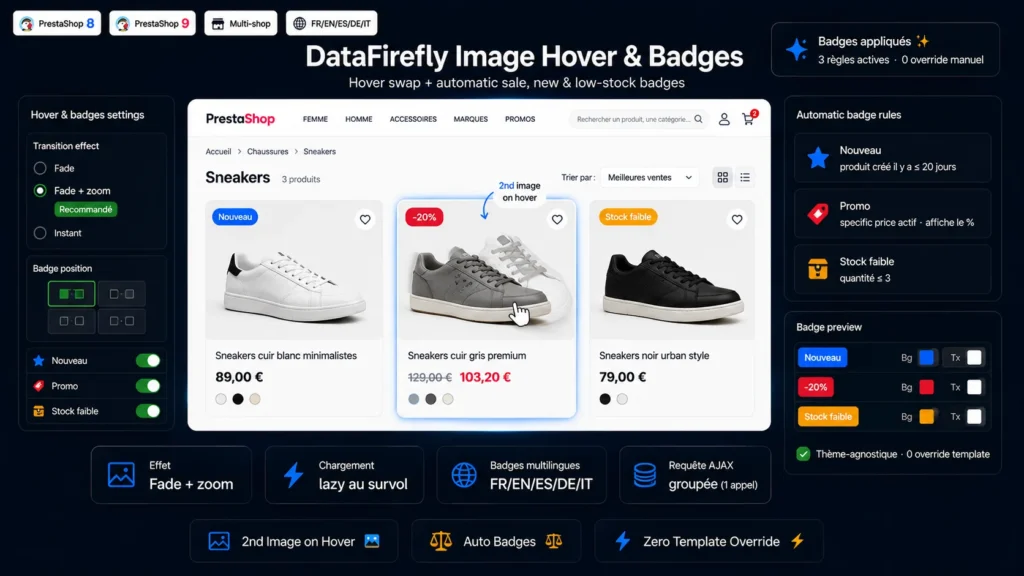
In a shop, the listing page is often the first point of contact with a product. By showing the second image on hover, you reveal another angle, a worn shot or a detail without the visitor having to click. The result: more engaging category pages and a smoother buying journey. The effect works on every listing of the shop — category, search, home, new products, price drops, manufacturer and supplier pages.
§ 02
Badges that trigger all on their own
No more highlights to manage product by product. The module automatically applies a New badge based on product age, a Sale badge as soon as a specific price is active — with the optional discount percentage display — and a Low stock badge when the available quantity drops below the threshold you defined. Each badge can be toggled independently, with its own multilingual labels, background color and text color.
§ 03
Built for performance
The module does not multiply requests: a single grouped AJAX request fetches the data for all products visible on the page, in batches. The hover image itself is only downloaded on the first mouse hover, which avoids weighing down the initial page load. On touch-only mobile, the hover image swap is disabled automatically.
§ 04
Compatible without touching your theme
No template file is overridden. The module spots the product miniatures directly in JavaScript, which makes it compatible with the classic theme as well as child themes. It re-adapts automatically when the list is regenerated by faceted navigation or AJAX pagination. Installation takes a few clicks and all configuration is handled from a clear admin page.




There are no reviews yet.