


Everything you'd want to know before you install.
A detailed look at how PrestaShop Product Page Tabs — Drag & Drop Manager works, why we built it the way we did, and the thinking behind the features above.
§ 01
Take back control of your product page tabs
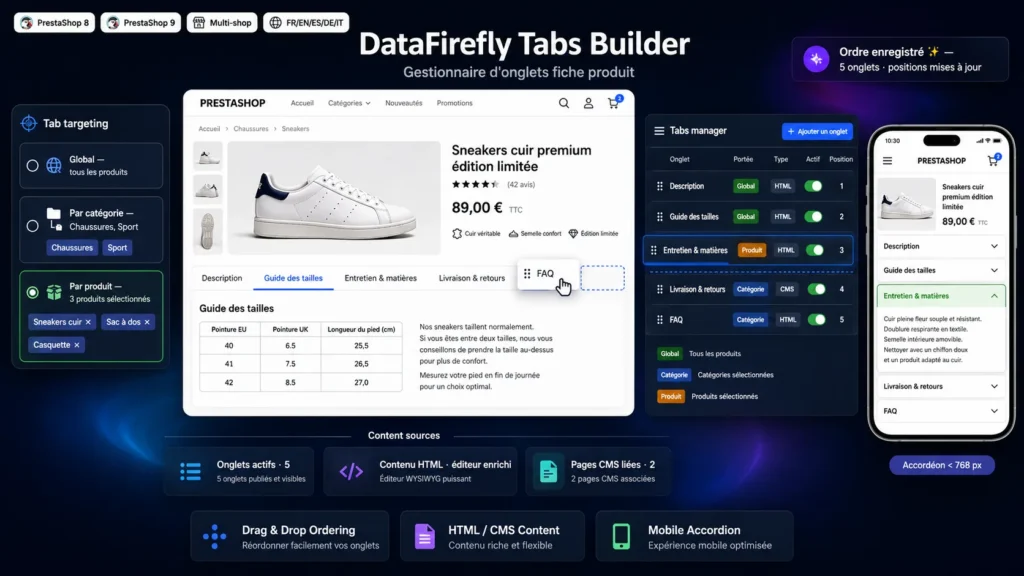
PrestaShop themes usually impose a fixed set of tabs on the product page. This module gives you control back: create as many tabs as needed — size guide, care, shipping and returns, FAQ, brand story — fill them with the content of your choice and reorder them with the mouse. Tabs are injected through the official extra content hook, so they render like native tabs, without any template file being overridden.
§ 02
The right tab, on the right products
Each tab picks its scope. A global tab appears on every product page. A category tab only shows on products from the categories selected in a checkbox tree. A product tab targets only a precise selection, searched by name, reference or ID and managed as chips. You can share a care tab across a whole textile department, while reserving a technical tab for a few references.
§ 03
Rich HTML or CMS page, your choice
For each tab, you either write HTML content in the built-in rich editor, translatable language by language, or you link an existing CMS page. In the latter case, the CMS page content is displayed directly in the tab, in the visitor language: ideal to reuse an already-written returns policy or care charter, without duplicating it.
§ 04
A mobile experience built for reading
On small screens, a row of tabs quickly becomes unreadable. Below the breakpoint you define, the module automatically turns tabs into a single-open accordion, with headers and chevrons. Above that threshold, native tabs stay displayed as-is: the behaviour is fully non-destructive. The script is written in vanilla JavaScript, with no jQuery dependency, and falls back cleanly on themes with atypical markup.




There are no reviews yet.