PrestaShop Design & Navigation

Scheduled Seasonal Decorations – Christmas, Black Friday & Sales

Your store dresses up for Christmas on its own

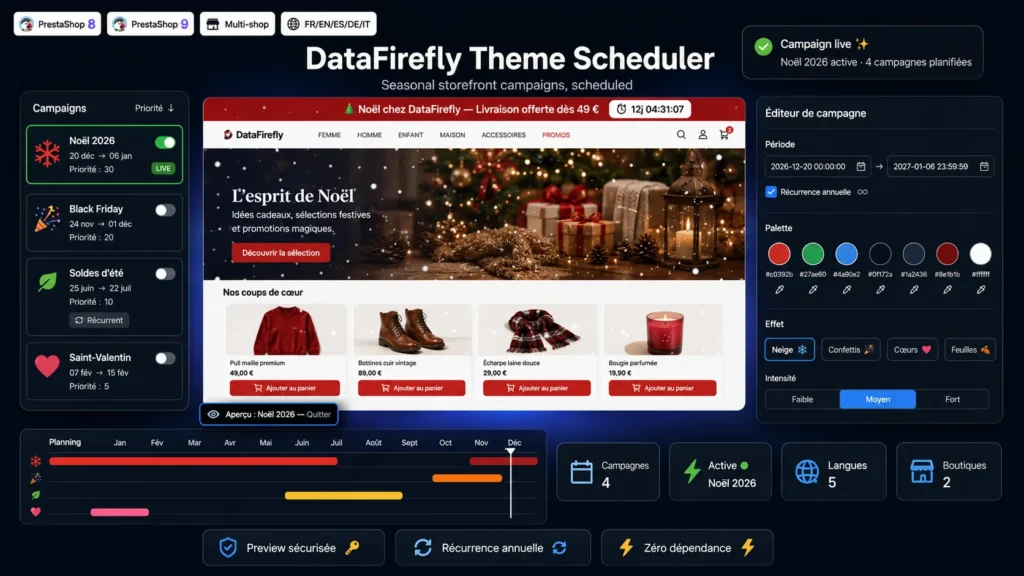
Schedule once, celebrate every year. Promo top bar with live countdown, per-language banner, full color palette and snow, confetti or fireworks effects: every campaign switches on and off automatically on the dates you choose. Yearly recurrence even handles campaigns crossing New Year, and the secure preview lets you check your Christmas look in the middle of August without your visitors seeing a thing.

At a glance
  • Scheduled storefront campaigns: Christmas, Black Friday, sales, Valentine's Day
  • Promo top bar with countdown, per-language banner, 7-color palette, canvas effects
  • Automatic yearly recurrence, including campaigns crossing New Year
  • Secure preview via secret link, invisible to your visitors
  • Visual year planner in the back office, duplication and JSON export
PrestaShop 8 PrestaShop 9 Multistore Multilingual Zero dependency
  • 30-day refund
  • 12 months updates
  • 24h support
www.datafirefly.com/en/
Scheduling Christmas and Black Friday seasonal decoration on a PrestaShop storefront
v1.1.0 · updated 2026-07-16
What it does

The short version.

01

Set it and forget it

Every campaign starts and stops on its own at the chosen dates and times, server time. Never again a Black Friday bar still live on December 3rd.

02

Smart yearly recurrence

Tick one box and your Christmas campaign comes back every year, even when it runs from December 20 to January 6. The year transition is handled natively.

03

Secure preview

Each campaign has a secret token link: check your seasonal look on the real store, browse page after page, without showing anything to your visitors.

04

Complete makeover

Top bar with HTML message and countdown, banner image per language and per position, 7-color palette applied to buttons, links, header and footer, homepage HTML block and custom CSS.

05

Premium visual effects

Six pure JavaScript canvas animations: snow, confetti, hearts, autumn leaves, twinkling stars and fireworks. Three intensities, reduced-motion friendly, automatic pause when the tab is inactive.

06

Year planner

A 12-month timeline in the back office shows all your campaigns at a glance, with a today marker and a LIVE badge. Duplicate a campaign in one click, export and import schedules as JSON.

The long version

Everything you'd want to know before you install.

A detailed look at how Scheduled Seasonal Decorations – Christmas, Black Friday & Sales works, why we built it the way we did, and the thinking behind the features above.

§ 01

No more last-minute launches

Every year it is the same race: switch the Black Friday bar on Thursday night, remember to remove it on Monday, bring the Christmas colors back, tear everything down on January 7. Scheduled Seasonal Decorations removes that mental load. You build your campaigns once, with precise dates and times, and the module handles the rest: automatic activation, automatic deactivation, and a clean return to the store's normal appearance without a trace.

§ 02

A complete makeover, not just a top bar

A campaign combines every visual lever of a commercial highlight: a top bar with translated message and real-time countdown, a different banner image per language positionable in three theme areas, a seven-color palette that reskins buttons, links, header and footer, a free HTML block on the homepage, an ambient effect such as snow or fireworks, and custom CSS to go further. Every element is optional: use everything or just the countdown.

§ 03

Recurrence that thinks for you

Summer sales come back every year, and so does Christmas. Tick yearly recurrence and the campaign reactivates automatically on the same dates, year after year, without touching anything. The module natively handles campaigns crossing New Year: a December 20 to January 6 campaign works perfectly and returns every winter.

§ 04

Preview safely, validate with confidence

Each campaign generates a secret preview link protected by a 32-character token. Open it and you see the store exactly as your customers will on launch day: top bar, colors, snow, everything is there, on every page while you browse. Your visitors see nothing. Share the link with your team or your client for sign-off, then leave the preview in one click.

§ 05

Built to last, lightweight by design

No external dependency, no class override, no third-party service call: only native PrestaShop hooks and pure JavaScript. CSS and JavaScript are loaded only while a campaign is active, and campaign resolution takes a single memoized SQL query. Animations respect the visitor's reduced-motion preference and pause when the tab is inactive.