PrestaShop Design & Navigation

Replace the Add to Cart Button in PrestaShop 8 & 9 Listings: “See Options” Button Linking to the Product Page

Customers pick their weight or size on the product page, not by chance from the category.

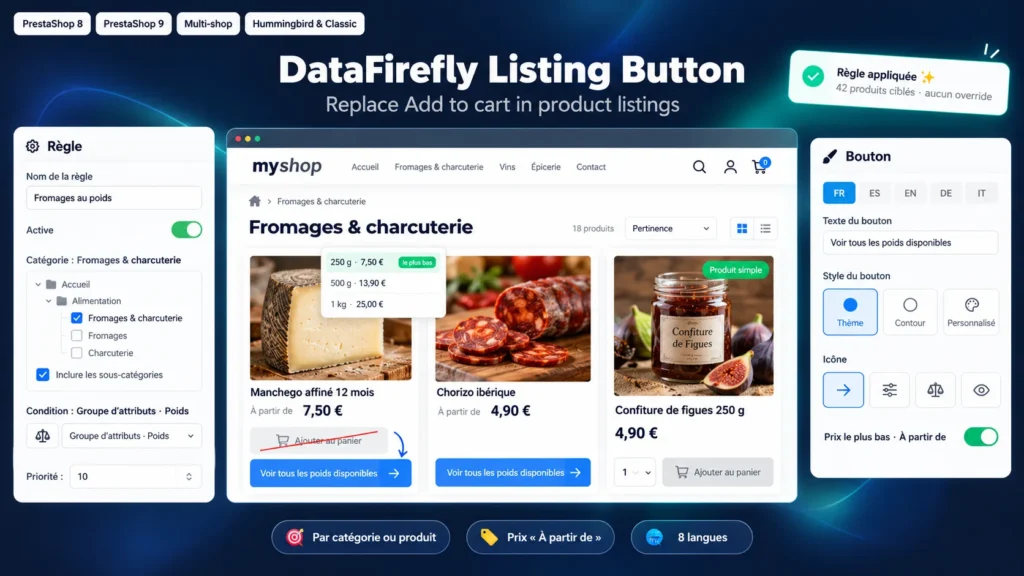
On a product with combinations, the Add to cart button of a listing adds the default combination. The customer who wanted 1 kg gets 250 g, the one who wanted an L gets an M, and customer service handles the return. This module replaces that button with a link to the product page, with the text you write in each language, for example "See all available weights". You decide where it applies: a category and its subcategories, specific products, or every product that has combinations.

At a glance
  • Replaces Add to cart with a button to the product page in every listing
  • Rules by category (with subcategories), by product or on the whole catalog, with exclusions
  • Condition "products with combinations" or "attribute group" (Weight, Size and so on)
  • Button text in each language, theme style or custom colors, icon
  • Lowest combination price shown with "From"
PrestaShop 8 & 9 Listings No override 8 languages
  • 30-day refund
  • 12 months updates
  • 24h support
  • PrestaShop Certified Agency 2026
  • PrestaShop Expert Certification — Core Skills

Built by a PrestaShop Certified Agency

www.datafirefly.com/en/
Replace the Add to Cart Button in PrestaShop 8 & 9 Listings: "See Options" Button Linking to the Product Page
v1.0.0 · updated 2026-10-18
What it does

The short version.

01

The right button on the right products

Each rule targets one or more categories, with or without their subcategories, specific products or the whole catalog. A condition limits the rule to products that have combinations, or to those using an attribute group such as Weight. Simple products in the same category keep their Add to cart button. Products can be excluded, and a priority settles overlapping rules.

02

A price that matches what the customer can buy

A listing usually shows the price of the default combination. The module can replace it with the lowest combination price, hiding the old price and the discount that no longer apply. The "From" prefix is only added when the price shown really is the lowest. Out of stock combinations can be ignored when the product refuses out of stock orders.

03

Wherever your products appear

The replacement applies on category pages, search, the home page, carousels and related products on the product page. After a faceted filter or an AJAX load, new miniatures are handled without reloading. The main product of the product page and the cart are never changed.

04

Works with your theme without editing it

The module finds targeted products through the price hooks that themes call in miniatures, and falls back to an AJAX request for themes that do not call them. It hides the cart button, the form around it and the quantity selector, then places the new button in the same spot. CSS selectors can be adjusted for a heavily customized theme.

The long version

Everything you'd want to know before you install.

A detailed look at how Replace the Add to Cart Button in PrestaShop 8 & 9 Listings: "See Options" Button Linking to the Product Page works, why we built it the way we did, and the thinking behind the features above.

§ 01

Why Add to cart causes trouble on products with combinations

A cheese sold in 250 g, 500 g and 1 kg is one product with three combinations. In the category, many themes show an Add to cart button that adds the default combination, often the smallest one. The customer believes the order is right and finds the mistake on delivery. PrestaShop's native setting for products with combinations depends on the theme and lets you neither choose the text nor target a category.

§ 02

Set up with rules, not product by product

You create a rule "Cheese and cured meats", tick the category, keep the subcategories and choose the condition "products with combinations". Every matching product, current and future, shows the button "See all available weights". A second rule can target the Size attribute group across the catalog with a different text. When two rules target the same product, the rule with the lowest priority number wins.

§ 03

An honest "From" price

The price shown in a listing is the one of the default combination. If it is not the cheapest, the customer sees a higher price than needed. With the lowest price option, the module computes the price of each combination with the shop rules (taxes, customer group, specific prices) and shows the lowest. The "From" prefix only appears when combination prices differ and the price shown is the lowest.

§ 04

Installation and compatibility

The module changes neither the core nor the theme. It relies on the product price hooks found in the miniatures of the Classic theme, Hummingbird and most commercial themes. For a theme that does not call them, automatic detection goes through an AJAX request. The CSS selectors for the container, the cart button, the price and the insertion point can be set in the configuration if your theme uses other classes.

€49.00
One-time · 12 months updates
Read the docs
  • Unlimited dev & staging installs
  • Source code included
  • 30-day refund
  • 24h support · EN / FR
5.0/5 20 reviews