
Our best PrestaShop modules for rental, booking and ticketing
Three modules that bring the calendar, deposit and quotas into the store: rental, appointment booking and ticketing without phone or Excel.
Rentals, appointments and events have something PrestaShop does not know natively: a date and limited availability. Without tooling, both end up on the phone and in Excel. With the right calendar, the customer books and pays alone.
Sound familiar?
The inevitable double booking
Two customers, the same period, one Excel calendar: the double booking is not a question of if, but when.
The phone as booking system
Every reservation a call, every change an email: managing appointments eats the time it is supposed to sell.
No-shows without prepayment
Unpaid reservations get forgotten: the slot was blocked, the customer does not show, the revenue is lost twice.
Events without ticketing
Selling an 80-seat event through a contact form: quotas, lists and payments reconciled by hand.
Our selection, ranked
Every module below is built, maintained and supported by our team. The ranking reflects what we would install first on a client store.
-
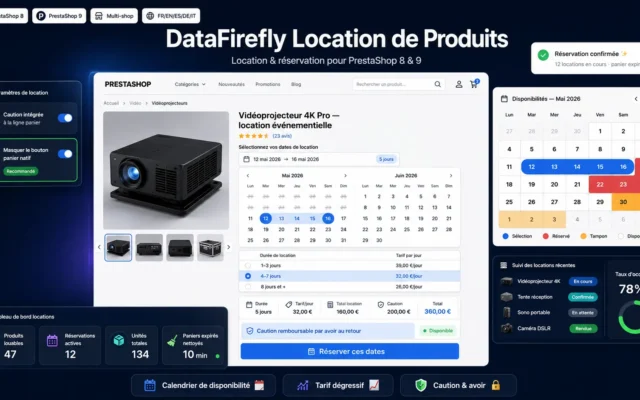
DataFirefly Product Rental
The rental foundationProduct rental with availability calendar, duration-based price tiers, deposit and buffers: the complete rental model inside PrestaShop.
Rent out your PrestaShop 8 and 9 products and run your fleet end to end: availability calendar, monthly back-office planning, units with serial numbers,…
€199.00 View the module -
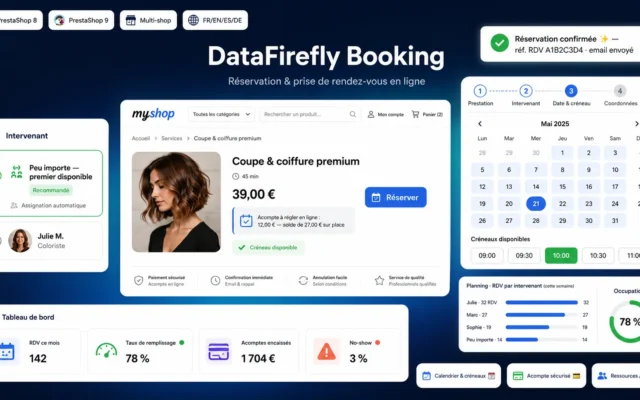
Booking & Appointments
The slot machineAppointment and slot booking with confirmations and reminders: services get booked online instead of over the phone.
Turn your PrestaShop store into a booking platform: interactive calendar, real-time slots, staff management and a deposit paid online.
€149.00 View the module -
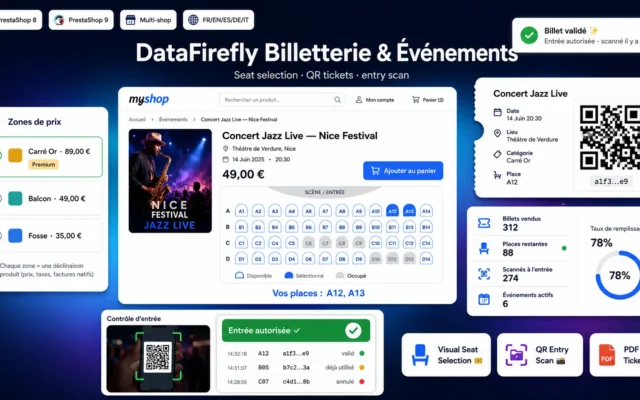
DataFirefly Event Tickets & Seating
The ticketing deskEvents and tickets with quotas, categories and attendee lists: seats sell like products, capacity stays under control.
Sell event tickets directly in PrestaShop: visual seat selection, QR tickets, PDF and scan-based entry control. Compatible with PrestaShop 8 & 9, multistore and…
€149.00 View the module
Side-by-side comparison
| Module | Best for | Price | Rating | Link |
|---|---|---|---|---|
| DataFirefly Product Rental | The rental foundation | €199.00 | — | |
| Booking & Appointments | The slot machine | €149.00 | — | |
| DataFirefly Event Tickets & Seating | The ticketing desk | €149.00 | — |
Sell time, not just objects
A rental, an appointment or a ticket are not classic products: they have a date, a duration and limited availability. PrestaShop does not handle that natively, and that is exactly where double bookings, phone calls and Excel calendars are born.
Three formats, one principle
Product rental with an availability calendar and deposit. Appointment booking with slots and confirmations. Ticketing with quotas and tickets. All three replace manual management with a calendar that maintains itself.
The calendar is the stock
When a period is reserved, it disappears from the options: no double booking, no callbacks. The customer sees live what is free and pays immediately. The object can come back, the slot cannot.
How to choose
Identify your time model
You lend objects with a return: rental. You sell services in time slots: appointment booking. You sell seats for a date: ticketing. The module follows the business model, not the other way round.
Plan buffers before you miss them
Cleaning, maintenance, return checks: two rentals need time between them. Configure buffers from the start, or the calendar sells periods that do not exist operationally.
Deposit and prepayment cut the no-shows
A paid booking is honoured, a free one is forgotten. Immediate payment at checkout and a transparent deposit filter out the undecided requests before they block capacity.
Start with one range, not everything
Launch with the most requested objects or services, stabilise prices and buffers, then expand. A small conflict-free calendar convinces more than a large one with clashes.
What you gain
The calendar that maintains itself
Availability calendar per product: a booked period disappears from the options instantly, double bookings become impossible.
Rental pricing without Excel
Daily, weekend or weekly rates, deposit and accessories: the rental model is modelled, not improvised.
Appointments without the phone
Slots, buffer times and confirmation emails: appointments get booked online instead of over the phone.
Events with capacity control
Quotas, ticket categories and attendee lists: events sell like products, with capacity under control.
Paid means booked
Reservation and payment in one flow: what is booked is paid, and the no-show rate drops.
From install to results
-
Identify your time model
Object with return, time slot or seats for a date: the model determines the module.
-
Model your pricing
Configure price tiers, deposit and buffers before the first customer books.
-
Require prepayment
Immediate payment at checkout: what is booked is paid, no-shows drop.
-
Automate the communication
Confirmations and reminders automatic: the phone stays for the exceptions.
-
Grow under control
Start with the most requested range, stabilise, then expand.
“Our calendar was an Excel file and a phone. Since the availability calendar went online, customers book at night, pay immediately, and we have not had a single double booking.”
Frequently asked questions
Does the module prevent double bookings?
Yes. The availability calendar blocks reserved periods in real time, including configurable buffers for cleaning or return checks between two rentals. Two customers cannot book the same period at the same time.
Can I set daily rates and a deposit?
Yes. You define price tiers by duration (day, weekend, week) with degressive rates, plus an optional deposit shown separately. Accessories and options can be added per rental.
Rental, appointment or ticket: which do I need?
Rental ties up an object over a period with a return. Appointment booking reserves a time slot for a service. Ticketing sells a limited number of seats for a date. The three modules combine in the same store.
Are there confirmations and reminders?
Yes. Every booking generates confirmation and reminder emails, and the attendee or renter list is available in the back office, exportable for the day itself.
Is this compatible with PrestaShop 9?
Yes. The whole selection covers PrestaShop 8.0 to 9.x, using native hooks and no core overrides.
Not sure which one fits your store?
Tell us your context — we answer with a straight recommendation, not a sales pitch.