
Everything you'd want to know before you install.
A detailed look at how DataFirefly Event Tickets & Seating works, why we built it the way we did, and the thinking behind the features above.
§ 01
A complete ticketing system, with no external dependency
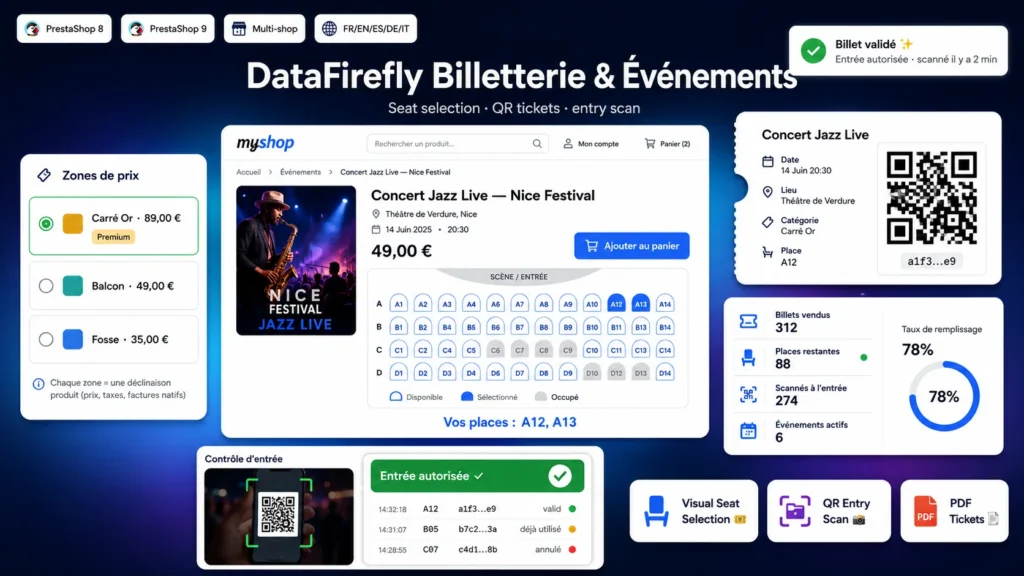
DataFirefly Event Tickets & Seating turns any PrestaShop product into an event ticket. You keep full control over prices, taxes and invoicing, because each seat category maps to a standard product combination. No third-party gateway, no dependency: QR and PDF generation is bundled inside the module.
§ 02
Visual seating chart for assigned seats
For seated events, draw your venue right in the back office: generate seat blocks, reposition them by drag-and-drop, disable the ones that are not for sale. On the storefront, customers pick their seat on an interactive chart where price zones are color-coded and availability updates in real time. The selected seat is held for a few minutes while the order is finalized.
§ 03
From payment to entry control
As soon as the order is validated, the module generates one QR ticket per paid seat and makes it downloadable as a PDF from the customer account. On the day, open the entry-control screen: scan the QR codes with the camera or type the code manually. Each validated ticket switches to used and can no longer be reused, with a log of the latest scans for the front-desk staff.
§ 04
General admission too
For events without a chart (standing, open access), switch to general-admission mode: the customer simply picks a category and a quantity via the native add-to-cart block, and receives as many QR tickets as seats purchased.




There are no reviews yet.