

Cart abandonment runs at around 70% across e-commerce as a whole. Part of it cannot be reduced: people compare, set things aside, come back later. The rest comes from identifiable friction, and most of it is fixed in the settings, without touching the theme.
The eight frictions of the native checkout
1. Forced account creation. This is the most expensive friction. A visitor who discovers they have to create an account to buy a 30 euro item leaves. PrestaShop supports guest checkout, the option is simply disabled by default on many installations.
2. The address form. The native form includes fields rarely useful for a domestic delivery: company, VAT number, address line 2, address line 3. Every visible field adds a hesitation, even an optional one.
3. Shipping costs discovered late. The leading cause of abandonment cited by buyers, across every study. A customer who builds a 40 euro cart and discovers 8 euros of shipping at the second-to-last step feels trapped.
4. The number of page reloads. Every step of the native checkout reloads the page. On an average mobile connection that adds up to several seconds of waiting, during which nothing reassures the customer.
5. Overly strict field formats. A phone number rejected because it contains spaces, a postcode refused because the country has not been selected yet. These errors are invisible in your analytics and blocking for the customer.
6. Missing payment methods. A customer who cannot find their usual method leaves, without telling you.
7. No reassurance at the moment of paying. The payment page is often the barest on the site, when it is the one where doubt peaks.
8. Mobile behaviour. Alphabetic keyboard on a numeric field, touch targets too small, a field hidden by the virtual keyboard. On a shop whose traffic is mostly mobile, this is the friction that costs the most.
What the settings fix
Five actions, with no technical work, in order of effort to result.
Enable guest checkout. Customer settings, one checkbox. Offer account creation after the order, at the moment the customer has a reason to do it.
Cut the required fields. In the per-country address field management, remove what is not needed to deliver. In most domestic cases four fields are enough.
Show shipping costs from the cart onward. An estimator, or at minimum the free shipping threshold with the amount left to reach it. The goal is that no amount comes as a surprise once the customer has entered the checkout.
Check the payment methods on mobile and on desktop, under real conditions. A badly configured payment method does not appear, and nobody reports it to you.
Set the field types. The phone field has to trigger the numeric keypad on mobile. That is a form property, adjustable without a redesign.
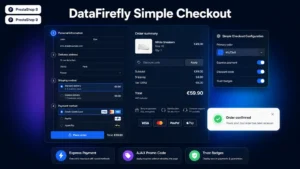 Simple & Elegant Checkout for PrestaShopAn elegant one-page checkout that converts€99.00
What requires a module
Three frictions cannot be fixed through configuration.
Merging the steps into a single page means replacing the order controller. Live field validation, which shows the error before submission, takes code. And address autocomplete, which cuts both typing time and delivery errors, goes through an external service.
Those three produce the most visible gain, but they come after the five settings above, not before.
What not to do
Two false good ideas come up often.
Removing the promo code field. The argument is well known: it sends customers off to hunt for a code elsewhere. Removing it entirely frustrates those who legitimately have one, from your newsletter. Reducing it to a discreet link is the right compromise.
Adding an exit popup. A popup offering a discount as the cursor leaves the page recovers a few orders and trains your customers to wait for a discount. It moves the problem rather than solving it.
Measure before acting
Record three figures before any change, over thirty days.
The checkout completion rate, completed orders against entries. The step-to-step progression rate, which locates the leak. And the form error rate, often the most revealing and the least measured.
Those three figures will tell you which of the eight frictions actually concern you. A shop losing 40% of its customers at the address step does not have the same job ahead as a shop losing them at payment.
The Simple and Elegant Checkout module for PrestaShop handles the friction left after the settings, on PrestaShop 8 and 9: single-page entry with no reloads, a slimmed-down address form, live field validation and ordering without a mandatory account.