
Everything you'd want to know before you install.
A detailed look at how PDF Catalog for PrestaShop – Pro Viewer with Two-Page, Thumbnails & Fullscreen works, why we built it the way we did, and the thinking behind the features above.
§ 01
Publish your PDF catalogs without writing a single line of code
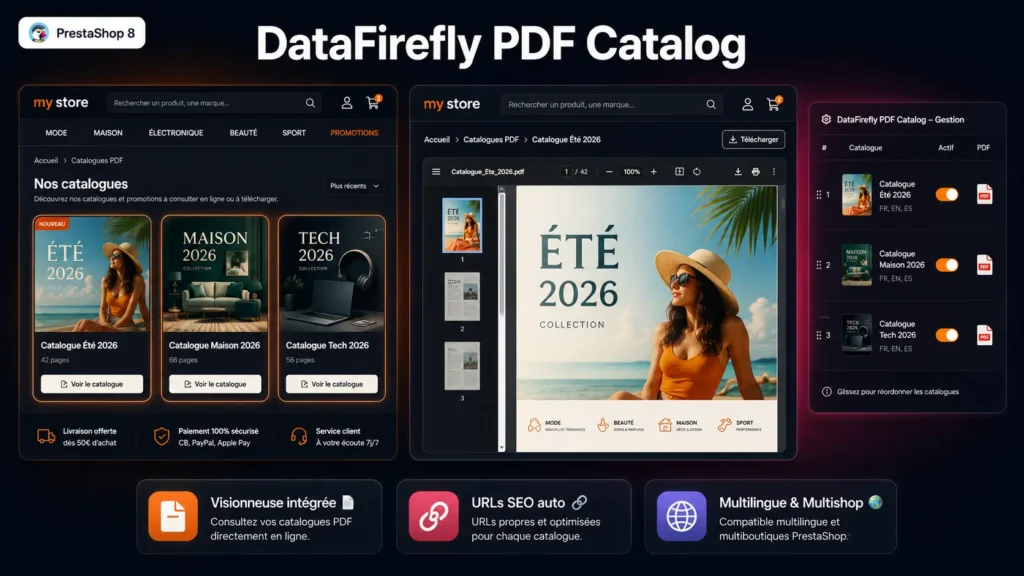
DFPDFCatalog adds a dedicated tab to the Catalog menu of your PrestaShop back office. From that tab you add a catalog by filling in a title, a description, a banner image and the PDF file. Within seconds the catalog appears on the /catalogues-pdf page of your store, ready for your customers to browse.
§ 02
Embed a catalog in any page
A showcase page does not fit every use case. For a vertical landing page, a public procurement page or a category that should present its own catalog, you simply paste a shortcode where you want it: dfpdfcatalog id="3" between square brackets. The module resolves that marker server side in CMS pages, category descriptions and product pages, and a JavaScript fallback covers contents produced by a page builder or a theme block. A Smarty widget is available for templates, and a layout free embed controller lets you display a catalog inside an iframe, including on an external site. You can place as many catalogs as you need on the same page: every viewer is independent from the others.
§ 03
A professional grade viewer built into your store
The built-in PDF.js viewer gives a reading experience comparable to Adobe Acrobat directly on your site: magazine two-page mode (cover alone, then spreads 2-3, 4-5…), a clickable thumbnail sidebar with lazy rendering, HD fullscreen mode, zoom and fit to width, keyboard navigation. Rendering stays crisp on Retina and 4K screens thanks to adaptive HiDPI rendering. PDF hyperlinks remain clickable, text is selectable and the browser Ctrl+F search works natively on the PDF content.
§ 04
Designed for pages showing several catalogs
Displaying eight catalogs on one page must not slow it down. By default each embed shows an opening poster built from the catalog banner, and the viewer only loads on click. In direct display mode, loading starts as the widget nears the viewport. The rendering library and the stylesheet are downloaded once for the whole page, and only if a catalog is actually present. Large PDFs are streamed, with HTTP Range request support for progressive loading.
§ 05
Clean URLs and careful SEO
The module declares its routes through the moduleRoutes hook: /catalogues-pdf for the listing page and /catalogue-pdf/{id}-{slug} for each viewer, where {slug} is generated automatically from the title. Every viewer page builds its own meta title and meta description from the catalog title and description. The listing page has its own meta as well. Native PrestaShop breadcrumbs are respected. Embed pages meant for iframes are set to noindex, so they never compete with your real pages.
§ 06
Multilingual, multistore and custom sorting
Catalog titles and descriptions are translated per language from the back office. Catalogs are filtered per shop: each store only sees the catalogs assigned to it. Display order is customisable by drag and drop in the admin list, and each catalog can be enabled or disabled independently without deleting it.




There are no reviews yet.