
Everything you'd want to know before you install.
A detailed look at how DataFirefly Dark Mode — Browser-Aware Dark Mode with Customer Preference for Shopware 6.7 works, why we built it the way we did, and the thinking behind the features above.
Why a dark mode in Shopware 6.7
Shopware 6.7 has no native dark mode on the storefront. Yet since 2023, OS dark mode has been massively adopted: iOS switches automatically at night with True Tone, macOS and Windows have automatic brightness settings, power-users keep their screen dark 60-80% of the time. A store without dark mode sends these visitors an aggressive white flash on every page load — especially painful at night and on mobile. It’s a quality signal in reverse: your site is out of step with 2026 usage. DfDarkMode fills this gap with a clean, anti-FOUC implementation that respects the customer’s preference.
Anti-FOUC: the detail that separates a pro dark mode from a makeshift one
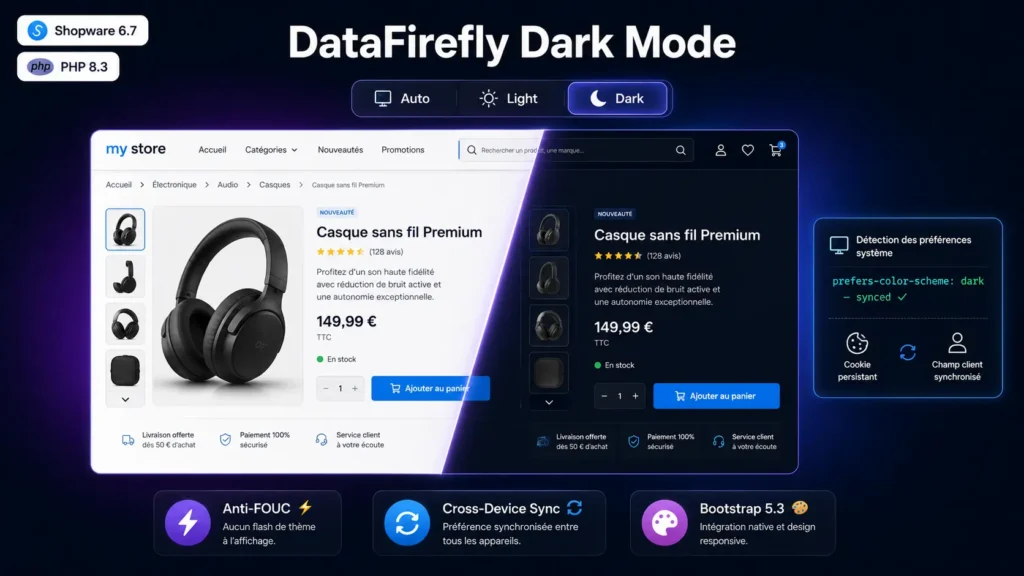
FOUC stands for “Flash of Unstyled Content” — that fraction of a second where the page appears white before JavaScript applies the dark theme. Most dark mode plugins leave this flash because they apply the theme via JavaScript in DOMContentLoaded, which fires after the browser’s first paint. DfDarkMode solves the problem with a minimal inline script placed directly in the head tag of the base layout: this script reads the preference cookie (synchronous, ~10 lines of JS) and sets the data-bs-theme attribute on the root element BEFORE the browser makes its first paint. Result: zero white flash, even on first load, even in forced dark mode. Users never see their store in “fake light” mode.
3 states and full persistence
The header toggle cycles between Auto, Light, Dark. Auto follows the browser’s prefers-color-scheme in real time via a MediaQuery listener — when the visitor’s OS switches to dark at 6pm, the storefront changes instantly, without page reload. Light and Dark force the mode regardless of browser preference. The preference is persisted differently depending on status: anonymous visitors via df-dark-mode cookie valid 1 year, logged-in customers via df_dark_mode_preference customer custom field created automatically on install. The customer profile page contains a selection card to change the preference directly from the customer account. On login, the cookie is synced with the custom field value — so a customer who set their preference on their phone finds the same setting on their computer.
Bootstrap data-bs-theme compatibility: zero CSS to write
Bootstrap 5.3+ introduced the data-bs-theme="dark" convention as the standard for dark mode. If your Shopware theme already uses CSS rules targeting the [data-bs-theme="dark"] selector — the case for most 2025+ premium themes — DfDarkMode is immediately compatible: you install, you activate, it works. If your theme doesn’t have dark styles yet, you can use native Bootstrap variables (--bs-body-bg, --bs-body-color, etc. which have different dark values automatically), or add your own rules at your own pace. DfDarkMode doesn’t touch your CSS — it simply sets an attribute on the root element of the page.
Clean, standard Shopware architecture
The plugin strictly follows Shopware 6.7 conventions: PSR-4 autoload under the Df/DarkMode namespace, Plugin class with install / update / uninstall lifecycle, customer custom field created via the standard DAL repository, AJAX route declared via PHP 8 Symfony Routing attributes, services injected via services.xml, subscribers attached to kernel.event_subscriber. Uninstallation respects the keepUserData flag from the Shopware context: if the admin checks “Keep user data”, custom fields and customer preferences remain; otherwise, everything is cleanly deleted. No custom schema migrations required (custom fields only). Plain-text, MIT-licensed, auditable source code.
Customisation and JS event for integrations
By default, the toggle is inserted in the base_header_actions_wishlist block of the base layout. To move it, simply override base.html.twig and place the dark-mode-toggle component include in another block (search, account, custom, etc.) — a complete example is in the README. On the JS side, the plugin emits a df-dark-mode-changed event on the document on every change, with event.detail.preference (auto / light / dark) and event.detail.resolvedTheme (calculated light / dark). Handy for syncing another component (Recharts chart, external iframe, Calendly embed, etc.) with the current theme.


There are no reviews yet.