
Everything you'd want to know before you install.
A detailed look at how DataFirefly Price Alert — Price drop alert with conversion tracking for PrestaShop works, why we built it the way we did, and the thinking behind the features above.
§ 01
The problem: your price drops are invisible to those who needed them
Once a visitor leaves your product page without buying, they probably won't come back. Yet many of these visitors had only one blocker: the price. When you later run a sale (-15%% weekend, end-of-season clearance, loss-leader price on a reference), those potential customers hear nothing — they've moved on. Native PrestaShop offers no price-drop alert. You leave measurable revenue on the table: per benchmarks, 5%% to 15%% of hesitant visitors come back to buy when notified.
§ 02
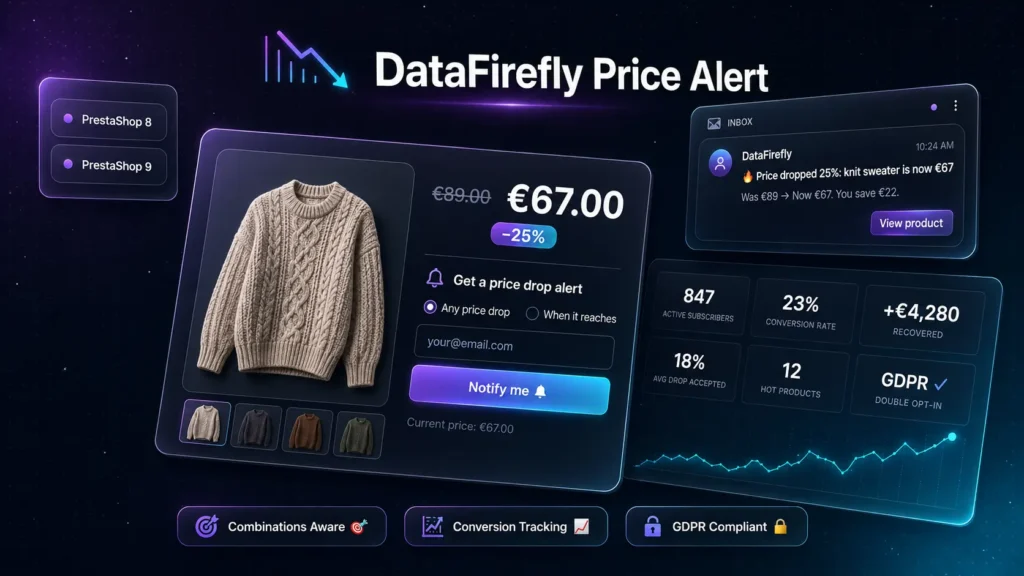
The customer journey, in two clicks
The form is always visible on the product page. The customer types their email, picks any drop (default) or target price (with an amount they set, mandatorily below the current price), submits. With double opt-in (GDPR-recommended, on by default), they receive a confirmation email and activate their alert in one click. When you next cut the price — manually, via specific price, or via cron — the system detects the drop, sends them an email with the new price, the percentage off, the savings amount, and a direct link to the product. If they order, the row moves to purchased automatically and id_order is recorded.
§ 03
Three triggers: cover every drop scenario
PrestaShop has multiple ways to lower a price: manual edit of a product (fires actionObjectProductUpdateAfter), edit of a specific combination (fires actionUpdateProductAttribute), or a scheduled specific price that activates on a date — and the latter fires no hook at all. The module covers all three: hooks for manual edits (zero latency), CLI command bin/scan-prices.php to wire into cron for catching date-scheduled specific prices. Recommended setup: hooks enabled + cron every 30 minutes.
§ 04
Conversion tracking: how much your pricing actually earns
On actionOrderStatusPostUpdate, the module walks every order line and matches (product_id, product_attribute_id, email) with subscribers in notified status. On match, the subscriber moves to purchased with id_order linked. The admin dashboard aggregates these data: conversion count, conversion rate (notified → purchased), average accepted drop in percent, and most importantly recovered revenue in euros. You know exactly how many euros your price-drop strategy earned you over the period — a metric typically missing from standard e-commerce dashboards.
§ 05
Architecture, security, compliance
PSR-4 architecture with namespace DataFirefly/PriceAlert and entity / repository / service separation — the boundary is clean if you later want to factor out shared code with dfwaitlist or other alert modules. 32-byte cryptographic tokens (random_bytes) for confirmation and unsubscribe, unique per subscriber. Native multi-shop (id_shop on every table, scoping on every query). Auto-purge of unsubscribed and notified subscribers after N days (180 default, configurable, 0 disables). Compatible with PrestaShop 8.0 → 9.x, PHP 8.0+, multilingual (FR/EN/ES/DE bundled for transactional emails). Source code unencrypted, declare(strict_types=1) on every PHP file.



There are no reviews yet.