
Everything you'd want to know before you install.
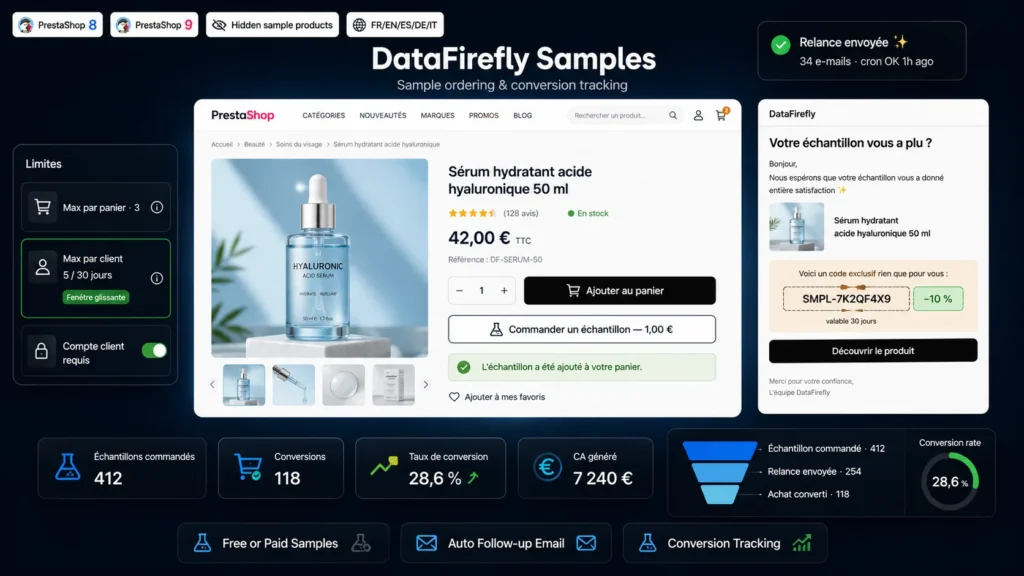
A detailed look at how Product Sample Ordering: Follow-up & Conversion Tracking (PrestaShop 8 & 9) works, why we built it the way we did, and the thinking behind the features above.
§ 01
The purchase barrier that a sample removes
A paint shade, a foundation, an upholstery fabric, a paper: these are products people hesitate to order online because they cannot touch them or see them in real light. A sample removes that barrier, provided you can offer it cleanly, without a parallel catalogue, without having your stock drained, and knowing what the programme brings in.
§ 02
A sample for each combination
On a product with combinations, turn on "Sample per combination". The customer picks a combination on the product page as for a normal purchase, then clicks the button. The combination is recorded on the sample line, for example "Format: A4, Paper: Coated 300 g", and stays visible in the cart, the order, the invoice and the follow-up email. The customer can request several combinations of the same product, each on its own line, within the limit you set.
§ 03
Sample products hidden from your catalogue
For each product enrolled in the programme, the module creates a hidden sample product with a translated name, an SMPL reference, and the VAT rate and image of the source product. These products sit in a dedicated, disabled "Samples" category: they never show in listings, search, or new products and best sellers blocks. Their page 301-redirects to the source product. For your product feeds and sitemap, simply exclude that category.
§ 04
Limits enforced on the cart itself
The checks do not stop at the button. On every cart change, the module checks the sample lines: quantity brought back to 1, duplicates removed, maximum per cart, maximum per product and per customer, global maximum per customer over the rolling window. The + and - buttons on the cart page, a direct link, "Reorder" or a cart merge on login all go through the same rules. When a line is removed, the customer sees a message on the cart page.
§ 05
Pricing under control, resellers included
The sample price is set per product, from 0.00 to a few euros, and converted to tax excluded using the source product VAT rate. Your quantity discounts and minimum quantities stay attached to the source product. If you grant a discount to a customer group, for example -15% for resellers, a setting decides whether it also applies to samples. The button always shows the price the logged-in customer will pay.
§ 06
Conversion measured on real orders
For every order containing a sample, the module records the customer, the product and the combination. When that customer later buys the product, or any product depending on the selected mode, the sample is marked as converted once the purchase order is validated: a bank wire counts when the payment is received. Cancelled orders and payment errors do not use up the customer's limits. The dashboard shows samples ordered, conversions, conversion rate and revenue generated.
§ 07
One reliable follow-up per order
A few days after the sample order (14 by default), an email is sent in the customer's language with the tested product or products, a link to the page and, if enabled, a single-use, customer-restricted voucher. One email per order, even with several samples, and none if the product was bought in the same order. Sends run through a token-secured cron task protected against duplicates. If sending fails, the module retries three times and deletes the voucher that could not be sent. Follow-ups can be restricted to newsletter subscribers.

There are no reviews yet.