
Everything you'd want to know before you install.
A detailed look at how Native Live Shopping for WooCommerce works, why we built it the way we did, and the thinking behind the features above.
§ 01
Why native live shopping rather than a third-party service
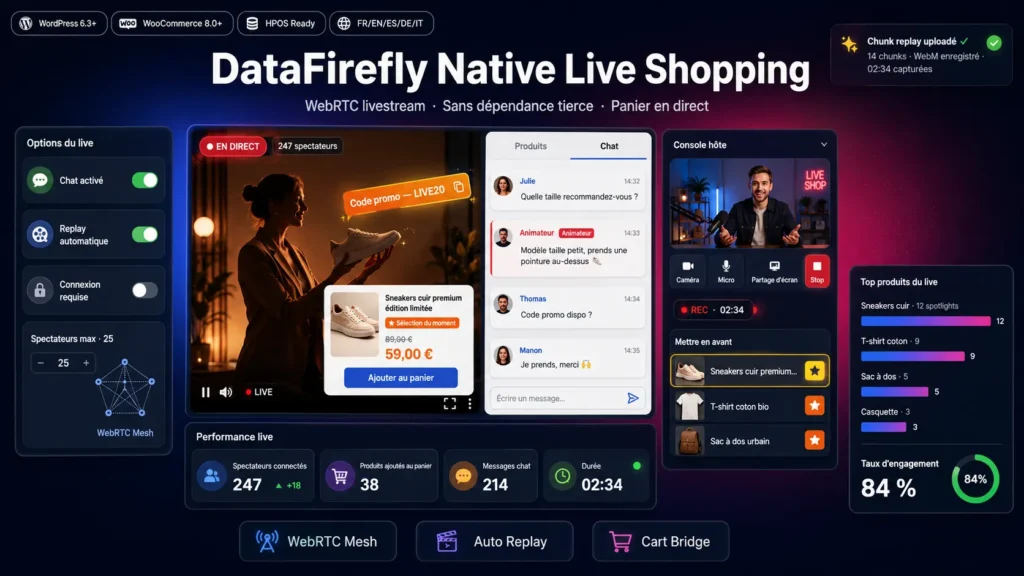
Commercial platforms like Bambuser or CommentSold charge monthly subscriptions often in the four figures, require subscribing to an external cloud infrastructure, capture your customer data and impose their own moderation rules. DataFirefly Native Live Shopping completely reverses this model: everything runs on your WordPress installation, the WebRTC stream is direct between host and viewers, signaling goes through your own REST API, recordings stay stored on your side as WordPress attachments. No outbound calls, no dependencies, no annual license.
§ 02
WebRTC mesh architecture for moderate audiences
The module uses a peer-to-peer mesh topology where the host opens one WebRTC connection per viewer. This approach is ideal up to around 25 simultaneous viewers depending on the host's upload bandwidth (count roughly 500 kbps per connected viewer). Beyond that, you can configure an external TURN server to traverse symmetric NATs, or consider switching to an SFU if your audiences regularly exceed this limit. Signaling uses REST polling rather than WebSockets, guaranteeing full compatibility with shared hosting.
§ 03
A true integrated shopping experience
During the live, the host spotlights a product with one click from the console embedded in the WordPress admin. The viewer immediately sees an overlay appear with photo, name, price and Add to cart button. One click is enough to add the product to the official WooCommerce cart, with server-side session persistence and automatic source tracking via a live_show_id meta on the cart item. Your sales statistics know which products were sold during which live, and how many.
§ 04
Automatic replay with event synchronization
During broadcast, the host browser's MediaRecorder API records the stream as WebM chunks uploaded on the fly through the REST API. Each action (product spotlight, coupon broadcast, host message) is timestamped with an offset relative to the recording start. On replay, the event timeline is replayed at the correct timestamp, recreating the original experience with products appearing and disappearing exactly when they were spotlighted live.
§ 05
Host console embedded in the admin
No external app to install. The host starts broadcasting directly from the Live Shopping menu in WordPress, with video preview, camera/mic/screen-share controls, product list linked to the live with a spotlight button for each one, live chat with visually distinguished messages between host and viewers, coupon and host-message broadcast form, and real-time activity log. The console is responsive and works equally well on desktop and tablet.
§ 06
Multilingual and WordPress-standards compliant
The module ships with five complete translation files (French source, English, Spanish, German, Italian) using informal address by default on the ES/DE/IT versions to stay consistent with the conversational tone of live shopping. Natively compatible with Polylang: the CPT is declared translatable and critical metadata is automatically copied between translations. The architecture follows PSR-4, capabilities are dedicated, REST nonces are systematically verified, and the plugin officially declares compatibility with WooCommerce's high-performance order storage.


There are no reviews yet.