
Everything you'd want to know before you install.
A detailed look at how Tiered Quantity Discounts (Bulk Pricing) for PrestaShop works, why we built it the way we did, and the thinking behind the features above.
§ 01
Your quantity discounts deserve better than a grey table
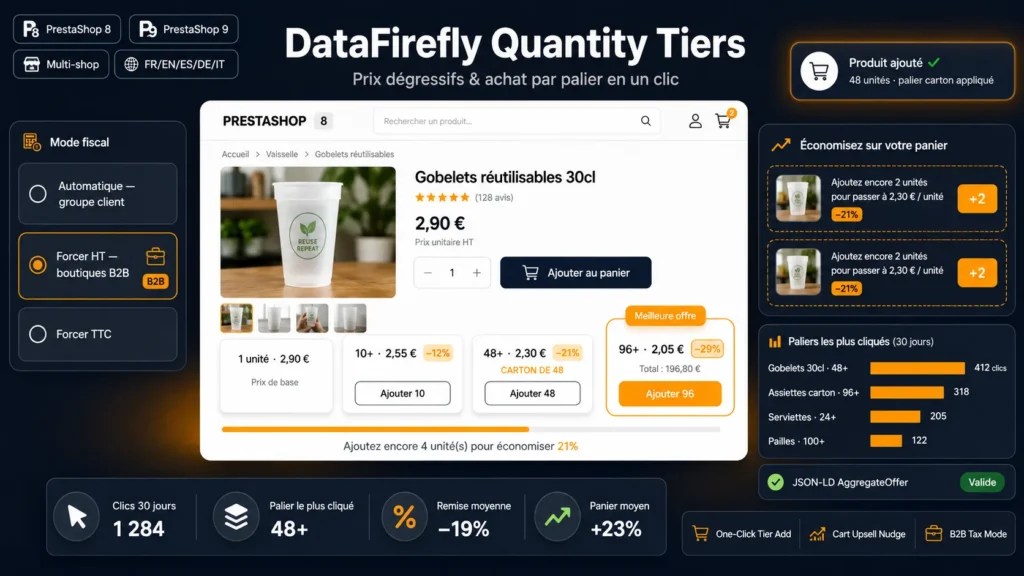
You have already configured quantity discounts in PrestaShop, but the native table is invisible: lost under the price, with no hierarchy and no call to action. DF Quantity Tiers takes exactly the same data, your specific prices from N units, and stages them properly: clear cards, prominent savings, a Best deal badge on the most advantageous tier. No duplicate setup, no migration: install it and it shows.
§ 02
Add to cart per tier, at last
The real friction with quantity discounts is that the customer has to understand the table, change the quantity by hand, then click Add. With DF Quantity Tiers, every tier has its own button: Add 10, Add 48. One click sets the quantity and triggers the theme's native add-to-cart, with the usual confirmation window. Compatible with combinations, stock management and minimum quantities, because the standard PrestaShop mechanism does the work.
§ 03
The cart upsell that grows average order value
A customer put 8 units in the cart while the tier at 10 would save them 15 percent? The module shows it right under the cart: Add 2 more units to get 8.90 per unit, with a one-click plus 2 button. It is the same principle as free shipping bars, applied to your quantity discounts, and it is remarkably effective on average order value.
§ 04
Built for B2B
Running a professional store? Force tax-excluded display with the label next to every price, regardless of the customer group. Give your tiers business meaning with packaging labels: 12 equals case, 48 equals half pallet, 96 equals pallet. Your customers order in business logic, not abstract quantities.
§ 05
Measure what converts
Every click on a tier button is recorded anonymously: product, combination, quantity, discount. The dashboard in the configuration shows you over 30 days which tiers trigger the most add-to-carts. You finally know whether your 5 percent discount attracts anyone or whether everything happens at the case tier, and you calibrate your prices accordingly.
§ 06
SEO and structured data
The module adds JSON-LD AggregateOffer markup with one Offer per tier and its eligible quantity: your price ranges become readable by search engines. If your theme or SEO module already outputs full markup, disable it in one click, with no conflict.
§ 07
Installed in two minutes
Install the zip, pick the layout, the position on the product page and your accent color: everything else works immediately from your existing specific prices. No file overrides, native hooks only, so no friction with your theme or other modules. Uninstall is clean and complete.



There are no reviews yet.